Get free AI from NVIDIA (build.nvidia.com)
NVIDIA lets you use many AI models for free through its website build.nvidia.com. This guide shows how to create a free NVIDIA account and get an API key (a long password that starts with nvapi-), so your agent can use those models instead of a paid provider.
| Time needed | 10 minutes |
| You need | An email address you can read now, and a web browser |
| Result | A free NVIDIA API key, ready to paste into Hermes or n8n |
Free, but for trying things out
- When NVIDIA shows you the key, it says: "This key is for API testing use only and is valid for 1 year." Use it to try AI models and for light personal use. It is not a guaranteed service for your business: NVIDIA can slow it down or change it at any time.
- The key is a password. Anyone who has it can use your NVIDIA account. Never post it in a chat, an email or a screenshot.
- For an agent that your customers depend on, keep a paid provider such as Claude.
What you get (and the limits)
- No price per message. NVIDIA's FAQ says: "The free tier runs on rate limits - up to 40 requests per minute (RPM) for most models, with no per-token billing." (build.nvidia.com FAQ)
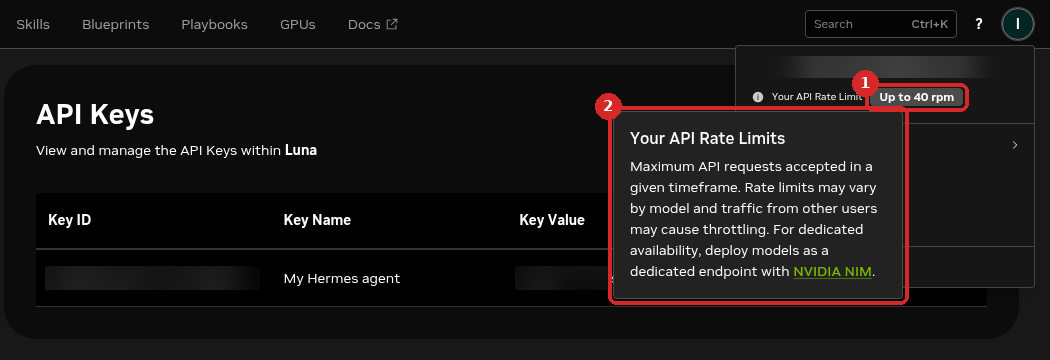
- A speed limit, not a credit balance. Your own limit is shown in your account menu (see Check that it worked). On our test account it said Up to 40 rpm (40 requests per minute). NVIDIA adds: "Rate limits may vary by model and traffic from other users may cause throttling." In practice, a busy model can answer slowly or refuse a request for a moment.
- Many models, but not Claude or ChatGPT. Our key listed 83 models: NVIDIA Nemotron and open models from other companies (DeepSeek, Kimi, GLM, Gemma, Llama, Mistral, OpenAI's open gpt-oss...). They are different from Claude: answers, languages and the way they use tools can differ. Test your own tasks before you rely on them.
- Not every listed model answers. With our free key,
nemotron-3.5-super-vl-120b-a12b,nemotron-3.5-lightning-30b-a3bandnemotron-3-nano-omni-30b-a3b-reasoninganswered within a few seconds (the first one also used tools correctly in Hermes). Others, includingnemotron-3-super-120b-a12b, returned Not Found or Gone (model retired), and one gave no answer within 2 minutes. If a model fails, pick another one. - Valid for 1 year. The key expires after the time you choose (12 months by default). Then you create a new one.
1. Open the NVIDIA API Keys page
Open build.nvidia.com/settings/api-keys in your browser.
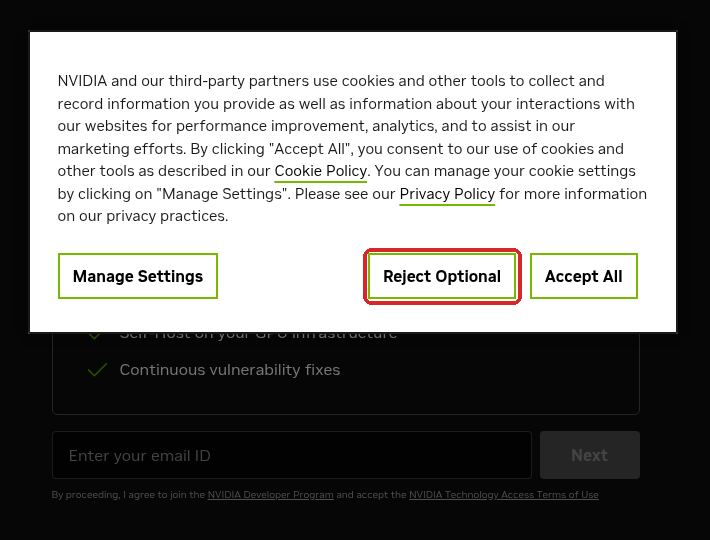
A cookie window appears first. Click Reject Optional (or Accept All if you prefer).
2. Enter your email
The page says Sign In to Get Started with NVIDIA AI.
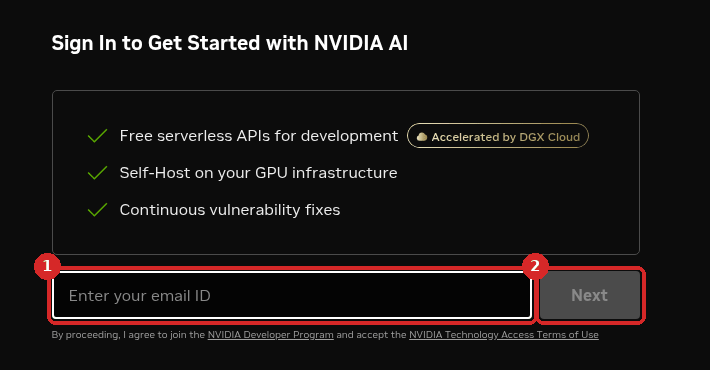
- Type your email address.
- Click Next.
The small text under the box says that by continuing you join the free NVIDIA Developer Program and accept NVIDIA's terms.
If you already have an NVIDIA account, NVIDIA now asks for your password: type it, click Log In and go to step 5.
3. Create your NVIDIA account
With a new email, NVIDIA shows Create Your Account. Your email is already filled in.
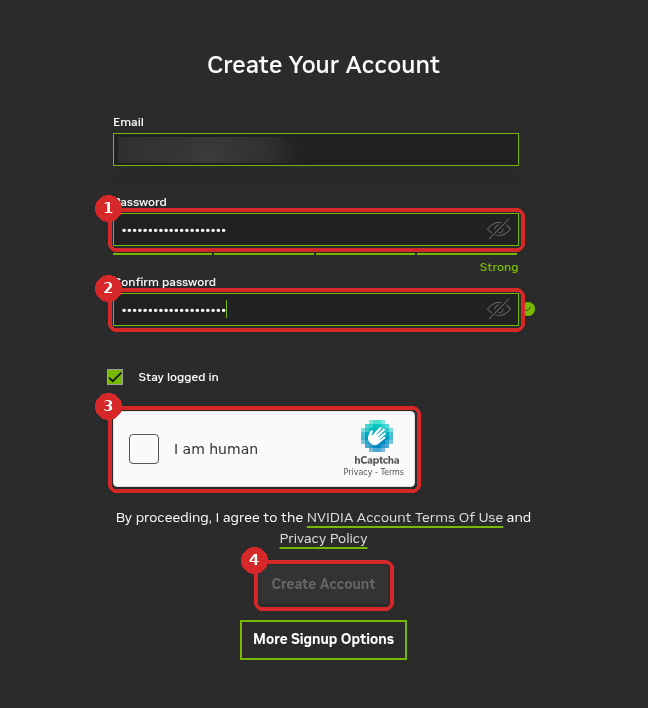
- Password: choose a strong password. The bar under the box turns green and says Strong.
- Confirm password: type the same password again. A green tick appears.
- Tick I am human yourself. Sometimes a small picture puzzle appears: solve it. This check protects NVIDIA from robots, so nobody can do it for you.
- Click Create Account (it stays grey until the check is done).
4. Type the code from NVIDIA's email
NVIDIA sends you an email with the subject NVIDIA Account Created. Open it:
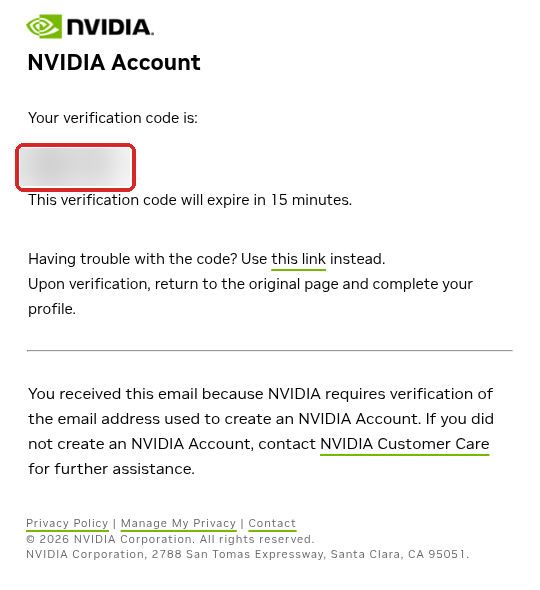
The code (blurred here) looks like 123-456. It expires in 15 minutes. Type it on the NVIDIA page that is waiting for it.
No email?
Look in your Spam folder. If the 15 minutes have passed, the email has a this link option, or you can start again from step 1.
NVIDIA then asks you to complete a short profile. Fill it in and continue. You land back on the API Keys page.
5. Generate your API key
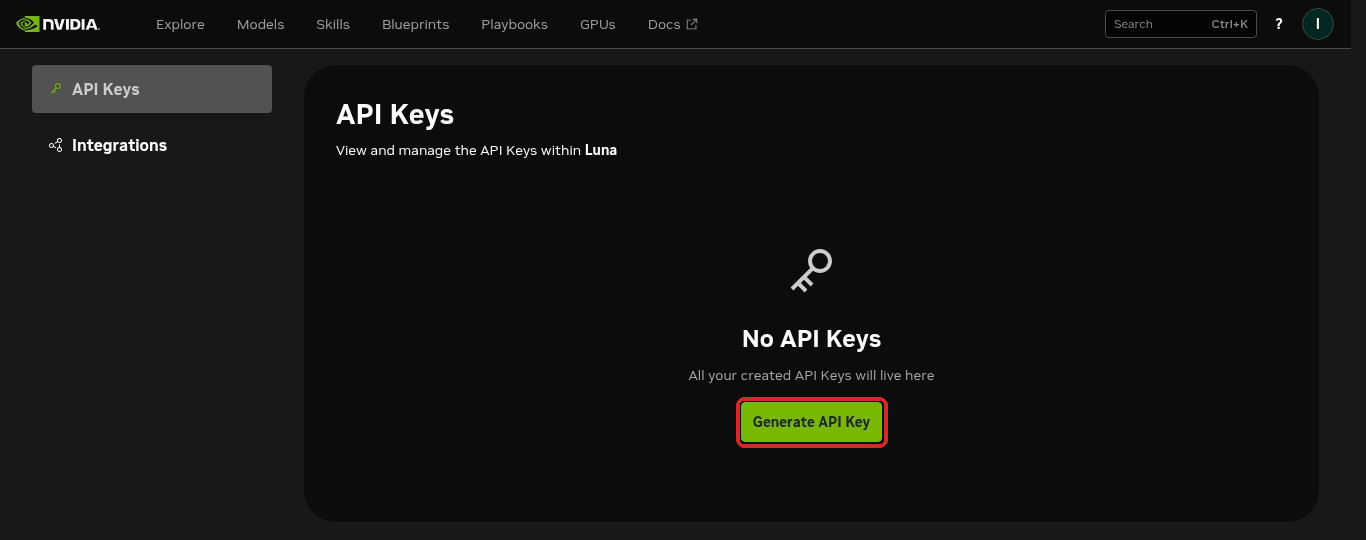
The page says No API Keys. Click Generate API Key.
The Generate API Key window opens:
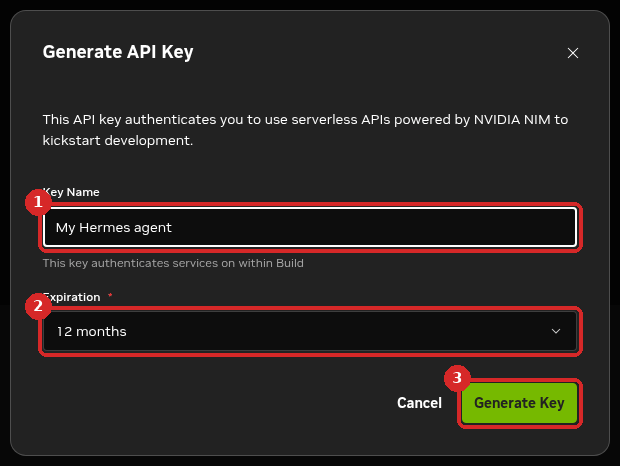
- Key Name: a name that helps you remember where you use it, for example
My Hermes agent. - Expiration: how long the key works. We kept 12 months.
- Click Generate Key.
6. Copy the key and keep it safe
The window API Key Granted shows your key (blurred here):
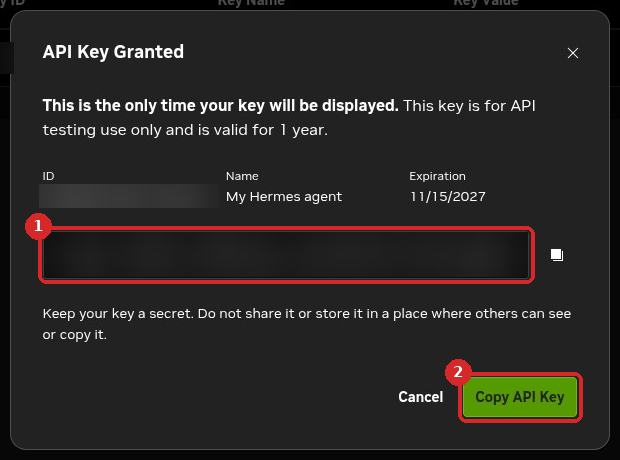
- Your key. It starts with
nvapi-. - Click Copy API Key and paste it straight away into your agent (see Next steps) or into a password manager.
You only see the key once
"This is the only time your key will be displayed." After you close the window, the list shows only nvapi-**** and the last 3 characters. If you lose the key, generate a new one (step 5).
Check that it worked
- On the API Keys page, your key is in the list with ACTIVE and its expiration date.
- Click your initial (round button, top right). The menu shows Your API Rate Limit (1), for example Up to 40 rpm. Click the small i next to it to read NVIDIA's explanation (2).
Common problems
Create Account stays grey
Tick I am human and solve the puzzle if one appears. Both password boxes must match (green tick).
I forgot my NVIDIA password
On the password page click Forgot Password?. NVIDIA emails you a link to choose a new password.
I lost my key or it leaked
Open API Keys, click the ⋮ button at the end of the key's line and choose Delete API Key, then click Generate API Key to make a new one. Paste the new key into your agent.
In our test, a deleted key kept working for several minutes after we deleted it. Delete it as soon as you think it leaked, and do not assume it stops at once.
My agent sometimes answers slowly or with a 'too many requests' error
That is the free rate limit (about 40 requests per minute, sometimes less when NVIDIA is busy). Wait a minute and try again, or pick another model. For steady use, switch your agent back to a paid provider.
Other agents
OpenClaw
OpenClaw's own documentation has an NVIDIA provider page, set up with commands in the terminal. We have not tested it on a LusoVPS OpenClaw agent yet, so this guide covers Hermes and n8n only.