Change your plan (upgrade or downgrade)
If your agent needs more memory, processors or disk, you can move it to a bigger plan. There is no upgrade button in the client area for agents: you ask us in a support ticket, and we make the change.
| Time needed | 3 minutes to ask |
| You need | Your client area login, and the name of the plan you want |
| Result | A request to change the plan of your agent, sent to our billing team |
Why a ticket?
The agent's page in the client area has no Upgrade/Downgrade option. The Agents page answers "Can I change plans?" with: "Yes. If your agent needs more memory or processing power, contact us to move to a bigger plan."
1. Pick the new plan
The three plans (Lite, Plus and Extra) and what each one includes are listed in Which agent should I choose? and on the Agents page. Write down the plan you want, for example Plus.
To see which plan you have now, open Services → My Services: the name of your agent ends with the plan, for example Hermes Agent Lite.
2. Open a ticket with Billing Support
- Sign in to the client area and click Open Ticket in the top menu.
- Click Billing Support ("If you have any question billing related. Mon-Fri, 09:00 GMT to 18:00 GMT").
3. Fill in the request and send it
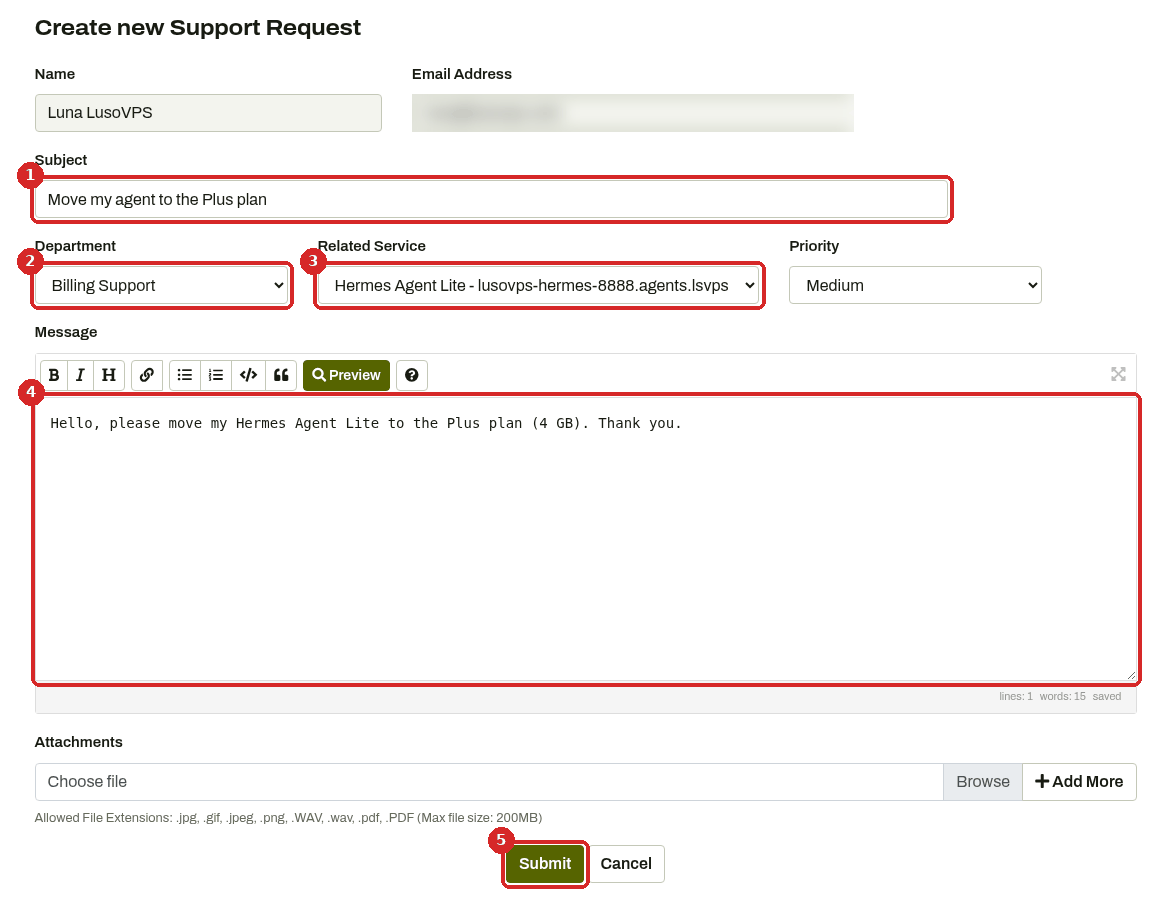
- Subject: a short title, for example Move my agent to the Plus plan.
- Department: Billing Support is already selected.
- Related Service: choose your agent from the list. This tells us exactly which agent to change.
- Message: say which plan you want.
- Click Submit.
Smaller plan?
The Agents page only mentions moving to a bigger plan. If you want a smaller one, ask in the same way and we will tell you what is possible.
Check that it worked
You can follow your request under Support → Tickets in the client area. After the change, open your agent's page (Services → My Services, then click the agent): the name shows the plan (for example Hermes Agent Plus) and Recurring Amount shows its price.
Common problems
My agent is slow or out of memory. Do I need a bigger plan?
Maybe. First try Restart in the Manage agent tab (see Your agent in the client area) and read My agent stopped answering. If it keeps happening, describe what you see in the ticket.