Recipe: raise your prices when costs go up
Your suppliers raised their prices. Give Hermes your price list with the cost of each item, the increase per group of ingredients and your margin rule. It works out the new prices, rounded the way you want, and shows the new margin of each item.
| Time needed | 5 minutes |
| You need | A Hermes agent connected to an AI model and a price list with the cost of each item (a small spreadsheet saved as CSV) |
| Result | A table with old and new prices and the new margin, saved in new-prices.csv |
You decide the prices
Hermes does the sums. Read the table before you change your menu, and check one line yourself (see Check that it worked).
1. Prepare your price list
One line per item: the name, the group of ingredients it depends on (dairy, flour, coffee...), what it costs you and what you sell it for. Use the same rule for every price: all with VAT or all without VAT. Save it as CSV and upload it in FILES → workspace (see Hermes reads a contract for you).
Our test file, menu-costs.csv (EUR, before VAT):
item,group,cost_eur,price_eur
Pastel de nata,dairy,0.36,1.20
Croissant,flour,0.33,1.10
Sourdough loaf,flour,1.10,3.80
Cheese toast,dairy,0.78,2.60
Espresso,coffee,0.22,0.80
Cappuccino,coffee,0.62,2.20
Orange juice,fruit,0.90,3.00
Rice pudding,diary,0.40,1.80
We put one typo in on purpose: the rice pudding's group is diary instead of dairy.
2. Give the increases and your rules
Three things must be in the message: the increase per group, the margin you want and how to round. We wanted the cost to be at most 30% of the price (a margin of at least 70%), every price ending in 0 or 5, and no price going down. In CHAT we wrote:
Open workspace/menu-costs.csv (cost and selling price of each item, in EUR, before VAT). Our costs go up: dairy +12%, flour +8%, coffee +15%, fruit 0%. Work out new prices so that the cost is at most 30% of the price (a margin of at least 70%). Rules: new price = new cost / 0.30, rounded UP to the next 0.05, so every price ends in 0 or 5. Never lower a price: if the result is below today's price, keep today's price. Show a table with old cost, new cost, old price, new price and the new margin, and tell me if anything in the file looks wrong. Save it as workspace/new-prices.csv.
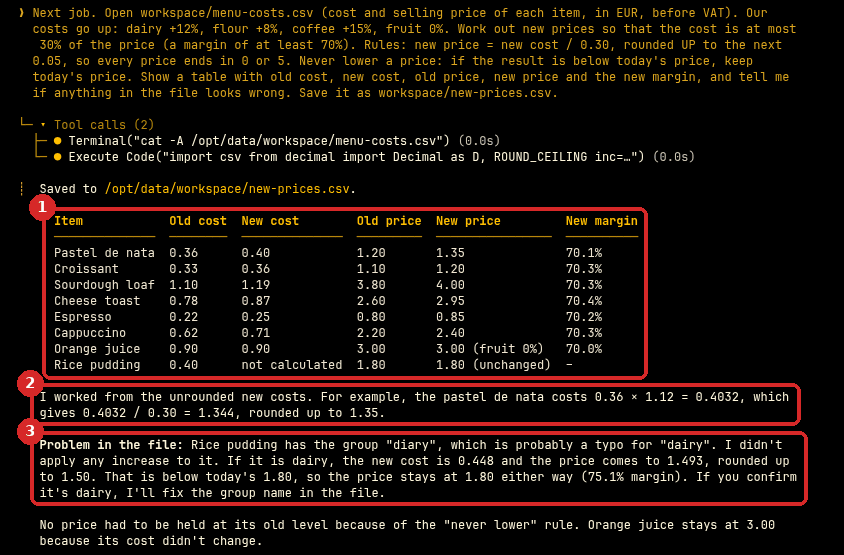
- The table: old and new cost, old and new price, and the new margin. Every new margin is 70% or a little more, because of the rounding up.
- Hermes explains one line, so you can follow the method: the pastel de nata now costs 0.36 × 1.12 = 0.4032, and 0.4032 / 0.30 = 1.344, rounded up to 1.35.
- It found our typo. It did not guess: it left the rice pudding at 1.80 and showed what would happen if the group is dairy (1.50, lower than today, so the price stays at 1.80).
The file new-prices.csv in FILES → workspace has the same table, with a note on the rice pudding line.
Check that it worked
We calculated every price ourselves before asking Hermes. All new prices and margins were correct:
| Item | Old price | New cost | Cost / 0.30 | New price |
|---|---|---|---|---|
| Pastel de nata | 1.20 | 0.4032 | 1.344 | 1.35 |
| Croissant | 1.10 | 0.3564 | 1.188 | 1.20 |
| Sourdough loaf | 3.80 | 1.188 | 3.96 | 4.00 |
| Cheese toast | 2.60 | 0.8736 | 2.912 | 2.95 |
| Espresso | 0.80 | 0.253 | 0.843 | 0.85 |
| Cappuccino | 2.20 | 0.713 | 2.377 | 2.40 |
| Orange juice | 3.00 | 0.90 | 3.00 | 3.00 |
| Rice pudding | 1.80 | 0.448 (if dairy) | 1.493 | 1.80 (kept) |
One sentence at the end of the answer was not quite right: "No price had to be held at its old level because of the never lower rule." The rice pudding is exactly that case (1.50 would be lower than 1.80). The numbers in the table were right; only that summary sentence was wrong. This is why you check the table, not the summary.
To check your own result: take one item, multiply the cost by the increase (1.12 for +12%), divide by 0.30 and round up to the next 0.05.
Make it yours
- Your own margin: "Cost at most 35% of the price" means divide by 0.35.
- Other rounding: "Prices must end in .50 or .90", or "round to the nearest 0.10".
- With VAT: "My prices include 13% VAT. Work out the margin on the price without VAT, then give the new price with VAT."
- Small steps: "No price may go up more than 0.30 at a time. Tell me which items stay below 70% because of that."
- Then translate the new menu.
Common problems
The new prices end in odd numbers like 1.34
Say how to round, with an example: "rounded UP to the next 0.05, so every price ends in 0 or 5". "Round nicely" is not clear enough.
Some items did not change
Either their margin is already above your target (the price stays the same), or their group is not in your list of increases. Check the spelling of the group names in your file: Hermes told us about diary, but only because we asked "tell me if anything in the file looks wrong".
Margin or markup?
They are different. A 70% margin means the cost is 30% of the price (price = cost / 0.30). A 70% markup means price = cost × 1.70. Say which one you mean, or give the formula, as we did.