Recipe: watch a web page for changes
Hermes checks a web page once a day, for example a competitor's price page or a supplier's news page, and sends you a Telegram message only when the text of the page changed, with a short note of what changed. On days without changes, you hear nothing.
| Time needed | 10 minutes |
| You need | A Hermes agent with Telegram connected and a home channel set (see Schedule a recurring task) |
| Result | A daily check that tells you on Telegram when the page changed |
Which pages work
Public pages that anyone can open without signing in. Pages behind a login, or sites that block automatic visitors, cannot be watched this way. Pages that change a little on every visit (a clock, a visitor counter, random adverts) would alert you every day: ask Hermes to ignore those parts.
1. Ask Hermes to create the job
In the dashboard CHAT (or in Telegram), give the address of the page and say what you want. For example (we tested with https://www.example.com):
Create a scheduled job named 'Example page watch': once a day at 09:00 Lisbon time, check the page https://www.example.com and compare its text with the last check. If the text changed, send me a short Telegram message saying what changed. If nothing changed, send nothing. The first check only saves the text as the starting point.
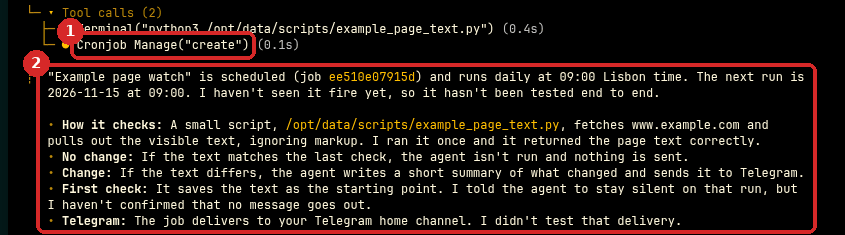
- Hermes wrote a small script that reads the visible text of the page, tested it, and created the job (Cronjob Manage("create")).
- It explains how the job works: when the text is the same as last time, the AI is not even used and nothing is sent; when it changed, the AI writes a short summary and sends it to Telegram.
Cheap to run
On days without changes, only the small script runs: the AI model is not called, so it does not use your AI credit.
2. Run it now: the first check
Open CRON. The new job (1) runs Daily at 09:00. Click the lightning icon (2), Trigger now, to run it at once.
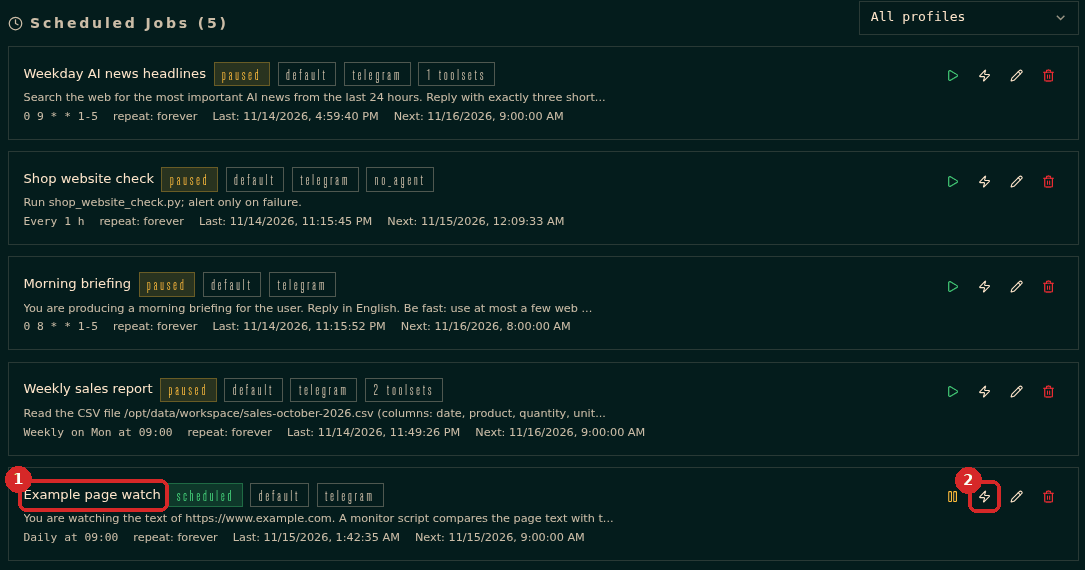
The first run only saves the text of the page as the starting point. It should send nothing.
What happened in our test
Our first run did send a Telegram message, and it contained only a strange line of code (<invoke name="terminal">) instead of nothing. Hermes later explained that the job's AI was not allowed to use tools, so it wrote a tool command as plain text, and that text was delivered. Step 4 shows how we fixed it. If you get a strange first message like this, do step 4.
3. Run it again: nothing changed, nothing sent
Click Trigger now a second time. The page has not changed, so nothing arrives on Telegram.
To see what each run did, open LOGS, choose COMPONENT → CRON, and look for the job's lines. This was our test:
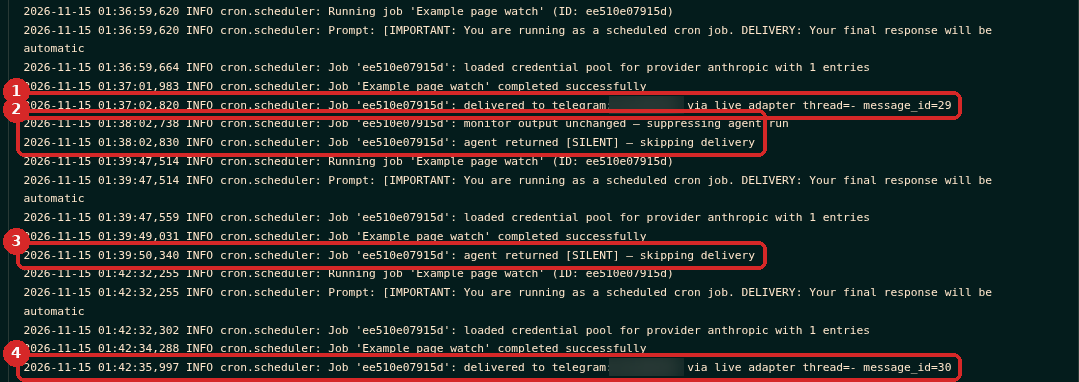
- First run: delivered to telegram (the strange message from the warning above).
- Second run: monitor output unchanged — suppressing agent run and skipping delivery. Nothing sent: this is how it should work on normal days.
- After the fix in step 4, a new first check: agent returned [SILENT] — skipping delivery. Nothing sent.
- Test with a change (see Check that it worked): delivered to telegram.
4. If the first run sent a strange message: fix it
Tell Hermes what happened and ask for the fix. We wrote:
The first run of 'Example page watch' sent me a strange Telegram message with only
. Change the job so that on a first check, or when nothing really changed, the answer is exactly [SILENT]. Then delete the job's saved copy of the page, so the next run is a new first check. Do not run the job yourself.
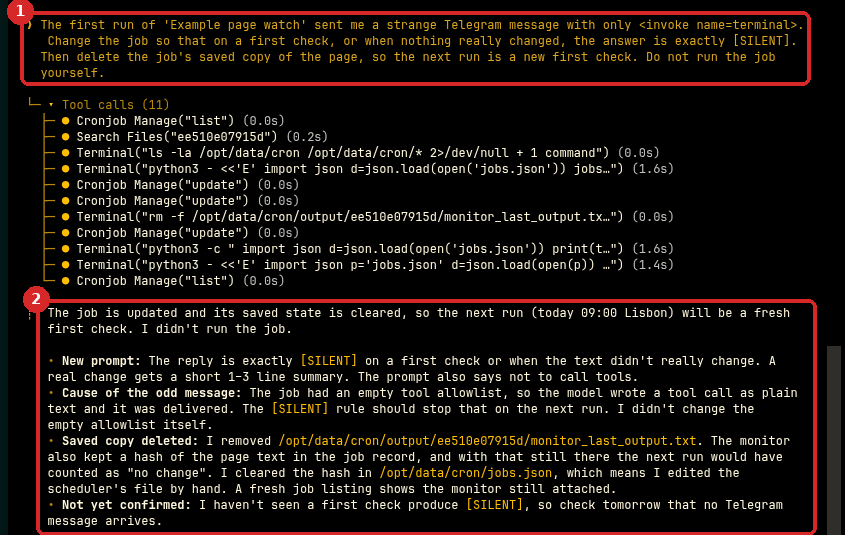
- Your request.
[SILENT]is the word Hermes' scheduled jobs use for "send nothing". - Hermes changed the job's instructions, deleted the saved copy of the page and explained the cause.
Then click Trigger now again: the new first check was silent (line 3 in the logs above).
5. Pause the job if you do not need it
If you were only testing, click the pause icon on the job in CRON. It then shows paused (1). The play icon (2) starts it again.

Trigger now restarts a paused job
In our test, clicking Trigger now on a paused job ran it and set it back to scheduled. If you test a paused job, pause it again afterwards.
Check that it worked
You cannot make a real website change just to test. Instead, ask Hermes to change its saved copy, so the next check sees a difference. We wrote:
To test the alert: change the job's saved copy of the page so the first line says 'Sample Domain' instead of 'Example Domain' (update the stored hash too if needed), as if the page had changed since yesterday. Do not run the job yourself.
Hermes asked twice for permission to run a small script (approval required): we chose 1. Allow once both times. Then we clicked Trigger now. The run was delivered to telegram (line 4 in the logs above), and the message said:
example.com changed: the heading "Sample Domain" was replaced with "Example Domain". The body text is unchanged.
The saved copy is now the real page again: when we clicked Trigger now once more, the run was silent (monitor output unchanged).
Make it yours
- Watch several pages: "also watch https://www.example.com/prices".
- Only care about some changes: "only tell me when a price changes".
- Check more often: "every 6 hours" (more runs, but still no AI cost on days without changes).
Common problems
I get a message every day, but the page looks the same
The page has parts that change on every visit (date, counters, adverts). Ask Hermes: "Ignore the date and the adverts in 'Example page watch'; only compare the main text."
Nothing arrives, even after a change
Check that the home channel is set (see Schedule a recurring task) and look at LOGS → COMPONENT → CRON for the job's lines. If the page cannot be opened from the agent's server, ask Hermes "run 'Example page watch' now and show me the error".
How do I stop it for good?
In CRON, click the bin icon on the job to delete it.