Cancel an agent
If you no longer need your agent, you can ask us to cancel it from the client area. This guide shows the cancellation form and the choice you have to make.
| Time needed | 5 minutes, plus the time to save your files |
| You need | Your client area login |
| Result | A cancellation request for your agent, sent to LusoVPS |
Save your files first
The cancellation form does not say what happens to the data on the server. Treat cancelling as losing everything on it: conversations, memory, workflows, connected channels and any file you uploaded. Before you cancel, download what you want to keep with the Files tab. See Terminal and files in the browser, which also lists the agent's own folder for Hermes, n8n and OpenClaw.
Want a different plan instead?
You do not need to cancel to change plans. See Change your plan.
1. Open your agent's page
- Sign in to the client area.
- Open Services → My Services and click the agent you want to cancel.
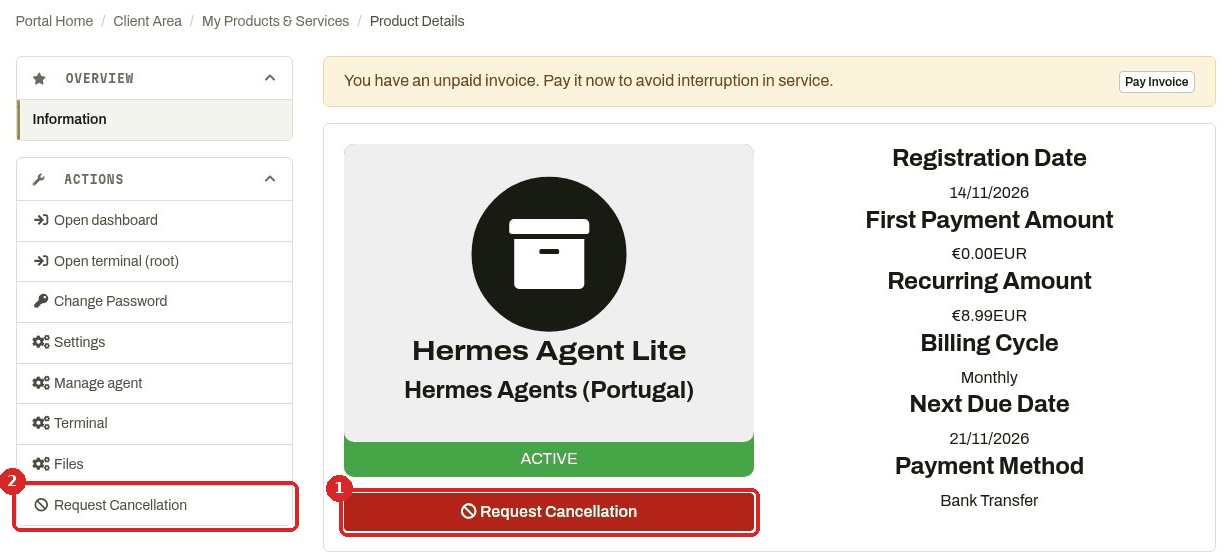
- Click the red Request Cancellation button under the status.
- Or click Request Cancellation at the bottom of the ACTIONS menu. Both open the same form.
Note the Next Due Date on this page: it is the end of the period you have paid for.
2. Fill in the form
The top of the page shows Requesting Cancellation for: followed by the agent's name and address. Check that it is the right agent.
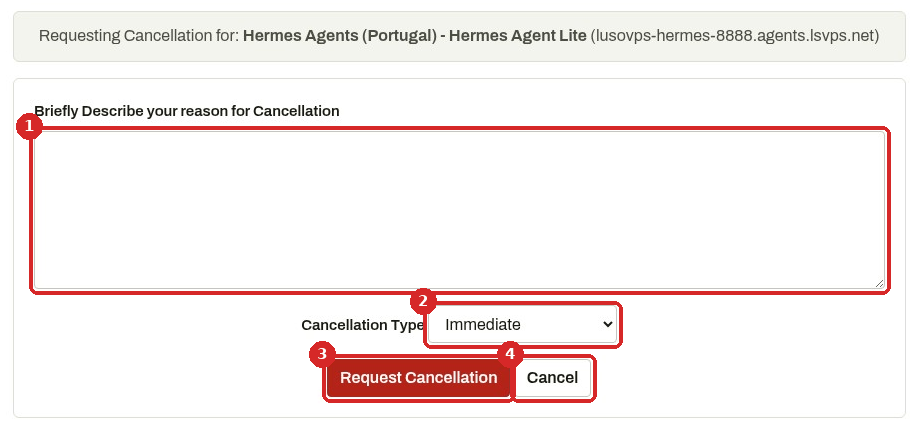
- Briefly Describe your reason for Cancellation: a few words are enough. It helps us improve.
- Cancellation Type: choose when the agent should stop:
- Immediate: you ask us to cancel the agent now.
- End of Billing Period: you keep the agent until the end of the period you have already paid for (the Next Due Date).
- Request Cancellation sends the request.
- Cancel closes the form without sending anything and takes you back to the agent's page.
Not sure yet?
Choose End of Billing Period. You keep using the agent for the time you have already paid, and you have time to save your files.
Check that it worked
We did not send a cancellation while writing this guide, so we cannot show you the screen that comes next. If you are not sure your request went through, click Open Ticket, choose Billing Support, select your agent under Related Service and ask us.
Common problems
I still have an unpaid invoice for the agent
Unpaid invoices are listed in Billing → My Invoices (see See, download and pay your invoices). If you are cancelling and do not want to pay for the next period, say so in a ticket to Billing Support with the invoice number.
I cancelled by mistake
Open a ticket with Billing Support straight away and select the agent under Related Service.
Next steps
- Terminal and files in the browser: save your files before you cancel.
- See, download and pay your invoices