Recipe: a daily news digest on Telegram
Every morning at 8:00, n8n reads a news feed, Claude turns the top 5 stories into 5 short lines, and you get them on Telegram.
| Time needed | 20 minutes |
| You need | An n8n agent with your Claude key (Sign in and build your first AI agent), your Telegram bot saved in n8n (step 1 of the contact form recipe), your numeric Telegram ID, and the address of a news feed (RSS) |
| Result | A Telegram message every morning with 5 one-line news summaries |
This is the finished workflow:
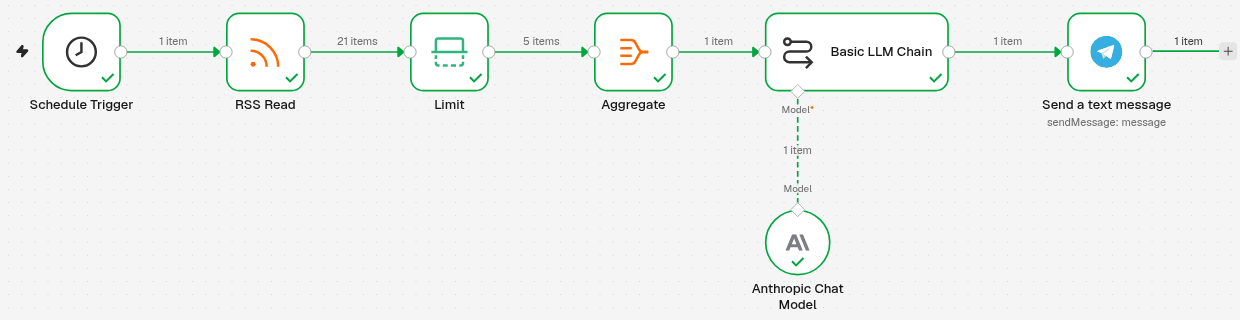
Schedule Trigger (8:00) → RSS Read gets the news → Limit keeps the first 5 → Aggregate puts them in one list → Basic LLM Chain (with Anthropic Chat Model) writes the 5 lines → Send a text message sends them to Telegram.
What is an RSS feed?
Most news sites publish a list of their latest articles at a fixed address, the RSS feed. We used the BBC technology feed, https://feeds.bbci.co.uk/news/technology/rss.xml. Look for RSS or a feed icon on your favourite news site, or try adding /feed/ to its address (for example https://observador.pt/feed/).
1. Start every morning at 8:00
- Click the + at the top of the menu on the left, choose New workflow and name it, for example Daily news digest.
- Click Add first step and choose On a schedule.
-
Set the Schedule Trigger:
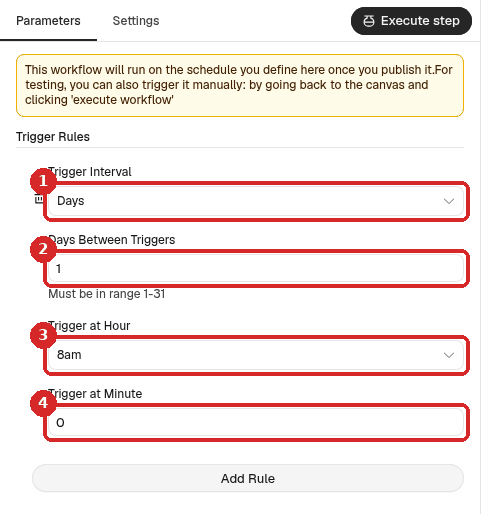
- Trigger Interval: Days.
- Days Between Triggers:
1(every day). - Trigger at Hour: 8am.
- Trigger at Minute:
0.
The hour follows the workflow's time zone. On our agent it was Europe/Lisbon. To check or change it, see Run a workflow on a schedule.
2. Read the news feed
- Close the panel. Click the small + at the right of the Schedule Trigger, search for
RSS Readand click it. - Paste the feed address in URL (1).
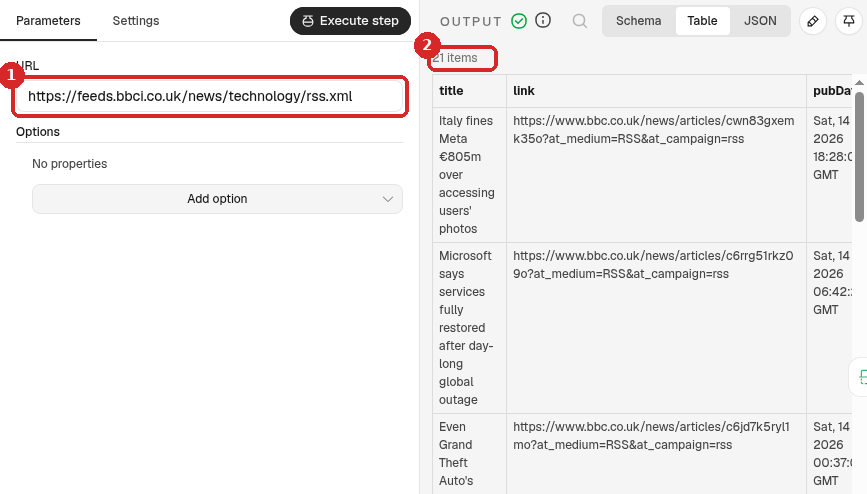
After a test (step 6), the OUTPUT lists the articles of the feed (2): in our test, 21 items, each with a title, a link, a date and a short description (contentSnippet).
3. Keep only the first 5
- Add a Limit step after RSS Read (the +, search
Limit). -
Set it:
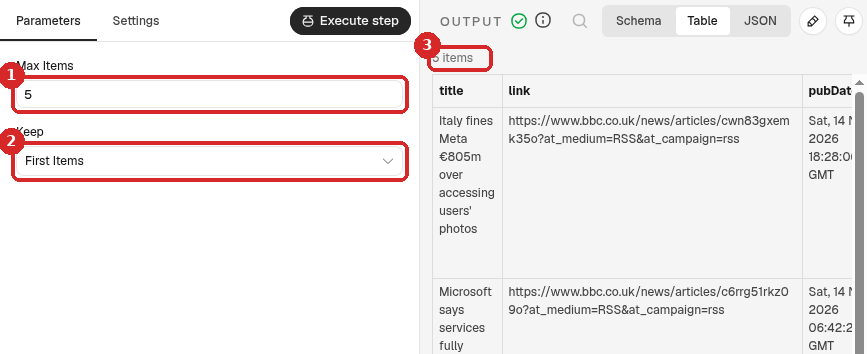
- Max Items:
5. - Keep: First Items (feeds list the newest first).
- The output now has 5 items.
- Max Items:
4. Put the 5 stories in one list
The AI step should read the 5 stories together and write one message. Without this step it would run 5 times and you would get 5 messages.
- Add an Aggregate step after Limit.
-
Set it:
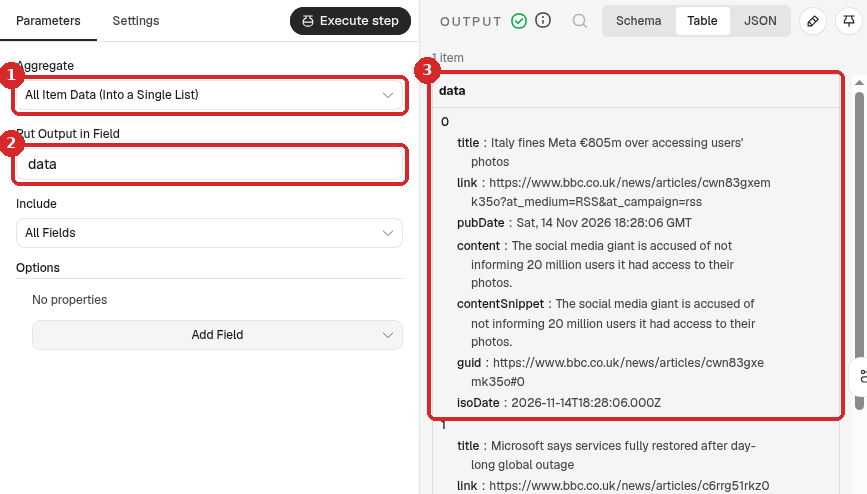
- Aggregate: All Item Data (Into a Single List).
- Put Output in Field: keep
data. - The output is 1 item with a list called data that holds the 5 stories.
5. Let Claude write the digest
- Add a Basic LLM Chain step after Aggregate (search
Basic LLM Chain). -
Set it:
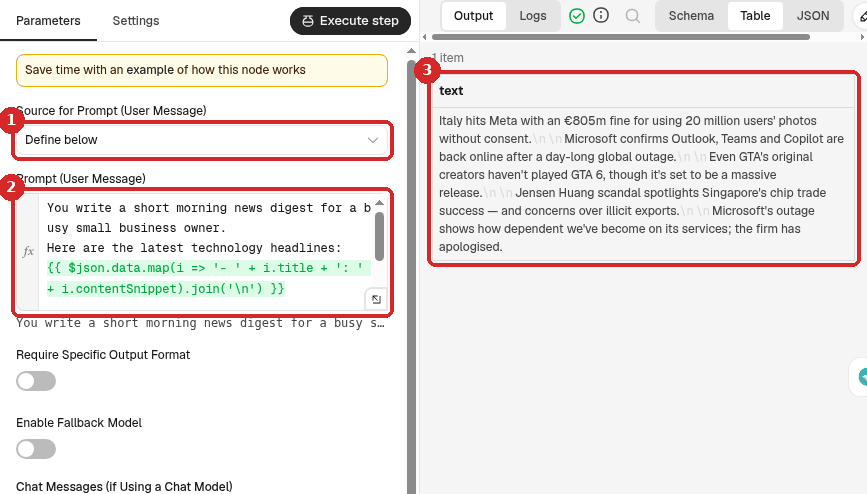
- Source for Prompt (User Message): Define below.
-
Prompt (User Message): click Expression and paste:
You write a short morning news digest for a busy small business owner.
Here are the latest technology headlines:
{{ $json.data.map(i => '- ' + i.title + ': ' + i.contentSnippet).join('\n') }}

Write exactly 5 lines, one per headline, each under 20 words, in plain English. No introduction, no title, no markdown.
The line with
{{ ... }}writes each story as- title: description. -
After a test, the OUTPUT shows the digest in text.
-
At the bottom of the panel, click the + under Model and choose Anthropic Chat Model (your Anthropic account credential is picked by itself).
6. Send it to Telegram and test
- Add a Telegram step after Basic LLM Chain: search
Telegramand choose Send a text message (under MESSAGE ACTIONS). -
Set it:
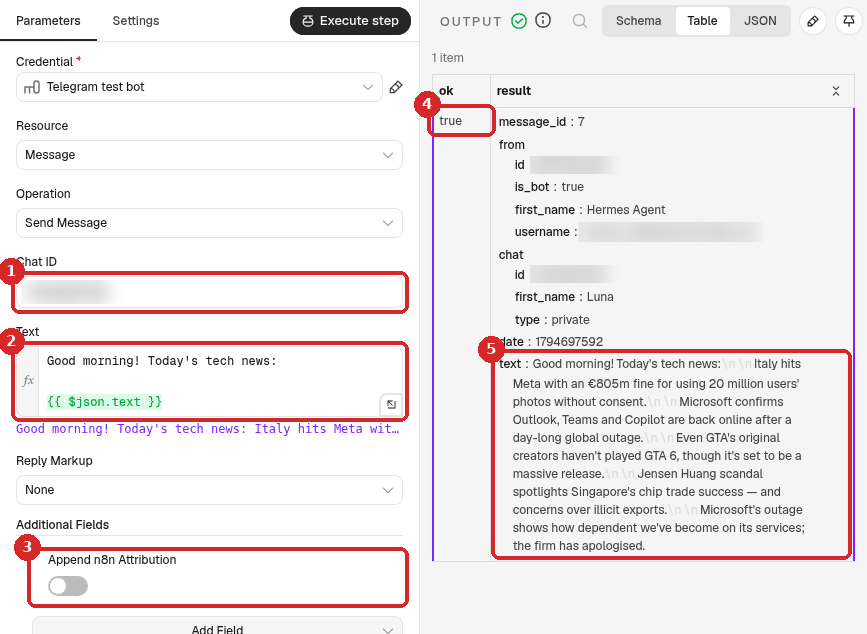
- Chat ID: your numeric Telegram ID. (Credential: your Telegram bot.)
-
Text: click Expression and paste:
-
Additional Fields → Add Field → Append n8n Attribution, switch off (otherwise Telegram messages end with This message was sent automatically with n8n).
-
Close the panel and click Execute at the bottom of the canvas. You do not have to wait until 8:00: this runs the whole workflow now.
All the steps get a green tick. In the Telegram step, the OUTPUT shows ok true (4): Telegram accepted the message. The text (5) is what arrived on the phone. In our test the run took about 3 seconds and the message started:
Good morning! Today's tech news:
Italy hits Meta with an €805m fine for using 20 million users' photos without consent.
Microsoft confirms Outlook, Teams and Copilot are back online after a day-long global outage.
7. Publish it
Click Publish at the top right, then Publish in the window. From now on the digest arrives every day at 8:00, even when n8n is closed in your browser. To stop it, click the arrow next to Published and choose Unpublish (details).
Check that it worked
- The test with Execute sent the message, and the Telegram step shows ok true.
- The workflow says Published.
- After 8:00 the next day, the Executions tab shows a run without the flask icon (started by the schedule), and the message is on your phone.
Make it yours
- News in Portuguese: use a Portuguese feed and change the prompt to in European Portuguese.
- Your sector: many trade magazines and blogs have RSS feeds. Use one feed per workflow, or duplicate the workflow for each.
- More or fewer stories: change Max Items in Limit and exactly 5 lines in the prompt.
- Weekdays only: in the Schedule Trigger, choose Weeks as Trigger Interval and pick Monday to Friday.
- Add links: ask in the prompt for the link after each line, and add
+ ' ' + i.linkafteri.contentSnippetin the prompt expression.
Common problems
I get 5 messages instead of one
The Aggregate step is missing or not between Limit and Basic LLM Chain. Check that Aggregate is set to All Item Data (Into a Single List).
RSS Read fails or shows no items
Open the feed address in your browser. It must show a page of code (XML) with <item> entries, not a normal web page. Some sites block automatic readers; try another feed.
The message has stars or strange symbols
Claude sometimes adds formatting. Keep No introduction, no title, no markdown in the prompt.
The digest arrives at the wrong hour
Check the workflow time zone (Run a workflow on a schedule), then Publish again.
Telegram says: Bad Request: chat not found
The Chat ID is wrong, or you never pressed Start in your bot. See the contact form recipe.