Which agent should I choose?
LusoVPS offers three AI agents: Hermes, n8n and OpenClaw. They cost the same, so the choice is about how you want to work. This page compares them in plain words and lists the plans.
| Time needed | 3 minutes to read |
| You need | Nothing yet |
| Result | You know which agent and which plan to order |
The short answer
- You want to chat with an assistant that remembers you and gets better with use: Hermes.
- You want to connect your business apps (email, spreadsheets, CRM, invoicing) and automate the work between them: n8n.
- You want to send tasks by message on WhatsApp or Telegram and have them done (calendar, reminders, research, replies): OpenClaw.
The Agents page says it this way: "Pick the one that fits your work. Hermes and OpenClaw are open source; n8n is fair-code, with public source. The server is yours, so you can add another agent later."
Hermes: the assistant that learns
- Who it is for: anyone who wants a personal assistant that gets better with use.
- What it does: keeps memory between conversations, creates and reuses its own skills, and splits large jobs across subagents. It can also run tasks on a schedule.
- How you talk to it: on Telegram, Discord, Slack, WhatsApp, by email, from the command line, or in the chat of its web dashboard.
- What you need: an API key from an AI provider (for example Anthropic for Claude, OpenAI or OpenRouter), and an account on the chat app you want to use.
Guides: Connect Claude, Telegram, WhatsApp, Discord, Scheduled tasks.
n8n: visual automation
- Who it is for: businesses that want to automate repetitive work between apps.
- What it does: you draw workflows in a visual editor, with no coding, and connect the services you already use. In the middle of a workflow, an AI step can read, decide and summarise. There is no limit on the number of workflows: only the size of your server limits you.
- How you talk to it: you mostly don't. You build workflows in n8n's web editor and they run on their own. A workflow can also include a chat, as in the first-steps guide.
- What you need: an API key from an AI provider (added inside n8n, not in the client area), and access to the apps you want to connect.
Guide: Sign in and build your first AI agent with Claude.
OpenClaw: the assistant in your messaging apps
- Who it is for: anyone who wants to hand off everyday tasks by message.
- What it does: takes care of calendar, reminders, research and replies. It is always on, 24 hours a day, on your server, and only answers the people you allow.
- How you talk to it: on WhatsApp, Telegram, Discord or Slack. It also has a web dashboard.
- What you need: an API key from an AI provider, and an account on the messaging app you want to use.
Guide: First steps and connecting Claude.
Planning to use WhatsApp?
Read the warning in Connect WhatsApp first: WhatsApp can restrict or ban numbers that behave like bots, so we recommend a separate number, not your personal one.
All agents have in common
- The agent runs on your own server at LusoVPS. Conversations, memory and workflows stay on it.
- You use your own AI key and pay the AI provider directly for what you use. LusoVPS adds no markup.
- You get a client area page with a terminal, a file manager, restart and update.
The plans
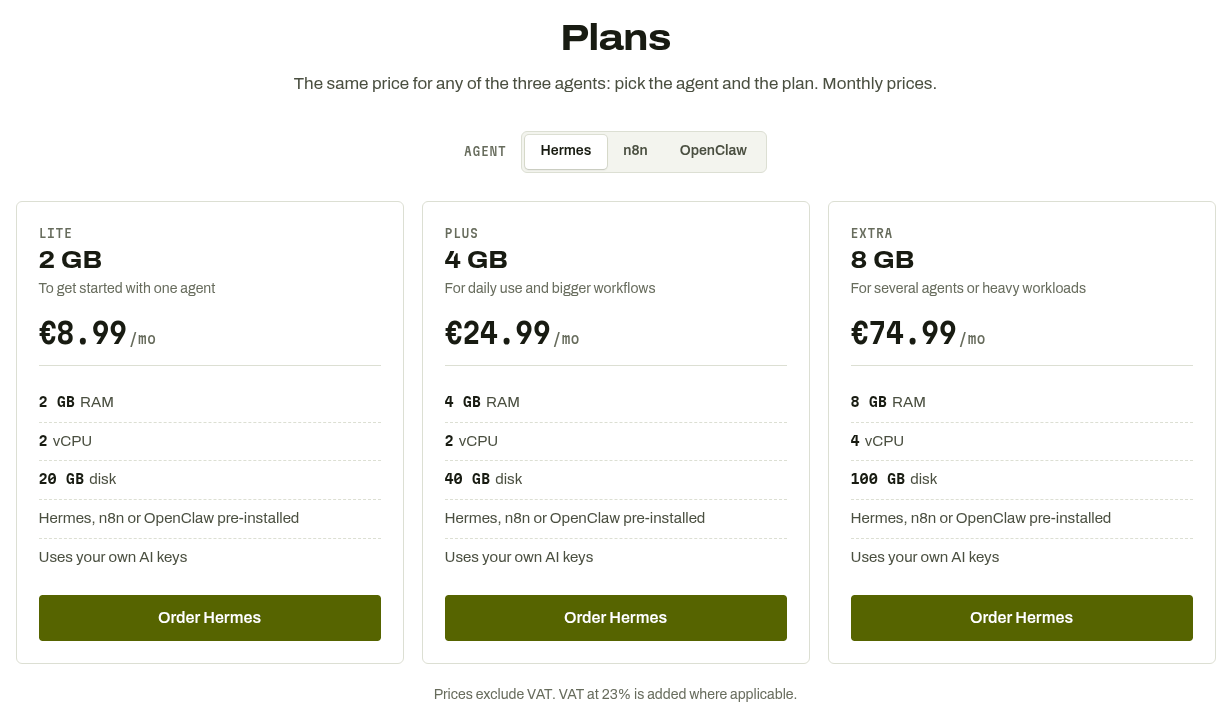
The same price for any of the three agents: pick the agent, then the plan.
| Plan | For | RAM | Processors | Disk | Price |
|---|---|---|---|---|---|
| Lite | To get started with one agent | 2 GB RAM | 2 vCPU | 20 GB disk | €8.99 /mo |
| Plus | For daily use and bigger workflows | 4 GB RAM | 2 vCPU | 40 GB disk | €24.99 /mo |
| Extra | For several agents or heavy workloads | 8 GB RAM | 4 vCPU | 100 GB disk | €74.99 /mo |
Prices on 14 November 2026. They exclude VAT ("VAT at 23% is added where applicable"). See lusovps.com/agents for current prices.
Which plan?
Lite is the plan for getting started with one agent. If you plan to run big workflows or several agents on the same server, look at Plus or Extra. You can move to a bigger plan later.