Recipe: OpenClaw drafts a polite reply to a customer complaint
Paste a customer complaint, say what you want to offer, and OpenClaw writes a short, polite reply you can copy into Google, Facebook or an email. Then ask for the same reply in Portuguese.
| Time needed | 5 minutes |
| You need | An OpenClaw agent connected to an AI model |
| Result | A ready-to-send reply in English and in Portuguese |
Why not a research recipe?
We first wanted OpenClaw to research a question on the web, with links. On our test agent web search is not set up out of the box: avatar menu → Settings → Search shows No search provider available for the Claude model. This recipe uses only the AI model, so it works on any OpenClaw agent.
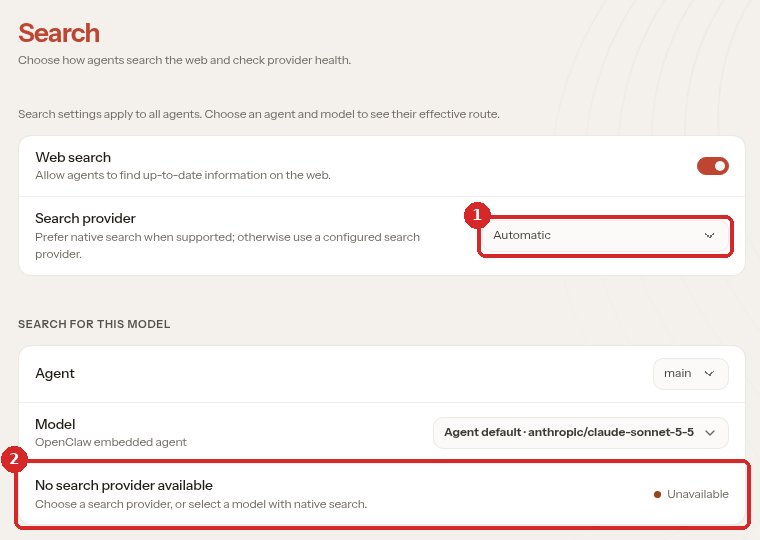
- Search provider: Automatic.
- For our assistant and its Claude model: No search provider available (Unavailable). The list of providers (some need an account and a key) was not tested.
1. Start a new conversation
Open the dashboard (client area → Manage agent → Open dashboard) and click the red + (New conversation). A new conversation is faster than a long one; see Chat with OpenClaw.
2. Paste the complaint and say what you want
Give the assistant three things: the customer's exact words, what the reply must say, and how long it can be. We sent:
A customer left this review: "I ordered a birthday cake for Saturday and it was not ready when I came at 10am. I had to wait 40 minutes. Very disappointed." Write a short, polite reply from me, the bakery owner: apologise, no excuses, say we are checking what went wrong, and offer a free box of 6 custard tarts on their next visit. Max 6 lines. Just write the reply here, do not save any files.
\"Do not save any files\"
Ask for the answer in the chat only. On our Lite test agent (2 GB) the agent often ran out of memory and restarted: during every job where it wrote files (OpenClaw's files and memory), and once also about two minutes after the second reply of this recipe, which had already arrived. If you use OpenClaw every day, choose Plus (4 GB) or more.
3. Read the reply
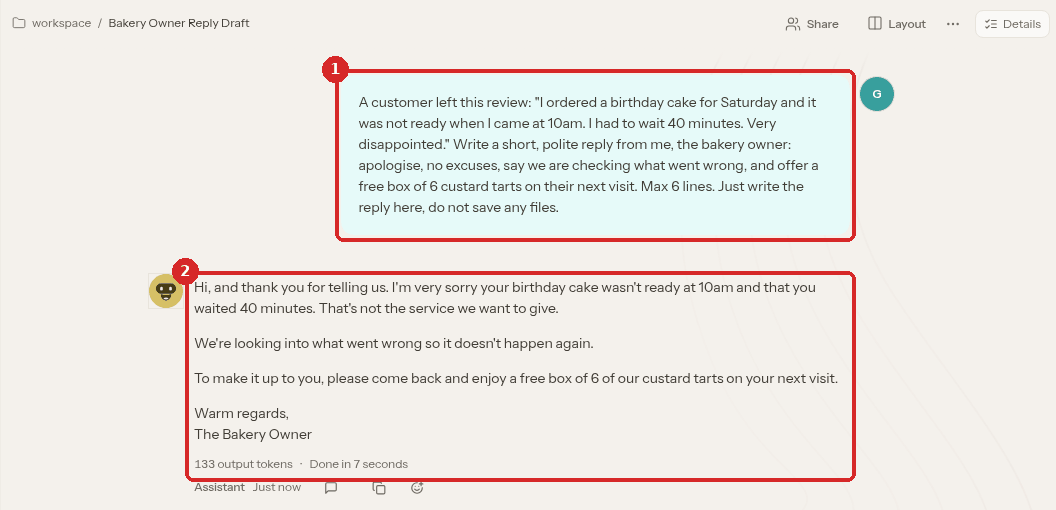
- Our request.
- The reply. It apologises for the 40-minute wait without making excuses, says "We're looking into what went wrong so it doesn't happen again", and offers the free box of 6 custard tarts.
On our Lite test agent the reply appeared about 1 minute after we sent the request. The label under it says Done in 7 seconds: on our agent the wait before the assistant started writing was longer than the writing itself.
4. Ask for changes or another language
Stay in the same conversation: the assistant remembers the reply. We sent:
Good. Now give me the same reply in Portuguese from Portugal, and sign it as Maria, Padaria Sol.
It answered in European Portuguese ("Estamos a apurar o que correu mal para que não volte a acontecer"), turned the custard tarts into pastéis de nata, and signed "Maria, Padaria Sol" (Done in 4 seconds).
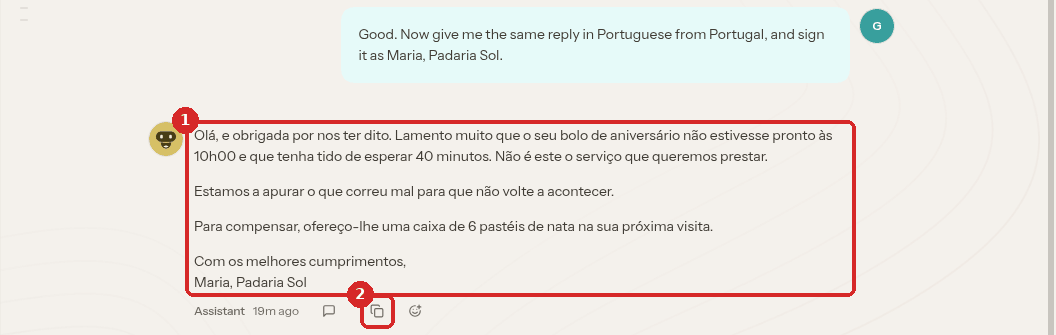
- The Portuguese reply.
- The copy button (Copy as markdown). Copy the reply and paste it where you answer the customer.
Check that it worked
- The reply covers every point you asked for: apology, what you are doing about it, and the offer.
- The details are right: the time, the wait and the offer are the ones from the complaint and your request. Read it once before you send it: you are the one answering the customer.
Make it yours
- "Make it warmer", "make it shorter", "write it as a 2-line Google review reply".
- Paste an angry email instead of a review: "Reply to this email. Offer a refund of the delivery fee. Stay calm and polite."
- Give your shop's name and your own name in the first message, so you do not have to change the signature.
Common problems
The reply promises something I did not offer
Ask "Remove the part about … and only offer …". Always read the reply before sending it.
The reply takes a long time or says \"Unable to finish this reply\"
Start a new conversation and send the request again. If it keeps happening, see Chat with OpenClaw.
I want answers with links from the web
Your OpenClaw needs a search provider first (Settings → Search). We have not tested that setup yet. A Hermes agent can research a question on the web with sources.