See how much AI your OpenClaw uses
OpenClaw counts every token it sends to and receives from the AI model, and estimates what it cost. This page shows where to see it, for which period, and by which model.
| Time needed | 5 minutes |
| You need | An OpenClaw agent with an AI key (First steps) |
| Result | You know how many tokens your agent used, roughly what they cost, and which model used them |
The real bill comes from your AI provider
The costs on this page are estimates calculated by OpenClaw. You pay the AI provider (for example Anthropic) directly, not LusoVPS. The exact amount, and your spending limit, are in your provider's console. See How much will the AI cost me?
1. Open the Usage page
- In the client area, click Manage agent → Open dashboard (see First steps).
- Click the Pages icon on the left and choose Usage. (Your avatar menu at the bottom left also has Usage.)
2. Choose the period
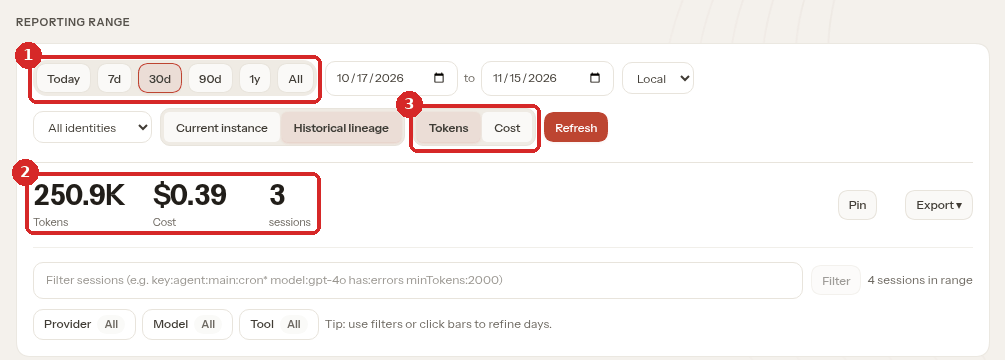
- The period: Today, 7d, 30d (the default), 90d, 1y or All. You can also pick exact dates in the two date boxes next to it.
- The totals for that period: tokens, estimated Cost, and the number of conversations (sessions).
- Tokens / Cost: shows the charts further down in tokens or in money.
In our test, 30d showed 250.9K tokens and $0.39. After clicking Today, the same page showed 46.2K tokens and $0.05 (only that day's use).
What is a token?
A token is a small piece of text, about three quarters of a word. Providers charge per million tokens, with different prices for each model. Everything counts: your message, the agent's answer, and the instructions and history OpenClaw sends with every message. That is why one short question can use thousands of tokens.
3. See the cost by model and by provider
Scroll down.
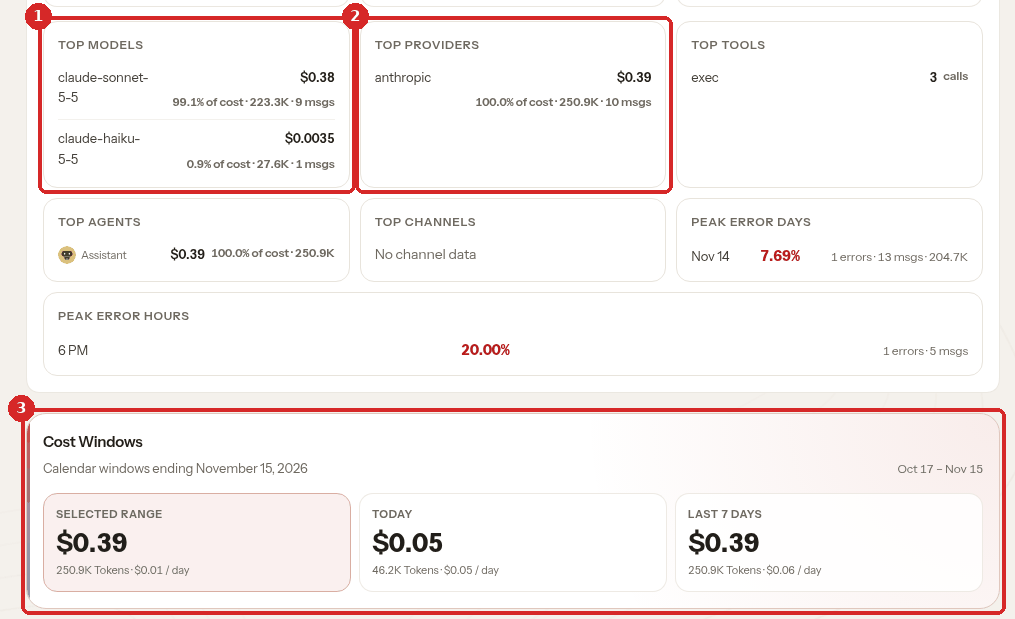
- TOP MODELS: the cost of each model and its share of the total. In our test,
claude-sonnet-5-5cost $0.38 (223.3K tokens) andclaude-haiku-5-5cost $0.0035 (27.6K tokens). A smaller model like Haiku is much cheaper for the same work: see Change the AI model OpenClaw uses. - TOP PROVIDERS: the same, grouped by provider (here only
anthropic). - Cost Windows: three quick totals side by side: the period you chose (SELECTED RANGE), TODAY and LAST 7 DAYS, each with the average per day.
Above these cards, USAGE OVERVIEW has more figures: number of messages, average tokens and cost per message, and errors.
4. See which conversation used the most
At the bottom of the page, SESSIONS lists each conversation with its model and tokens. Use SORT to put the biggest first (Tokens or Cost).
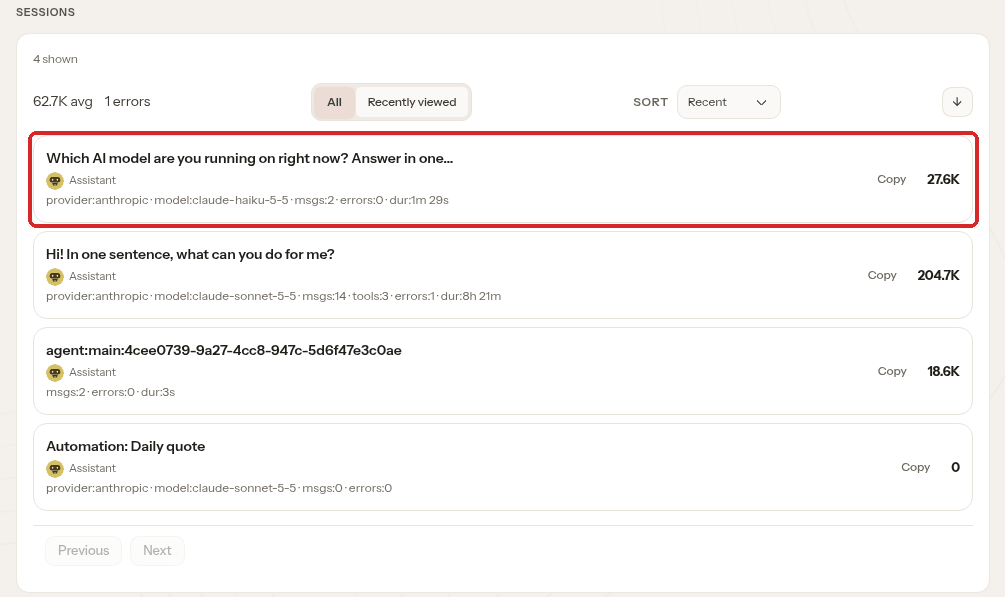
The highlighted line is a short question we asked after switching to Haiku: model:claude-haiku-5-5, 27.6K tokens. Scheduled tasks also appear here (see Schedule a recurring task).
Check that it worked
- Usage shows tokens and a cost for the period you chose.
- TOP MODELS lists the model your agent uses (see Settings → Models).
- Compare with your provider's console: the provider's figure is the one you pay.
Common problems
The page shows \"Loading\" or zeros
Wait a few seconds and click Refresh. If you just started using the agent, there may be nothing to show yet: send a message in the chat first.
The cost here is different from my provider's bill
The cost here is an estimate made by OpenClaw from the token counts. Your provider applies its own prices, taxes and any free credit. Always trust the provider's console.
The cost goes up even when I am not chatting
Something else is using the AI: for example a scheduled task in Pages → Automations. Look at SESSIONS to see which conversation used the tokens, and pause or remove what you do not need.
How do I stop spending too much?
Set a monthly limit in your provider's console, use a smaller model for simple tasks (Change the AI model), and start a new chat for a new topic: long chats send their whole history with every message. More tips: How much will the AI cost me?