Recipe: check your daily till and find cash mismatches
Give Hermes the daily export of your till. It works out the takings of each day, compares the cash you counted with the cash you should have, lists every day that does not match, and makes a summary per week.
| Time needed | 10 minutes |
| You need | A Hermes agent connected to an AI model and your till or POS export as a CSV file (cash, card, MB Way, refunds and counted cash per day) |
| Result | A table per day with the takings and the cash difference, the days that do not match, and a weekly summary, saved in till-check.md |
Check the totals before you rely on them
In our test the days were all right, but the weekly summary in the file had two wrong numbers until we asked Hermes to check it again. Step 3 shows how to catch this. Never use the result alone to accuse someone of taking money: check the receipts first.
1. Export and upload your till data
Export one line per day from your till or POS software: the cash, card and MB Way takings, the refunds, and the cash you counted in the drawer at closing. Save it as CSV and upload it in FILES → workspace (see Hermes reads a contract for you).
Our test file, till-november.csv, has 10 days (Tuesday to Saturday, 3 to 14 November 2026) for a hair salon. Refunds are paid in cash, and the counted cash does not include the 100 EUR float that stays in the drawer:
date,cash,card,mbway,refunds_cash,counted_cash
2026-11-03,142.50,310.00,85.00,0.00,142.50
2026-11-04,98.00,265.50,40.00,15.00,83.00
2026-11-05,120.00,298.00,62.50,0.00,120.00
2026-11-06,175.50,402.00,110.00,0.00,155.50
2026-11-07,260.00,515.00,145.00,18.00,242.00
2026-11-10,88.50,240.00,35.00,0.00,88.50
2026-11-11,131.00,287.50,70.00,0.00,131.00
2026-11-12,116.00,312.00,55.00,25.00,98.50
2026-11-13,190.00,388.50,98.00,0.00,190.00
2026-11-14,245.50,530.00,160.00,10.00,235.50
We put two mistakes in on purpose: on 6 November 20 EUR are missing from the drawer, and on 12 November there are 7.50 EUR too many.
2. Ask for the check
Explain how your till works in the message: how refunds are paid, and whether the counted cash includes the float. In CHAT we wrote:
Now workspace/till-november.csv: my salon's daily till for 3 to 14 Nov 2026. Refunds are paid in cash. counted_cash is the cash we counted in the drawer at closing, without the 100 EUR float. For each day give the total takings (cash + card + MB Way minus refunds) and check the counted cash against the cash we should have; list every day that does not match and by how much. Then a summary per week. Save it as workspace/till-check.md.
Hermes answered in about a minute:
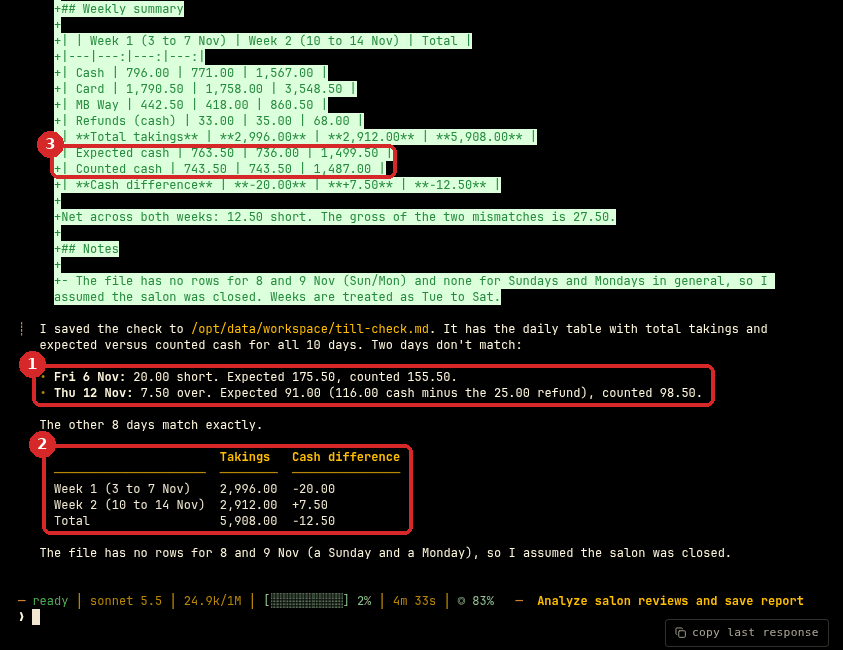
- The two days that do not match, both found: Friday 6 November, 20.00 short, and Thursday 12 November, 7.50 over (expected 116.00 cash minus the 25.00 refund = 91.00, counted 98.50). The other 8 days match.
- The takings and the cash difference per week: 2,996.00 and 2,912.00, 5,908.00 in total.
- In the file (the green preview above the answer), the weekly summary also has the Expected cash and Counted cash of each week. Two of these numbers are wrong: week 1 should be 763.00 and 743.00, not 763.50 and 743.50.
The daily table in till-check.md was right. This is the start of it, exactly as Hermes wrote it:
| Date | Cash | Card | MB Way | Refunds | **Total takings** | Expected cash | Counted cash | Difference |
|---|---:|---:|---:|---:|---:|---:|---:|---:|
| Tue 3 Nov | 142.50 | 310.00 | 85.00 | 0.00 | **537.50** | 142.50 | 142.50 | 0.00 |
| Wed 4 Nov | 98.00 | 265.50 | 40.00 | 15.00 | **388.50** | 83.00 | 83.00 | 0.00 |
| Thu 5 Nov | 120.00 | 298.00 | 62.50 | 0.00 | **480.50** | 120.00 | 120.00 | 0.00 |
| Fri 6 Nov | 175.50 | 402.00 | 110.00 | 0.00 | **687.50** | 175.50 | 155.50 | **−20.00** |
...
3. Ask Hermes to check its own totals
Add up one week yourself, or ask Hermes to do it with a program. We wrote:
Please check the weekly summary again: add up the Expected cash and Counted cash of each week from your daily table with a small program, and fix the file if anything is wrong.
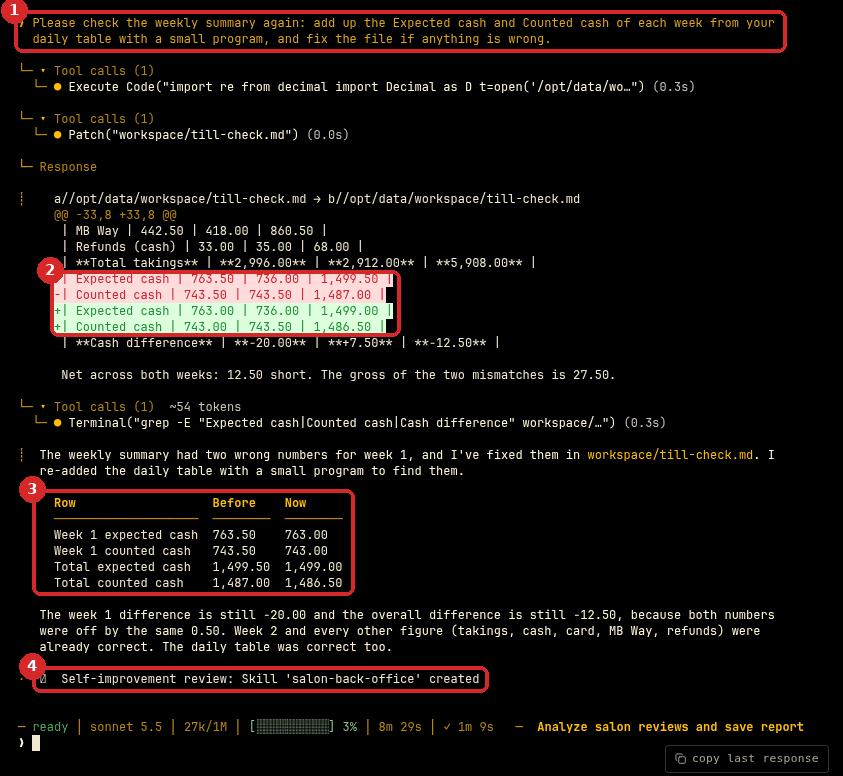
- Our request to check the weekly summary.
- Hermes fixes the file: the old lines in red, the new lines in green.
- It explains what changed: week 1 expected cash 763.50 → 763.00, counted cash 743.50 → 743.00, and the two totals. The differences (−20.00 and −12.50) did not change, because both numbers were 0.50 too high.
- After the task, Hermes created a skill for itself, salon-back-office. It does this on its own after some tasks; you can see the skill in SKILLS.
Check that it worked
We worked out every day and week ourselves before asking Hermes:
| Check | Our answer | Hermes |
|---|---|---|
| Total takings of each day (10 days) | e.g. 537.50 on 3 Nov, 925.50 on 14 Nov | All 10 correct |
| Days that do not match | 6 Nov 20.00 short, 12 Nov 7.50 over | Same |
| Takings week 1 / week 2 / total | 2,996.00 / 2,912.00 / 5,908.00 | Same |
| Expected cash, week 1 | 763.00 | 763.50 at first, 763.00 after the check |
| Counted cash, week 1 | 743.00 | 743.50 at first, 743.00 after the check |
So: the days and the mismatches were right the first time; two weekly totals were wrong until step 3. To check your own result, add the Expected cash of the days of one week with a calculator and compare with the weekly summary.
Make it yours
- Every Saturday evening: schedule it after you export the week. Keep the check request of step 3 in the same message.
- Your own tolerance: "Ignore differences under 1 EUR."
- More detail: "For each mismatch, list the refunds and the card payments of that day."
- Compare weeks: "Which weekday has the highest takings on average?"
Common problems
Every day shows a difference of 100 EUR
The counted cash in your file includes the float. Say so in the message: "counted_cash includes the 100 EUR float", or "without the 100 EUR float", as we did.
A day with a refund shows a mismatch, but the drawer was right
Tell Hermes how refunds are paid. If you refund to the card, they must not be taken from the cash. Our message said "Refunds are paid in cash."
The weekly totals do not add up
That happened in our test. Ask Hermes to recheck them with a small program and fix the file (step 3), or add the days yourself.