Recipe: sort customer reviews with AI
You send a list of customer reviews to n8n. Claude marks each one as positive, neutral or negative with a one-line reason, and you get one Telegram message with the counts and the negative reviews, so you know who to answer first.
| Time needed | 30 minutes |
| You need | An n8n agent with your Claude key (Sign in and build your first AI agent), your Telegram bot saved in n8n (step 1 of the contact form recipe) and your numeric Telegram ID (from @userinfobot) |
| Result | A Telegram message like New reviews: 6, Positive: 2, Neutral: 2, Negative: 2, followed by each negative review with its reason |
This is the finished workflow:
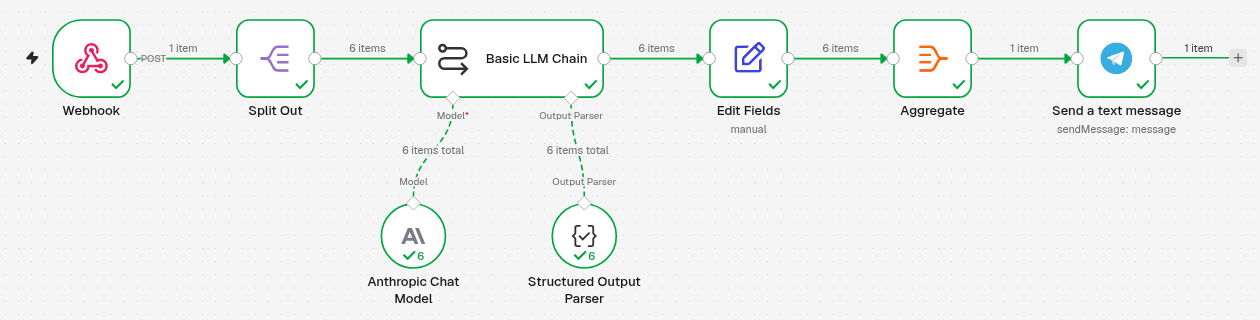
Webhook receives the list → Split Out makes one item per review → Basic LLM Chain (with Anthropic Chat Model and Structured Output Parser) classifies each review → Edit Fields keeps the author, text, sentiment and reason together → Aggregate puts all the reviews back in one list → Send a text message sends the summary to Telegram.
Send /start to your bot first
A Telegram bot can only write to people who have opened it. Open your bot in Telegram and tap Start once before you test.
The list you send
The workflow expects a JSON list called reviews, with an author and a text for each review. These are the 6 test reviews we sent. We labelled them ourselves first, to check Claude's answers: Ana and James positive, Tiago and Carla negative, Miguel and Rita neutral.
{
  "reviews": [
    {"author": "Ana M.", "text": "Ordered the azulejo mug as a gift. It arrived in two days and was beautifully packed. My mother loved it!"},
    {"author": "Tiago R.", "text": "The cork wallet looked nice for a week, then the stitching came loose. I asked for a replacement 10 days ago and still have no reply."},
    {"author": "Miguel S.", "text": "The T-shirt is OK. The fabric is fine and the fit is normal. Delivery took the expected 5 days."},
    {"author": "James P.", "text": "Best olive oil I have bought online. Fresh, peppery, and the bottle is lovely. Will order again."},
    {"author": "Carla F.", "text": "I received the wrong size T-shirt (M instead of L) and the link for the return label does not work. Very frustrating."},
    {"author": "Rita C.", "text": "Product as described. I paid by card and the parcel came with the tracking number from the email."}
  ]
}
Save it as reviews.json on your computer for the test in step 7. Later, your shop or review tool sends the list instead (if it can send data to a web address), or you send it yourself.
1. Receive the list with a Webhook
- Click the + at the top of the menu on the left, choose New workflow and name it, for example Sort customer reviews.
-
Click Add first step and choose On webhook call. Set it:
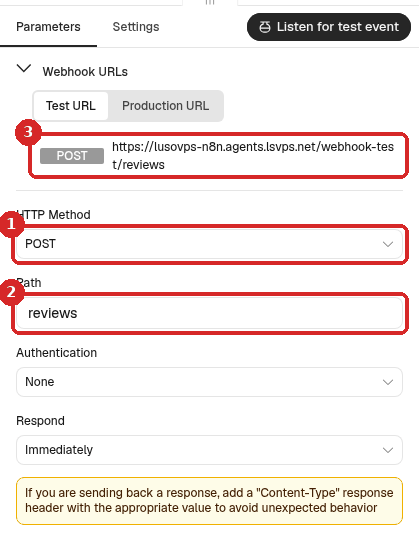
- HTTP Method: POST.
- Path:
reviews. - The Test URL, which you use in step 7. More about the two addresses: Receive data with a webhook.
2. One item per review (Split Out)
- Close the panel. Click the + at the right of Webhook, search for
Split Outand click it. -
Set it:
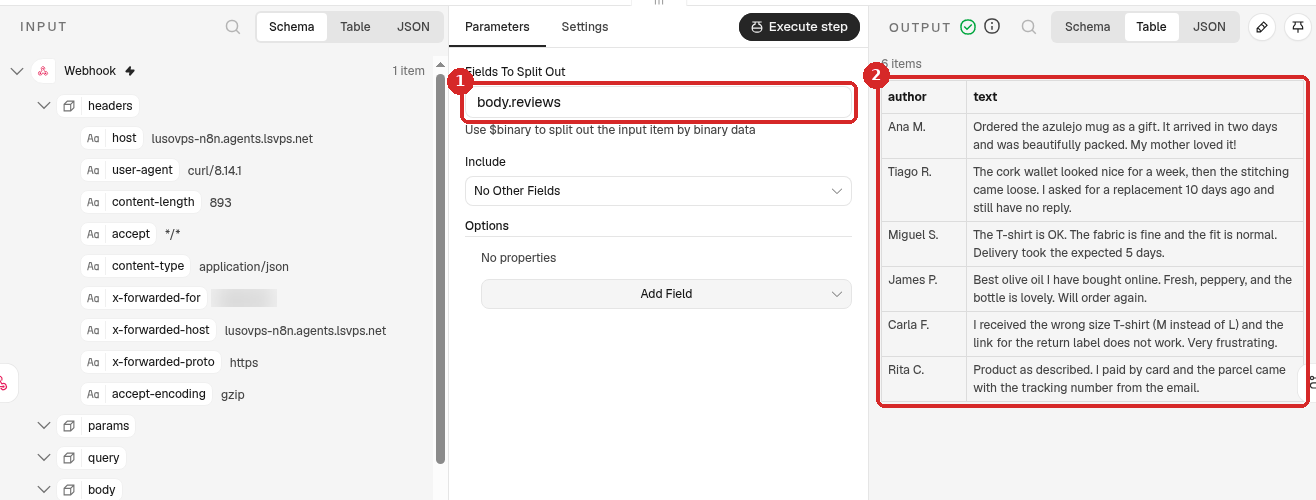
- Fields To Split Out:
body.reviews. The list arrives in the body of the call, under reviews. - After a test, the OUTPUT has 6 items: one per review, each with its author and text.
- Fields To Split Out:
3. Let Claude classify each review
- Close the panel. Click the + at the right of Split Out, search for
Basic LLM Chainand click it. - Source for Prompt (User Message): Define below.
-
Fill in the rest:
-
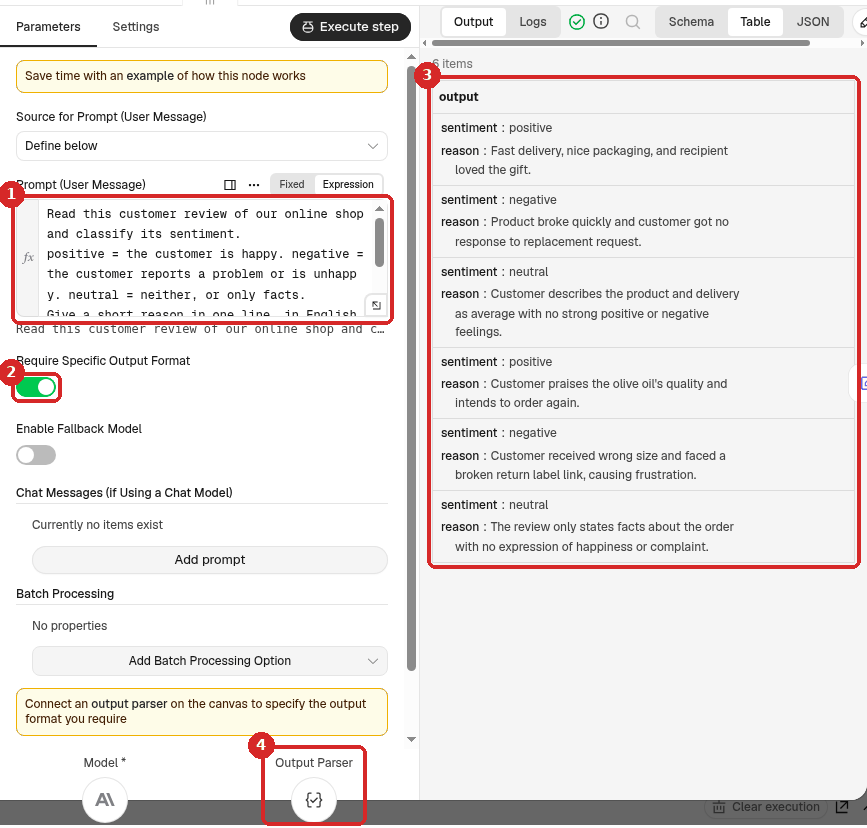
Prompt (User Message): click Expression and paste:
Read this customer review of our online shop and classify its sentiment.
positive = the customer is happy. negative = the customer reports a problem or is unhappy. neutral = neither, or only facts.
Give a short reason in one line, in English.

Author: {{ $json.author }}
Review: {{ $json.text }}
Saying what each word means (negative = the customer reports a problem) makes the answers more consistent.
-
Require Specific Output Format: switch it on. Claude must then answer in a fixed shape (step 4), so the next steps can count the answers.
- After a test, the OUTPUT shows a sentiment and a reason for each of the 6 reviews.
- A new Output Parser connector appears at the bottom, next to Model.
-
-
Click the + under Model and choose Anthropic Chat Model (n8n picks your Anthropic account credential).
4. Tell Claude the exact answer shape (Structured Output Parser)
- Click the + under Output Parser (box 4 above) and choose Structured Output Parser.
-
Set it:
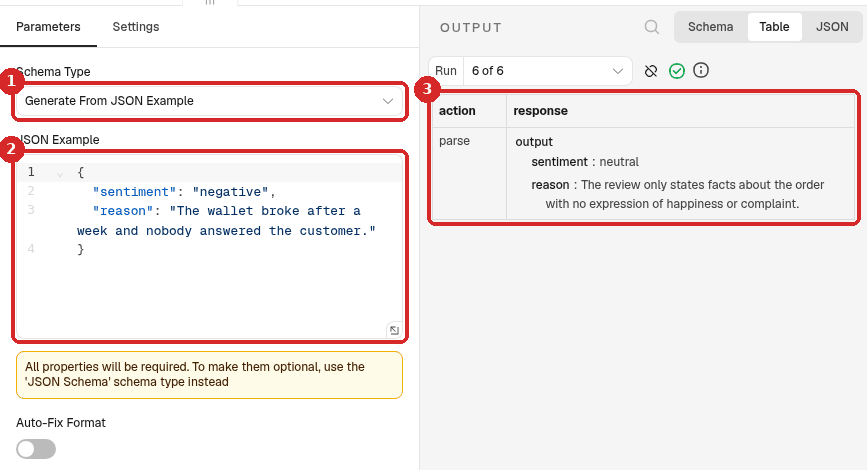
- Schema Type: Generate From JSON Example.
-
JSON Example: replace the example with:
{
  "sentiment": "negative",
  "reason": "The wallet broke after a week and nobody answered the customer."
}
n8n learns the shape from the example: two text fields, sentiment and reason. The values are only an example. n8n notes that All properties will be required.
-
After a test, the OUTPUT of each run shows output with the sentiment and reason Claude gave.
5. Keep each review with its result (Edit Fields)
The chain gives back only Claude's answer. Add an Edit Fields step after Basic LLM Chain, Mode Manual Mapping, and click Add Field for each of these (name, then the value as an expression):
| Name | Value |
|---|---|
author |
{{ $('Split Out').item.json.author }} |
text |
{{ $('Split Out').item.json.text }} |
sentiment |
{{ $json.output.sentiment }} |
reason |
{{ $json.output.reason }} |
The same kind of step, with a screenshot, is in the product descriptions recipe.
6. Put the reviews in one list and send the summary
You want one Telegram message, not six. Aggregate puts the 6 items back into one.
-
Add an Aggregate step after Edit Fields (search
Aggregate). Set it: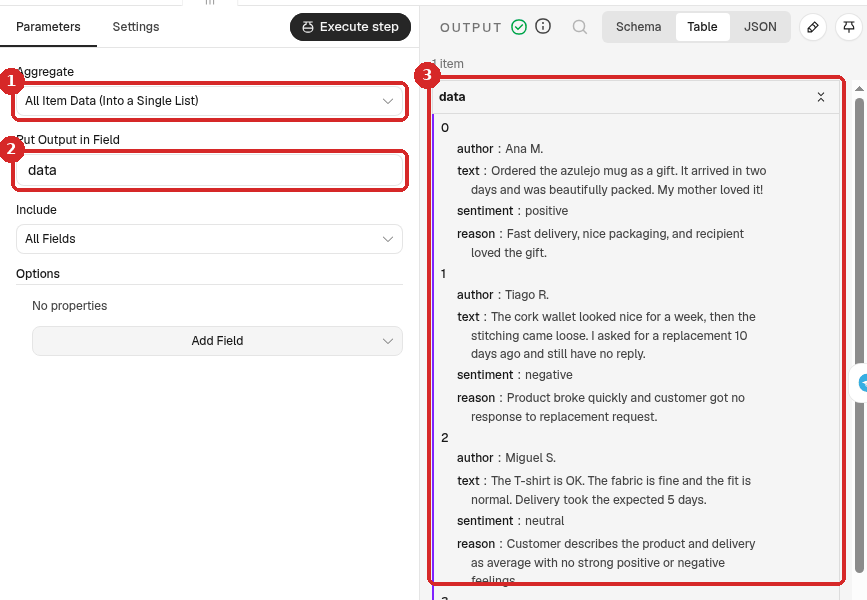
- Aggregate: All Item Data (Into a Single List).
- Put Output in Field: keep
data. - After a test, the OUTPUT is 1 item with a list called data that holds the 6 reviews with their sentiment and reason.
-
Add a Telegram Send a text message step after Aggregate (search
Telegram, under MESSAGE ACTIONS). Set it: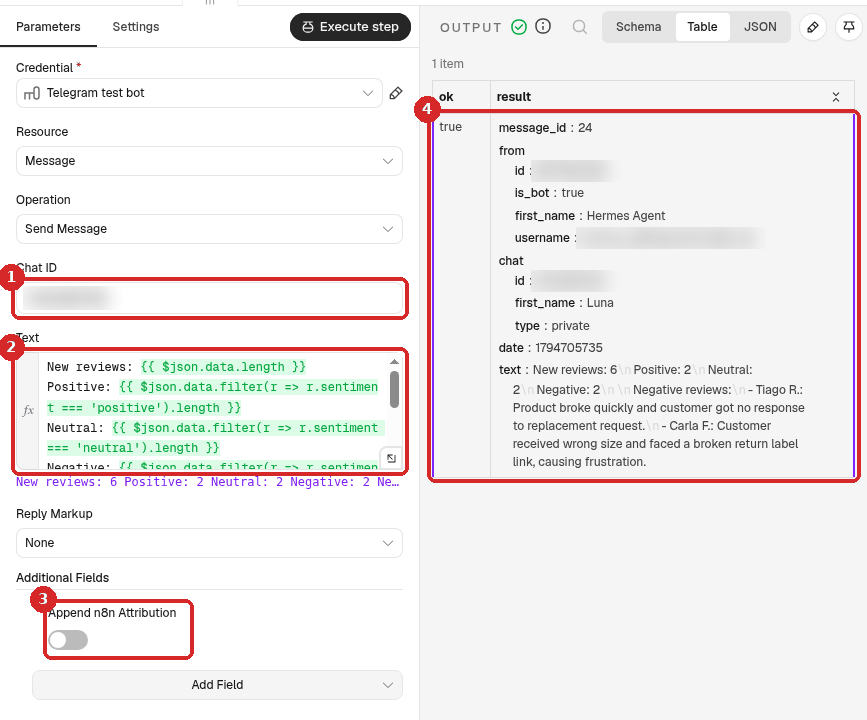
- Chat ID: your numeric Telegram ID. (Credential: your Telegram bot.)
-
Text: click Expression and paste:
New reviews: {{ $json.data.length }} Positive: {{ $json.data.filter(r => r.sentiment === 'positive').length }} Neutral: {{ $json.data.filter(r => r.sentiment === 'neutral').length }} Negative: {{ $json.data.filter(r => r.sentiment === 'negative').length }} Negative reviews: {{ $json.data.filter(r => r.sentiment === 'negative').map(r => '- ' + r.author + ': ' + r.reason).join('\n') }}filterkeeps the reviews with one sentiment,lengthcounts them, and the last line writes one line per negative review. Copy it as it is. -
Additional Fields → Add Field → Append n8n Attribution, switch off.
- After a test, the OUTPUT shows ok true, a message_id and the exact text that was sent.
7. Test it
- Close the panel and click Execute workflow at the bottom of the canvas. n8n waits for one call to the Test URL.
-
Send your
reviews.jsonto the Test URL. In a terminal on your computer, in the folder with the file (use your own n8n address):curl -X POST https://yourname-n8n.agents.lsvps.net/webhook-test/reviews \ -H 'Content-Type: application/json' \ -d @reviews.jsonn8n answers
{"message":"Workflow was started"}. -
All the steps get a green tick: 6 items from Split Out to Edit Fields, then 1 item. The Telegram message arrives.
8. Publish it
Click Publish at the top right, then Publish in the window. From now on, send the list to the Production URL (with /webhook/reviews instead of /webhook-test/reviews). See Receive data with a webhook.
Check that it worked
Compare Claude's answers with your own opinion of a few reviews. In our test, all 6 matched the labels we had written down before, and the message that arrived on Telegram was:
New reviews: 6
Positive: 2
Neutral: 2
Negative: 2

Negative reviews:
- Tiago R.: Product broke quickly and customer got no response to replacement request.
- Carla F.: Customer received wrong size and faced a broken return label link, causing frustration.
The whole run took 2.7 seconds.
Borderline reviews
A review like nice candle, but smaller than I expected can honestly be neutral or negative. If Claude's choice is not what you want, add your rule to the prompt in step 3, for example any complaint, even a small one, is negative.
Make it yours
- Reviews in Portuguese: Claude reads them as they are. Write Give a short reason in one line, in European Portuguese if you want the reasons in Portuguese.
- More categories: change the prompt and the JSON example, for example add
"topic": "delivery"to know what the complaint is about, and add the field in Edit Fields. - Only alert when there is a negative review: add an If step after Aggregate that checks the number of negative reviews (see the contact form recipe for an If step).
Common problems
Split Out says: The field 'body.reviews' wasn't found in any input item
The list in your call has another name. We got this when we sent {"items": [...]} instead of {"reviews": [...]}. The OUTPUT of Split Out then says No output data returned, the next steps do not run and no Telegram message is sent, but the run still counts as successful in Executions. Open Webhook after a test and look at its OUTPUT: the list must be under body → reviews. Fix the sender, or change Fields To Split Out to match.
n8n says: Problem in node 'Basic LLM Chain' – A Model sub-node must be connected and enabled
The chain has no Claude to ask. Click the + under Model and add Anthropic Chat Model with your Anthropic account credential (step 3).
sentiment and reason are empty in Edit Fields
The Structured Output Parser is not connected. Without it, the chain still runs (even with Require Specific Output Format on), but it gives back plain text instead of output with sentiment and reason. Connect the parser under Output Parser (step 4) and test again.
The counts in Telegram are all 0
The words do not match. The Telegram text counts exactly positive, neutral and negative in small letters. Check the sentiment values in the Edit Fields OUTPUT, and keep the three words in the prompt of step 3.
The test call answers: The requested webhook ... is not registered
Click Execute workflow first: the Test URL works for one call after each click. See Receive data with a webhook.
Telegram says: Bad Request: chat not found
The Chat ID is wrong, or you never pressed Start in your bot. See the contact form recipe.