Recipe: translate a menu or price list
Give Hermes your menu, price list or product sheet and get it back in other languages, with the prices unchanged and local items explained for tourists.
| Time needed | 3 minutes |
| You need | A Hermes agent connected to an AI model and your text as a file (or pasted in the chat) |
| Result | One file per language in your agent's workspace folder |
1. Upload the menu
Upload it to FILES → workspace (see Hermes reads a contract for you). Our test file, menu-pt.txt, was a Portuguese breakfast menu with seven items and prices such as Pastel de nata - 1,30 EUR.
2. Ask for the translations
In CHAT, say which languages, what to keep, and where to save:
Now translate workspace/menu-pt.txt into English and Spanish for tourists. Keep the Portuguese name of typical items (like pastel de nata) with a short explanation, keep the prices exactly, and save workspace/menu-en.txt and workspace/menu-es.txt. Show me the English one.
- Hermes saves both files.
- It shows the English menu and confirms the prices are exactly as in the original.
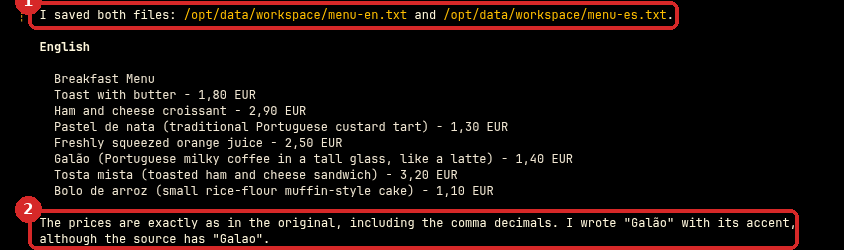
Typical items keep their name with an explanation, for example "Pastel de nata (traditional Portuguese custard tart) - 1,30 EUR" and "Galão (Portuguese milky coffee in a tall glass, like a latte) - 1,40 EUR". We checked all seven prices in both files: none changed.
Check that it worked
- Open FILES → workspace:
menu-en.txtandmenu-es.txtare there. - Compare the prices with your original, line by line.
Make it yours
- More languages: "also French and German".
- Other documents: product descriptions for your online shop, a welcome message for guests, house rules.
- "Use € instead of EUR and a dot for decimals" for English-speaking customers.
Common problems
The translation sounds too literal
Ask: "Make it sound natural for a British tourist" or give an example of the style you like.