Update Hermes
LusoVPS makes new Hermes versions available for your agent. This guide shows where to see the version you have, how to start an update from the client area, and how to check afterwards that your channels, skills, memory and scheduled jobs are still there.
| Time needed | 5 minutes, plus the update itself ("a few minutes", says the client area) |
| You need | Your Hermes agent from LusoVPS and access to the client area |
| Result | Your agent runs the latest Hermes version we have made available, with your data kept |
Update is not Reinstall
Update keeps your conversations, memory, skills, channels and scheduled jobs. Reinstall, in the card next to it, deletes all of them. Read the card title before you click.
Make a backup first
The client area says Your data is kept. A backup takes two minutes and protects you if something goes wrong: see Back up your Hermes agent.
1. See which version you have
In the client area, open your Hermes agent and click the Manage agent tab.
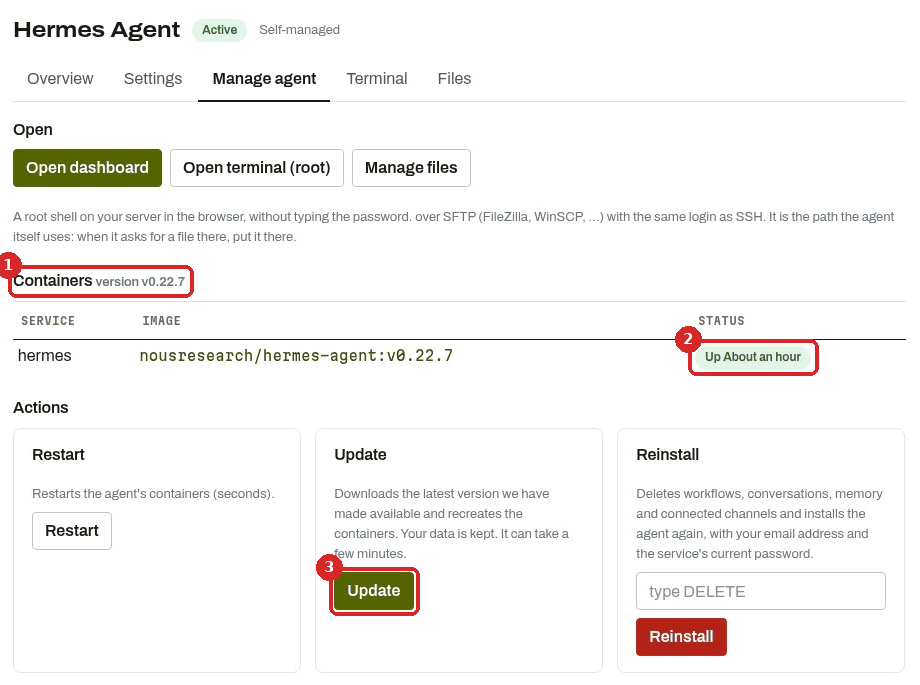
- Containers shows the version of your agent. Ours was version v0.22.7.
- STATUS shows how long Hermes has been running, for example Up About an hour. After an update that installs a new version, this time starts again from zero.
- The Update button.
The dashboard shows the same version at the bottom of the menu on the left (and on the SYSTEM page, line HERMES).
2. Start the update
- In the Manage agent tab, click Update in the Update card (Downloads the latest version we have made available and recreates the containers. Your data is kept. It can take a few minutes.).
- There is no confirmation window: the update starts at once. The page reloads and shows The update was started: the agent is updated within a few minutes.
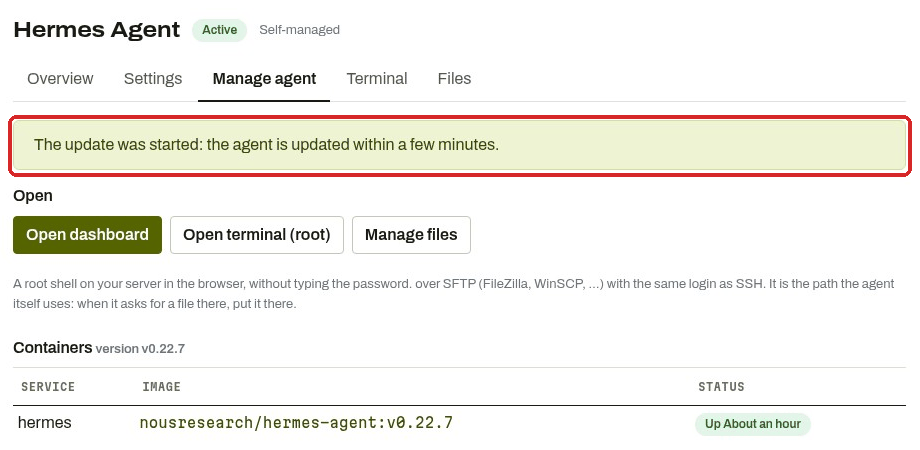
- Wait a few minutes, then open the Manage agent tab again and look at Containers: when a new version was installed, the version number changes and STATUS counts again from the restart.
What we saw in our test
When we clicked Update, our agent already had the latest version we offer (v0.22.7). Nothing was restarted: 5 minutes later the version was still v0.22.7 and STATUS still said Up About an hour. The dashboard and the channels kept working, and Hermes answered in the chat afterwards as usual. So if the version and the time do not change, you already had the latest version. We have not yet run an update that installs a new version, so we cannot tell you how long Hermes is unavailable in that case: plan it for a quiet moment, when no scheduled job is due.
3. Open the dashboard again
Click Open dashboard in the Manage agent tab. If the agent was restarted by the update, the dashboard may ask you to sign in again: Open dashboard in the client area signs you in.
Check that it worked
Open the dashboard and look at these pages:
-
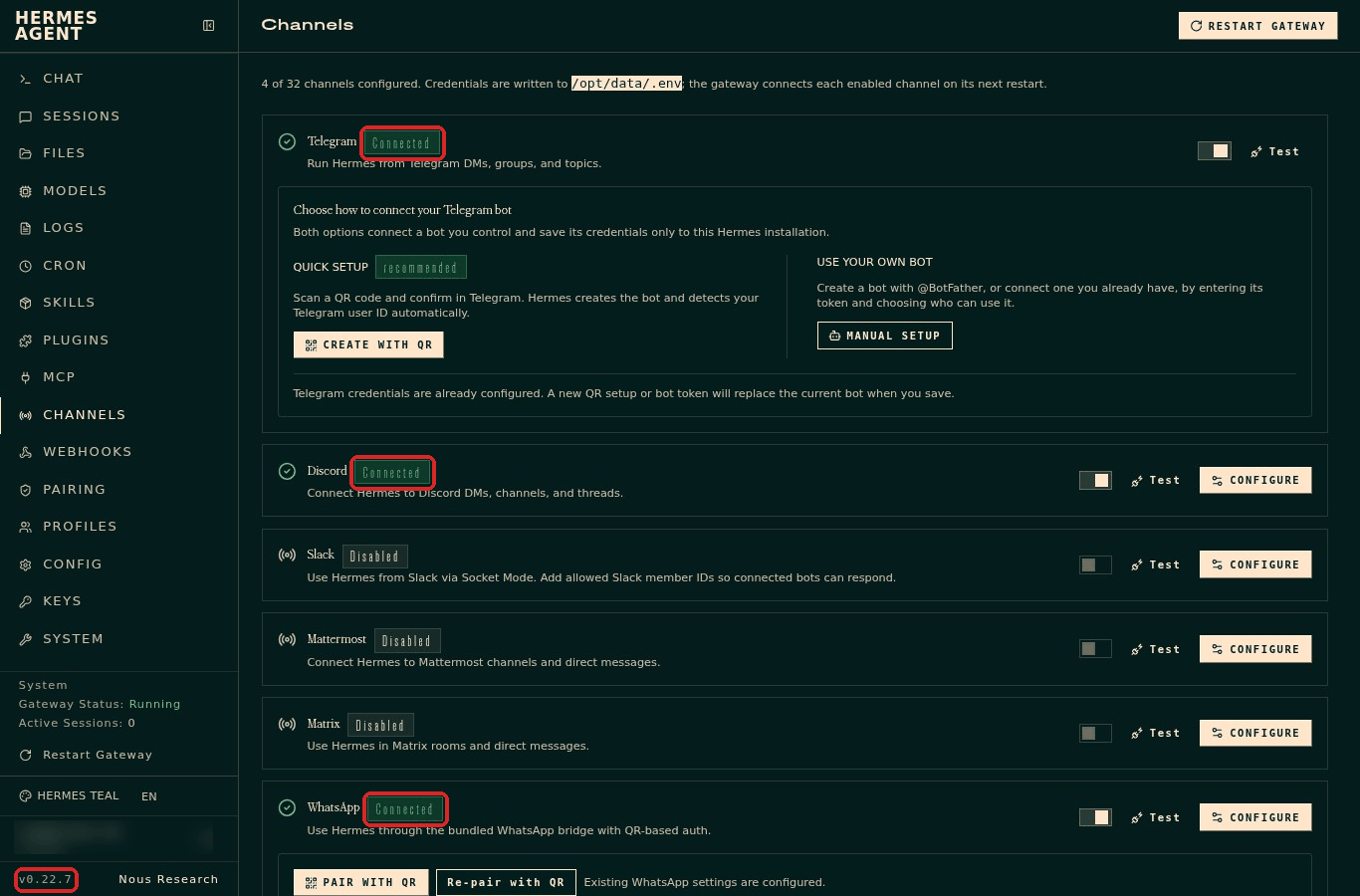
CHANNELS: your apps still show Connected. In our test Telegram, Discord and WhatsApp were all still Connected, and the version at the bottom left was still v0.22.7.
-
CRON: your scheduled jobs are still listed, with the same schedule and the same state (active or paused). We had 4 jobs before and after.
- SKILLS: the same number of skills (ours: 39/39 enabled).
- SYSTEM → Memory: the memory files still have the same size (our USER.md was 61 B before and after). You can also ask Hermes "What do you remember about me?" (how memory works).
- CHAT: ask a short question. Hermes should answer as usual.
To be sure a channel really works, send your bot a message on Telegram (or WhatsApp, Discord) and wait for the answer.
Common problems
The version did not change
If STATUS did not restart either, nothing was installed: you already have the latest version we have made available. That is what happened in our test. The version we offer can be lower than the newest one announced by the Hermes project.
The dashboard does not open after the update
Wait a few more minutes and try Open dashboard again. If it still does not open, use Restart in the Manage agent tab, then see The dashboard does not open. If nothing helps, open a ticket.
My bot does not answer any more after the update
Open LOGS in the dashboard and look for errors about that channel (how). Then see My agent stopped answering.
Should I use Restart, Update or Reinstall?
Restart when the agent is slow or stuck, Update to get a newer version, Reinstall only if you want to start from zero (it deletes everything). See Restart, Update or Reinstall: which one?