Recipe: a weekly signup report on Telegram
Every Monday at 8:00, n8n reads your Newsletter signups data table, counts the people who signed up in the last 7 days, Claude writes a 3-line summary, and you get it on Telegram.
| Time needed | 20 minutes |
| You need | An n8n agent with your Claude key (Sign in and build your first AI agent), your Telegram bot saved in n8n (step 1 of the contact form recipe), your numeric Telegram ID, and a data table with a datetime column for the signup date (the signup form recipe makes one) |
| Result | A Telegram message every Monday such as This week we had 3 new newsletter signups. They are Rita, Ana, and Bruno. ... |
This is the finished workflow:
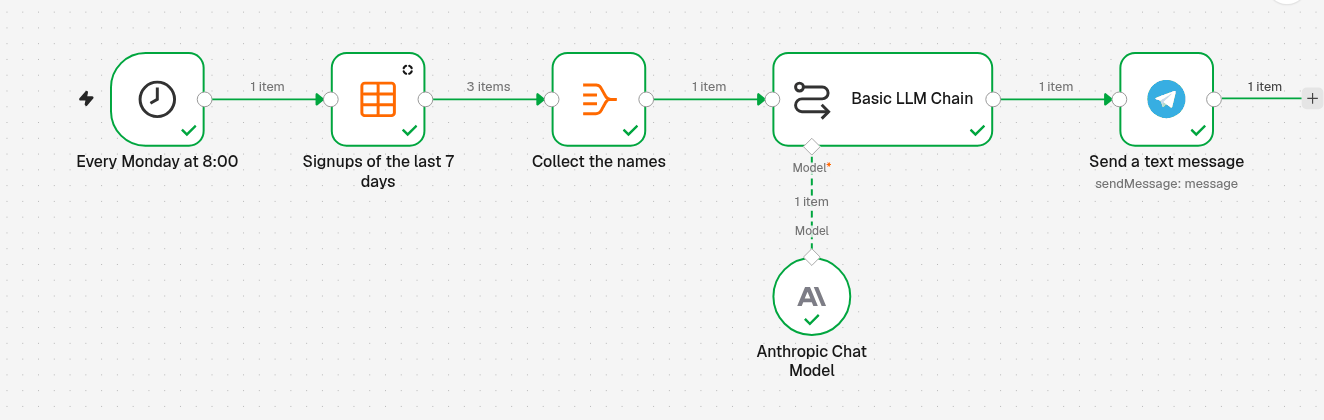
Every Monday at 8:00 (Schedule Trigger) → Signups of the last 7 days (Data table) reads the new rows → Collect the names (Aggregate) puts them in one list → Basic LLM Chain (with Anthropic Chat Model) writes the 3 lines → Send a text message sends them to Telegram.
1. Run every Monday at 8:00
- Create a new workflow and name it, for example Weekly signup report.
- Click Add first step and choose On a schedule. Rename the step
Every Monday at 8:00(click its name at the top of the panel). -
Set it:
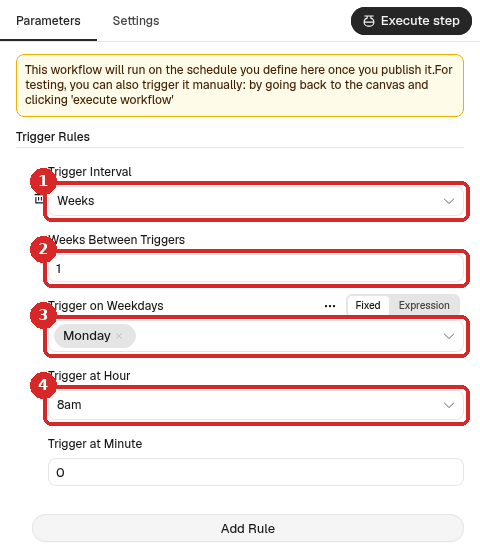
- Trigger Interval: Weeks.
- Weeks Between Triggers:
1. - Trigger on Weekdays: Monday.
- Trigger at Hour: 8am (and Trigger at Minute
0).
The hour follows the workflow's time zone (check it).
2. Read the signups of the last 7 days
- Close the panel. Click the + at the right of the trigger, type
data table, press Enter and choose Get row(s). Rename itSignups of the last 7 days. -
Set it:
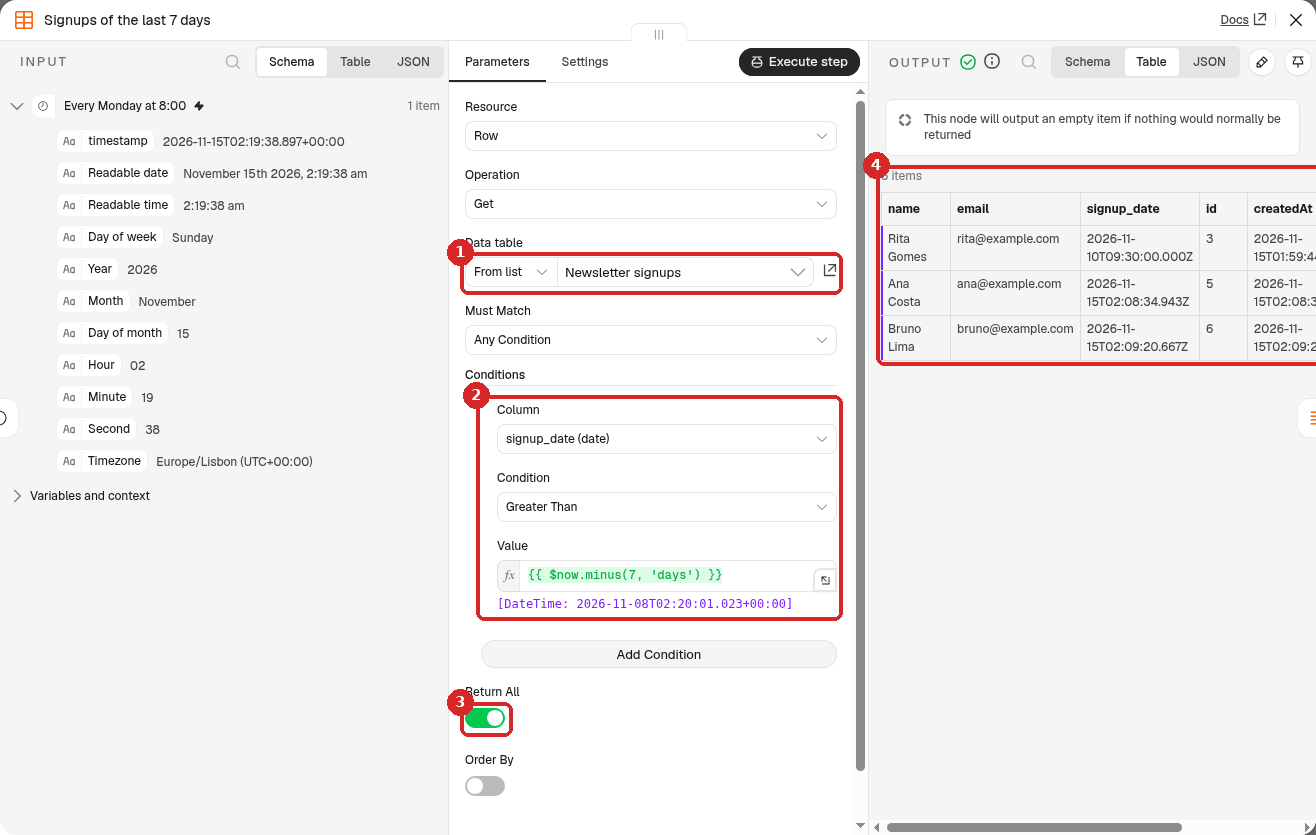
- Data table: From list → Newsletter signups.
- Conditions → Add Condition: Column signup_date (date), Condition Greater Than, Value: click Expression and paste
{{ $now.minus(7, 'days') }}. Under the box n8n shows the date and time 7 days ago. - Return All: on.
- After a test, the OUTPUT lists the rows newer than that date: in our test, 3 items.
-
In the Settings tab of the same step, switch Always Output Data on. In a week with no signups, the workflow then still goes on and tells you so, instead of stopping silently.
Our table had 5 rows. The two older ones (signed up on 20 October and 1 November) were correctly left out; the 3 rows from 10 and 15 November were returned.
3. Put the names in one list
The AI step should get all the names at once and write one message, not one per person.
- Add an Aggregate step after Signups of the last 7 days (the +, search
Aggregate). Rename itCollect the names. -
Set it:
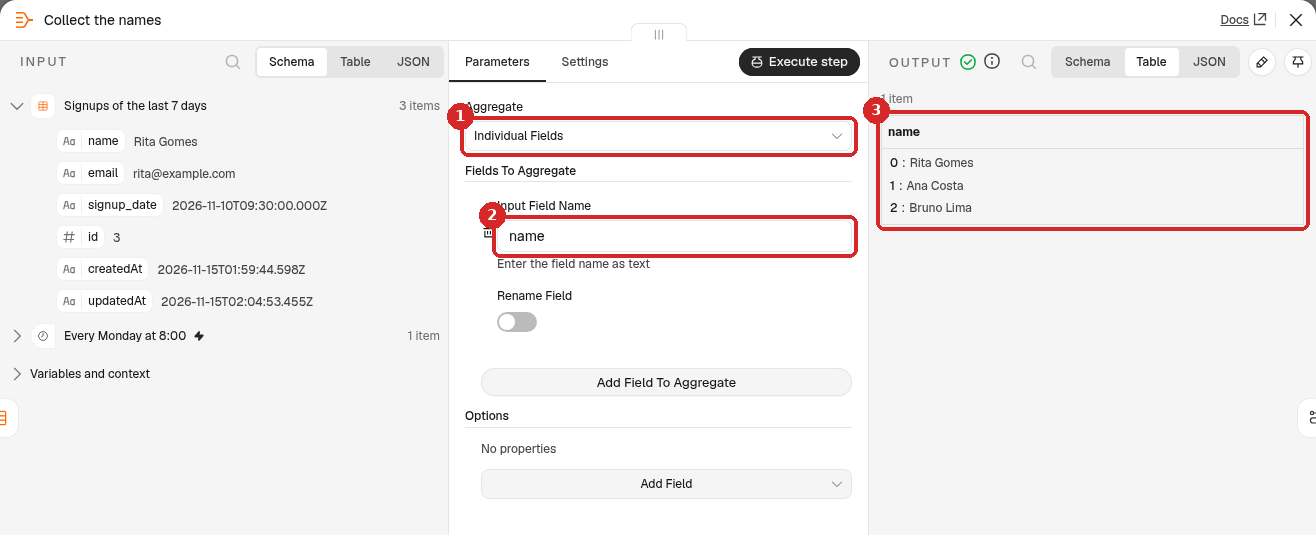
- Aggregate: Individual Fields.
- Input Field Name:
name(the column of your table). - The OUTPUT is 1 item with a list name: Rita Gomes, Ana Costa, Bruno Lima.
4. Let Claude write the 3 lines
- Add a Basic LLM Chain step after Collect the names.
-
Set it:
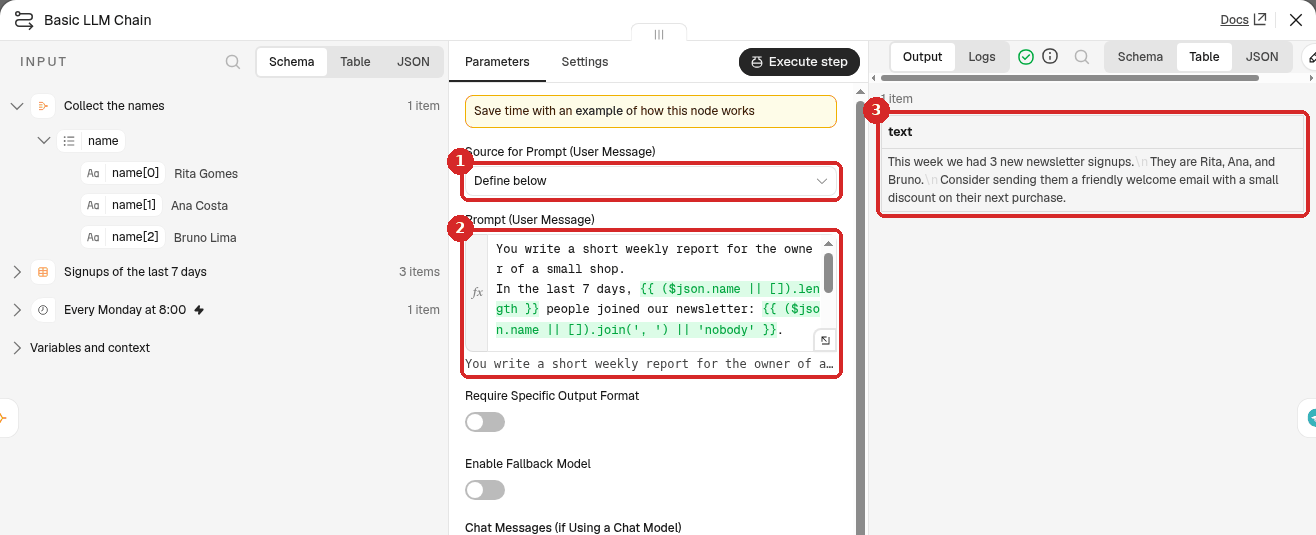
- Source for Prompt (User Message): Define below.
-
Prompt (User Message): click Expression and paste:
You write a short weekly report for the owner of a small shop.
In the last 7 days, {{ ($json.name || []).length }} people joined our newsletter: {{ ($json.name || []).join(', ') || 'nobody' }}.

Write exactly 3 short lines in plain English:
1. How many new signups there were this week.
2. Who they are (first names are fine).
3. One practical idea to welcome them.
No title, no markdown, no emoji.
n8n counts the names (
.length) and writes them one after the other (.join(', ')), so Claude gets the exact number and does not have to count.|| []and|| 'nobody'handle a week without signups. -
After a test, the OUTPUT shows the text Claude wrote.
-
At the bottom of the panel, click the + under Model and choose Anthropic Chat Model (your Anthropic account credential is picked by itself).
5. Send it to Telegram
- Add a Telegram step after Basic LLM Chain: search
Telegramand choose Send a text message. -
Set it:
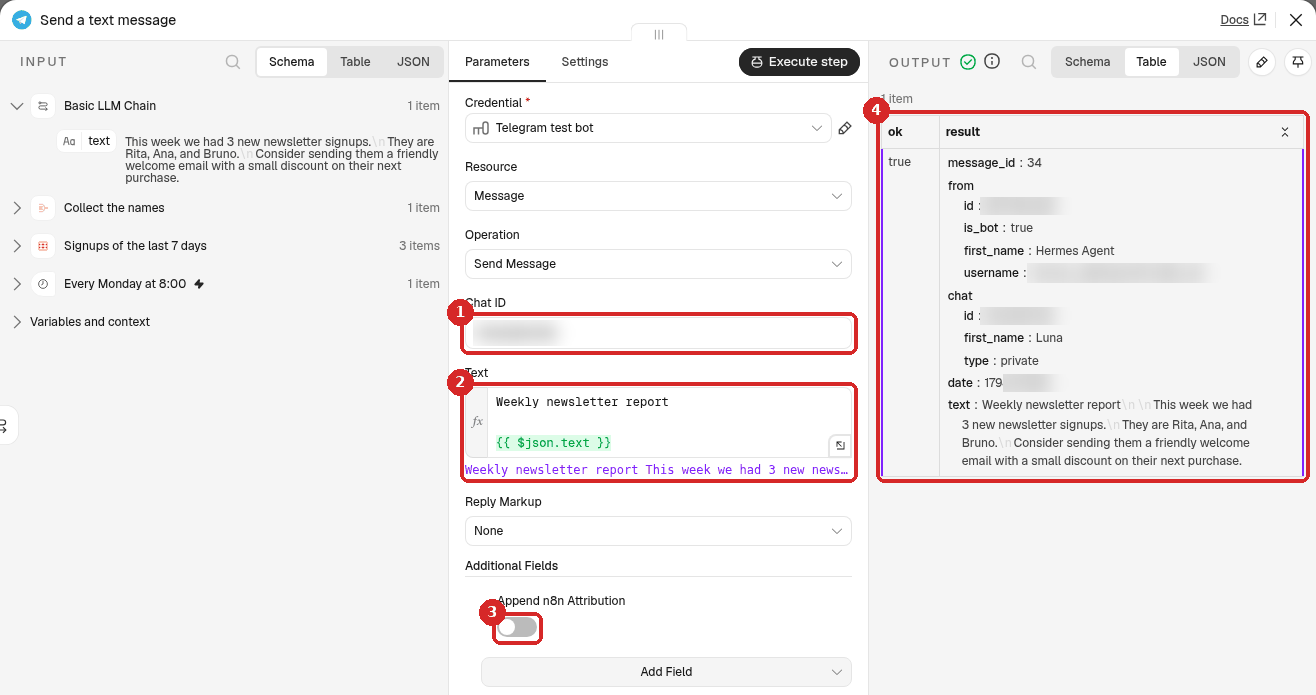
- Chat ID: your numeric Telegram ID. (Credential: your Telegram bot.)
-
Text: click Expression and paste:
-
Additional Fields → Add Field → Append n8n Attribution, switch off.
- After a test, the OUTPUT shows ok true and the text that was sent.
6. Test it now
You do not have to wait until Monday. Close the panel and click Execute workflow at the bottom of the canvas: the whole workflow runs once, now. All steps get a green tick, and the message arrives on Telegram. Ours said:
Weekly newsletter report
This week we had 3 new newsletter signups. They are Rita, Ana, and Bruno. Consider sending them a friendly welcome email with a small discount on their next purchase.
We also tested a week with no signups (we changed the condition for a moment so that no row matched). Claude then wrote This week we had 0 new newsletter signups. and suggested a way to get more.
7. Publish it
Click Publish at the top right, then Publish in the window. From now on the report arrives every Monday at 8:00. To stop it, click the arrow next to Published and choose Unpublish (details).
Note
For this guide we tested with Execute workflow only and did not leave the workflow published, so we did not wait for a real Monday run. How the schedule itself behaves is shown in Run a workflow on a schedule.
Check that it worked
- The test with Execute workflow sent the message, and the Telegram step shows ok true.
- The number in the message matches your table: count the rows whose signup_date is in the last 7 days.
- The workflow says Published, and after Monday 8:00 Executions shows a run without the flask icon.
Make it yours
- Every day or every month: change Trigger Interval, and change
minus(7, 'days')tominus(1, 'days')orminus(1, 'months'). - Your language: add Answer in European Portuguese to the prompt.
- Also the total: add a second Get row(s) step without a condition, or open the table: the Total at the bottom is the number of rows.
Common problems
The count is 0 but people did sign up
Check that signup_date is filled in for the new rows (the signup form recipe uses {{ $now }}) and that the Column in the condition is signup_date (date), the Condition Greater Than.
The workflow stops after the Data table step in a quiet week
Switch Always Output Data on in its Settings tab (step 2).
The message has stars or a title
Keep No title, no markdown, no emoji in the prompt.
Telegram says: Bad Request: chat not found
The Chat ID is wrong, or you never pressed Start in your bot. See the contact form recipe.