When OpenClaw misbehaves: logs and restart
Use this page when OpenClaw stops answering, the dashboard does not open, or everything is very slow. You will check the agent's status, read its logs and restart it.
| Time needed | 5 to 15 minutes |
| You need | Your client area login |
| Result | You know whether the agent is running, what it is doing, and how to restart it safely |
Do not use Reinstall to fix a problem
Reinstall deletes conversations, memory and connected channels, and cannot be undone. Restart and Update keep your data.
1. Check the status in the client area
- Sign in to the client area, open Services → My Services and click your OpenClaw agent.
- Click the Manage agent tab.
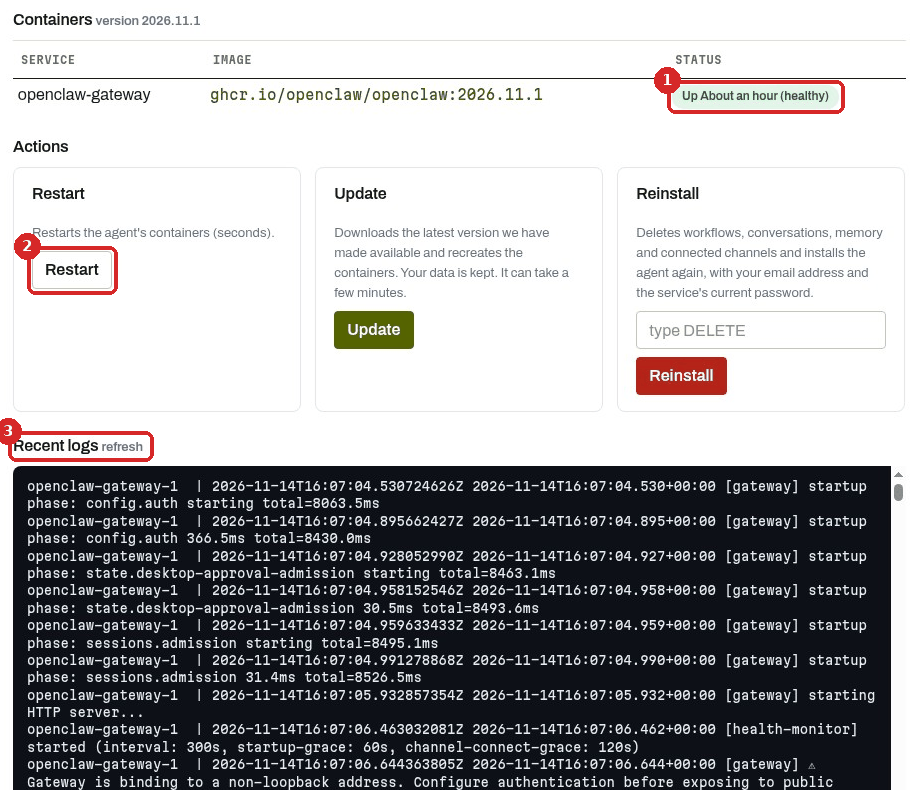
- STATUS of
openclaw-gateway(the agent). Up … (healthy) means it is running normally. - Restart restarts the agent (step 3).
- Recent logs: the agent's latest messages (step 2). Click refresh to load new lines.
What the status can say:
| Status | Meaning |
|---|---|
| Up 7 hours (healthy) | Running normally. |
| Up 33 seconds (health: starting) | Just started. Wait one or two minutes. |
| "We could not get your agent's status right now…" | The server is too busy to answer, usually because its memory is full. |
When the server is overloaded, the tab can look like this, with (no logs) under Recent logs:
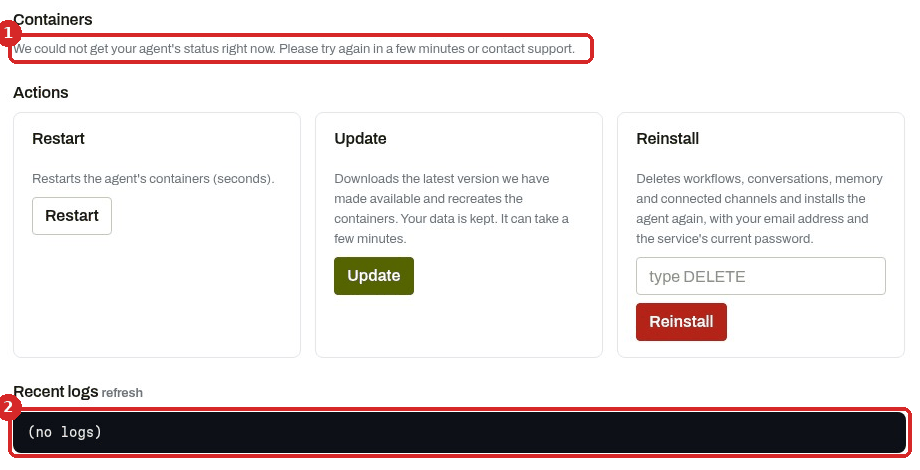
- The status could not be read.
- No logs could be read either.
On our Lite test agent this happened while the memory was full: the Manage agent tab took up to 2 minutes to open.
2. Read the recent logs
Scroll to the end of Recent logs. The newest lines are at the bottom. Lines you may see:
| You see | What it means |
|---|---|
startup phase: …, then Doctor complete. |
The agent is starting. OpenClaw runs its own health check (openclaw doctor) every time it starts. |
main-thread stall, liveness heartbeat delayed |
The agent is struggling: not enough memory or CPU. |
host timing gap detected: process was frozen ~137011ms |
The whole server froze (here for about 2 minutes). |
unauthorized … gateway token missing |
A browser tried to open the dashboard without being registered. Click Open dashboard in the client area. |
A sentence in plain words, then ended with stopReason=stop |
The assistant finished an answer. |
Set OPENAI_API_KEY in your environment (in the doctor box) |
Only about memory search, which wants an OpenAI key. With only a Claude key, the assistant still answered in our tests. |
Look for words like error, unauthorized, credit or quota near the end. Problems with the AI key are explained in My agent stopped answering.
3. Restart
Under Actions, click Restart. It keeps your data.
The client area says a restart takes seconds. When the agent is overloaded, it can take much longer. On our test agent, with the memory full:
-
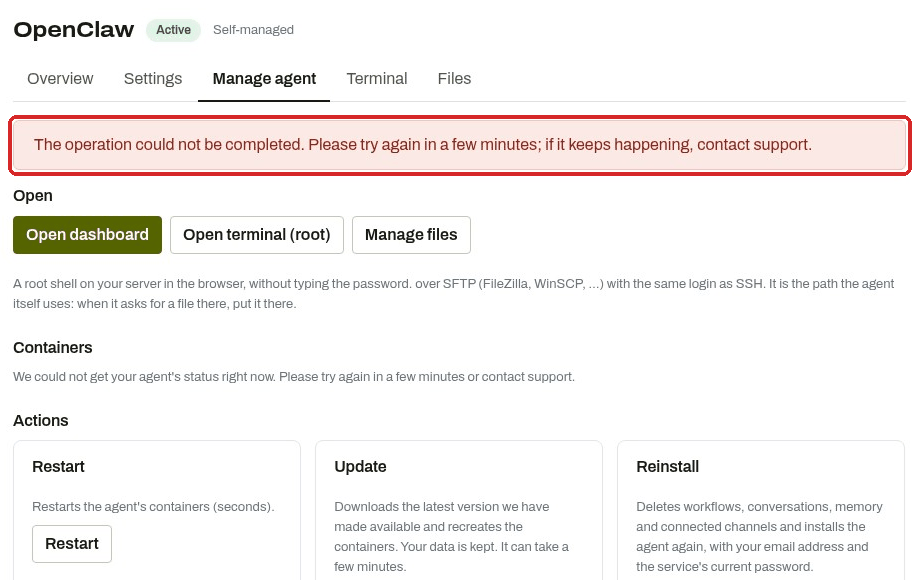
We clicked Restart. After about 80 seconds the page showed an error:
-
The restart still happened. About 6 minutes after the click, the status showed Up 33 seconds (health: starting):

-
About one minute later: Up About a minute (healthy).

-
Open dashboard worked again 55 seconds after we clicked it.
From the click on Restart to a working dashboard: about 9 minutes, on an overloaded Lite agent.
Do not click Restart several times
If you see "The operation could not be completed", wait 5 minutes and reload the Manage agent tab before trying again. The first restart may still be on its way.
4. Check from the terminal (optional)
In the client area, click the Terminal tab and type the commands below. They run inside the agent.
A quick check (2 seconds on our agent). Gateway event loop: ok means the agent is not overloaded.
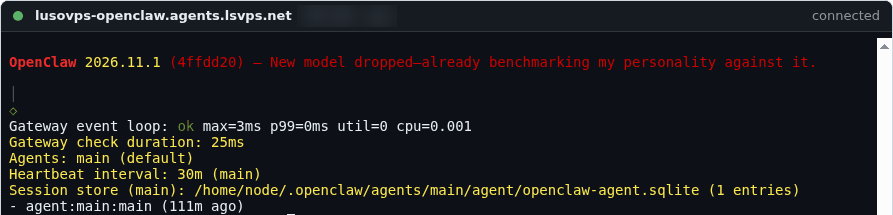
Shows the last 40 lines of the agent's own log file (2 seconds on our agent).
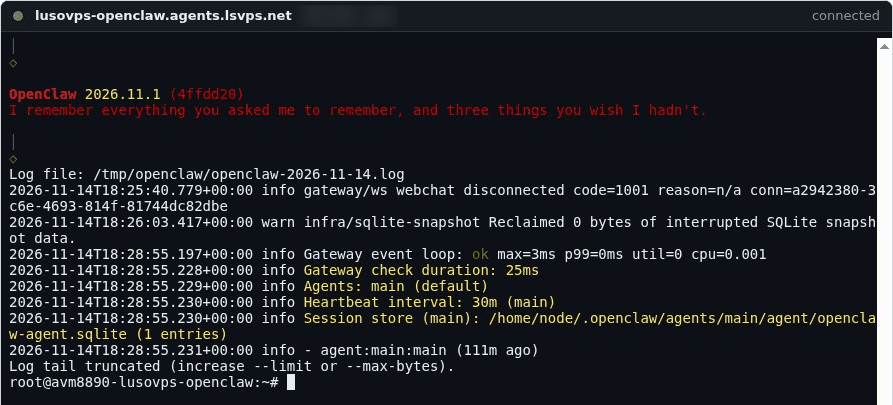
A full summary: version, model, sessions and channels. On our Lite agent it printed the summary after about 2 minutes, then did not return to the prompt and showed CLI cleanup failed. When the summary appears, press Ctrl+C.
Avoid openclaw doctor on a Lite agent
On our Lite agent, openclaw doctor --lint did not finish in 4 minutes, used all the memory and froze the server. The agent already runs this check every time it starts: read the result in Recent logs (Doctor complete.).
Every openclaw command needs extra memory: on our Lite agent, the free memory dropped to almost zero while one was running. If the agent is already slow, restart it from the client area instead.
Check that it worked
- Manage agent shows Up … (healthy).
- Recent logs shows no new
main-thread stalllines. - Open dashboard opens the dashboard, and the assistant answers.
Common problems
\"Unable to auto-login. Please contact support.\" when I click Open dashboard
The agent did not answer in time. On our test agent this happened twice while the memory was full (after about 25 and 60 seconds). Restart (step 3), wait until the status is healthy, then click Open dashboard again.
The Terminal tab says \"Connection timed out during banner exchange\"
The server is so busy that it cannot even open the terminal. Wait a few minutes, press Enter in the terminal to reconnect, or restart from Manage agent.
It keeps freezing after every restart
The agent needs more memory than the plan has. If it still happens, open a ticket and paste the last lines of Recent logs.