Recipe: turn news from your sector into social media drafts
Every Monday, n8n reads the latest news from a website in your sector (its RSS feed), takes the 3 newest articles, Claude writes a short social media post for each one with the link, and n8n saves the 3 drafts in a data table with the status draft, ready for you to check and post.
| Time needed | 30 minutes |
| You need | An n8n agent with your Claude key (Sign in and build your first AI agent) and the RSS address of a news website in your sector |
| Result | Every Monday at 10:00, 3 new rows in a post drafts table: the news title, the link, a post of 1-2 sentences written by Claude, and draft |
This is the finished workflow, after a test run:
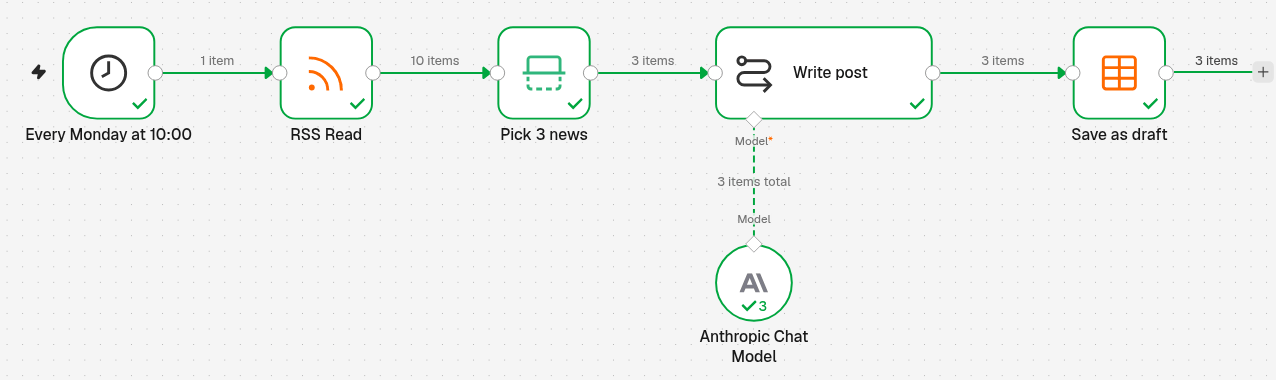
Every Monday at 10:00 (Schedule Trigger) → RSS Read reads the news website (10 articles) → Pick 3 news (Limit) keeps the 3 newest → Write post (Basic LLM Chain with Anthropic Chat Model) writes one post per article → Save as draft (Data table) adds one row per post.
n8n drafts, you post
This workflow does not post anything on Facebook, Instagram or X. It only fills a table. You read the drafts, change what you want, and post them yourself.
Find the RSS address of a news website
Many news websites and blogs publish an RSS feed: a page that lists their latest articles in a format that programs can read. The address often ends in /feed/, /rss or /feed.xml. Look for an orange RSS icon or an RSS link at the bottom of the website.
For this recipe we used a coffee news website, because our example business is a bakery and café: https://dailycoffeenews.com/feed/. Pick one for your sector.
Some websites block robots
While preparing this recipe, one coffee website answered our test with an Attention Required! security page instead of its feed. If RSS Read fails with your address, try another website.
1. Create the data table
Create a data table named post drafts with 4 columns, all of type String: title, link, post and status. The screens are in Store data inside n8n (Data tables). n8n adds id and createdAt by itself.
2. Run every Monday at 10:00
- Click the + at the top of the menu on the left, choose New workflow and name it, for example RSS to social drafts.
-
Click Add first step, choose On a schedule and set it:
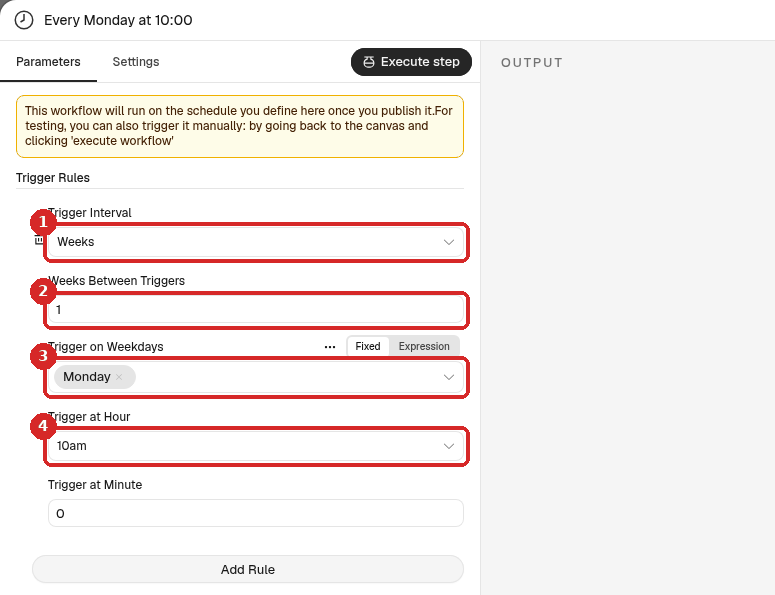
- Trigger Interval: Weeks.
- Weeks Between Triggers:
1. - Trigger on Weekdays: Monday.
- Trigger at Hour: 10am (leave Trigger at Minute at
0).
-
Rename the step
Every Monday at 10:00(click its name at the top of the panel). More about schedules: Run a workflow on a schedule.
3. Read the news (RSS Read)
- Close the panel. Click the + at the right of the trigger, type
RSSand choose RSS Read. -
Set it:
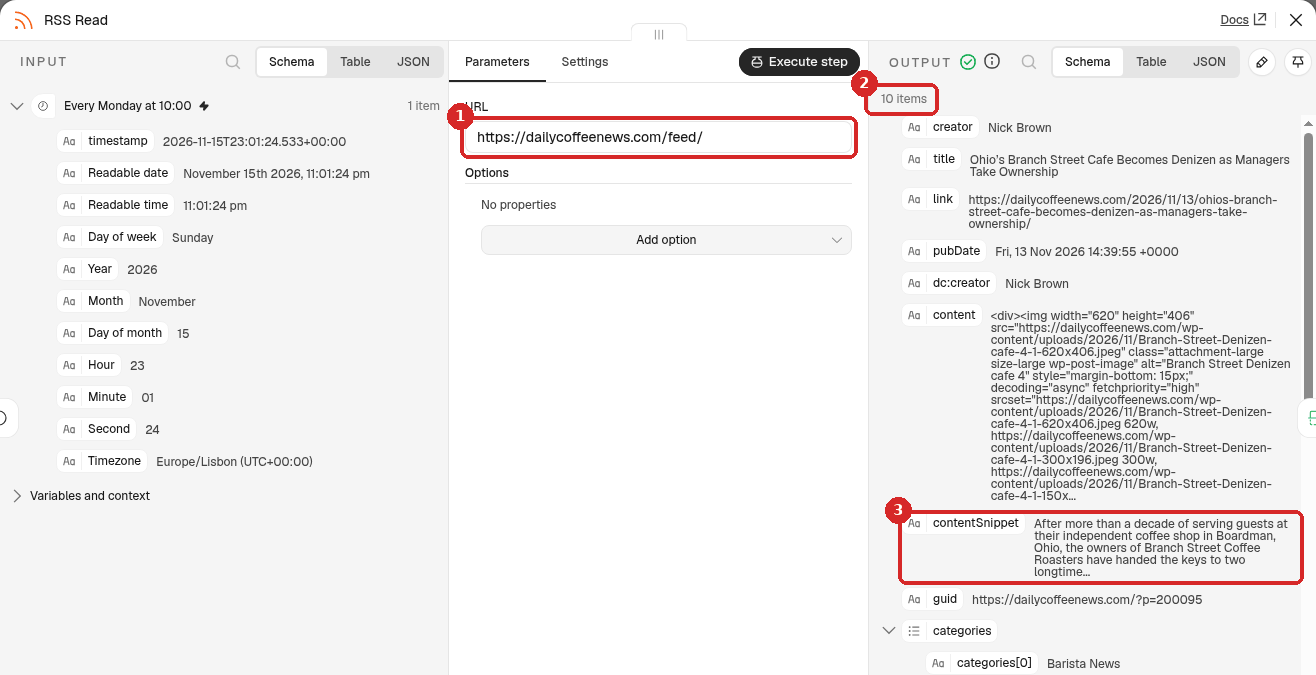
- URL: the RSS address of your news website.
- After a test, the OUTPUT shows one item per article. Our feed gave 10 items, the newest first.
- Each item has a title, a link and a contentSnippet (the first lines of the article in plain text). Claude uses these three.
4. Keep the 3 newest (Limit)
- Add a Limit step after RSS Read (the +, search
Limit). Rename itPick 3 news. -
Set it:
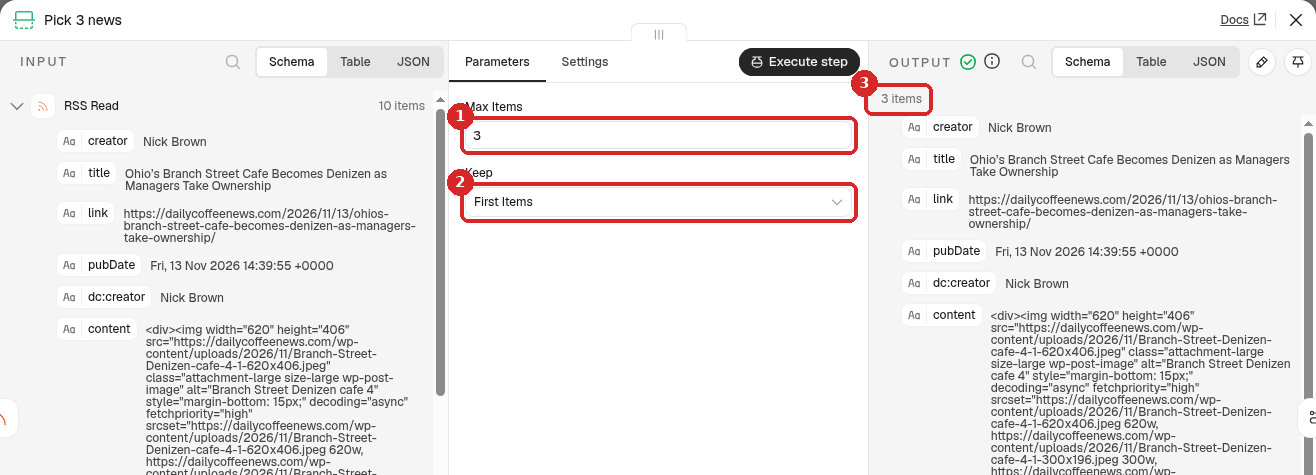
- Max Items:
3. - Keep: First Items. The feed lists the newest article first, so these are the 3 newest.
- After a test, the OUTPUT has 3 items.
- Max Items:
5. Let Claude write the posts
- Add a Basic LLM Chain step after Pick 3 news. Rename it
Write post. -
Set it:
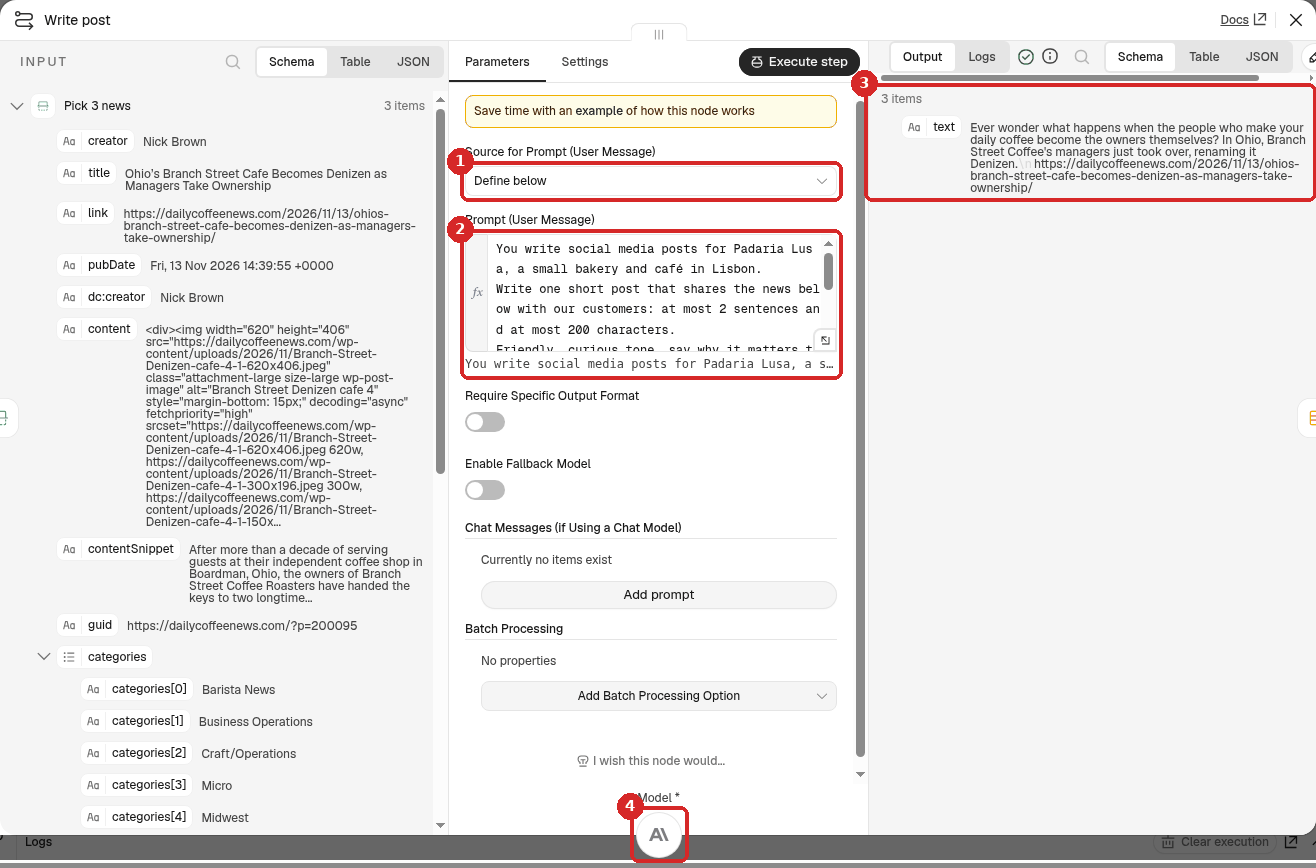
- Source for Prompt (User Message): Define below.
-
Prompt (User Message): click Expression and paste (change the business to yours):
You write social media posts for Padaria Lusa, a small bakery and café in Lisbon. Write one short post that shares the news below with our customers: at most 2 sentences and at most 200 characters. Friendly, curious tone, say why it matters to coffee lovers. No hashtags, no emoji. Then add the link on a new line, exactly as written: {{ $json.link }} Title: {{ $json.title }} Summary: {{ $json.contentSnippet }} -
After a test, the OUTPUT has 3 items, each with a text: the post, then the link.
- Click the + under Model and choose Anthropic Chat Model (n8n picks your Anthropic account credential).
The step runs once per article, so Claude writes 3 posts.
6. Save each post as a draft (Data table)
-
Close the panel. Click the + at the right of Write post, type
data tableand choose Insert row: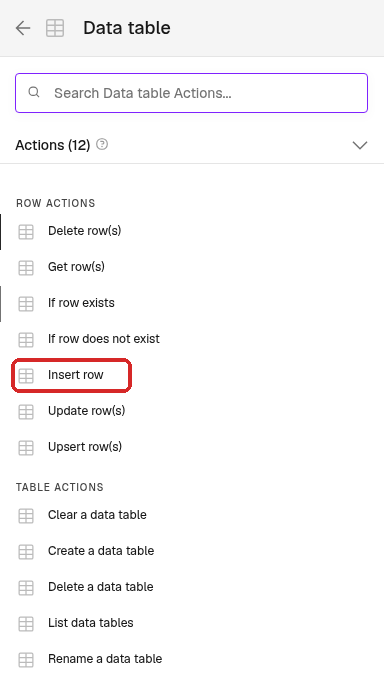
-
Rename the step
Save as draftand set it: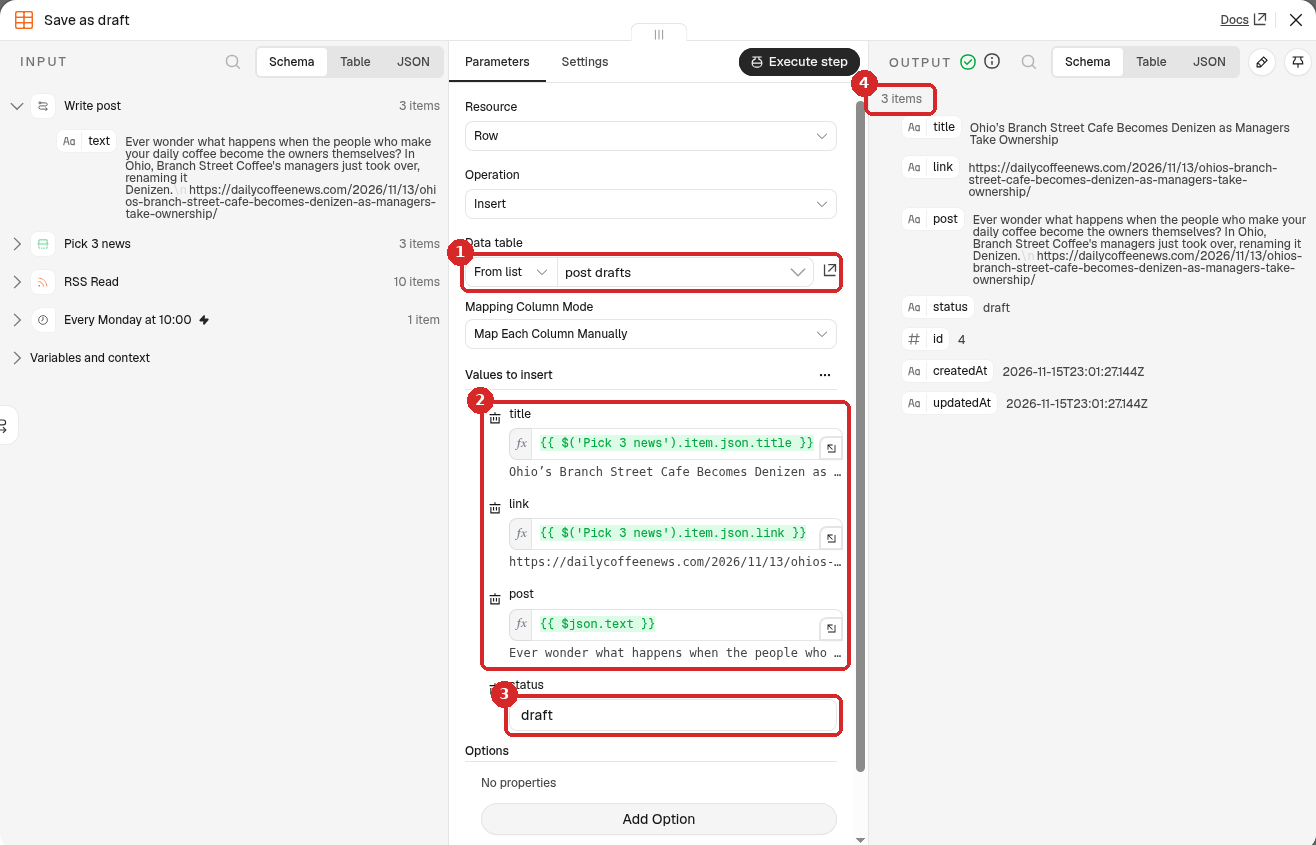
- Data table: From list → post drafts. n8n then shows one box per column under Values to insert (Mapping Column Mode: Map Each Column Manually).
-
title, link and post: click Expression in each box and type:
Column Value title {{ $('Pick 3 news').item.json.title }}link {{ $('Pick 3 news').item.json.link }}post {{ $json.text }}Write post only gives back the post (
text), so the title and the link are taken from the Pick 3 news step. -
status: type
draft(a fixed value, no expression). - After a test, the OUTPUT has 3 items: the 3 new rows.
7. Test it now
You do not have to wait until Monday. Close the panel and click Execute at the bottom of the canvas: the whole workflow runs once, now. All the steps get a green tick, with 10 items after RSS Read and 3 items after the other steps (see the picture at the top). Our run took about 3 seconds.
Open the table (menu on the left → Overview → Data tables → post drafts):
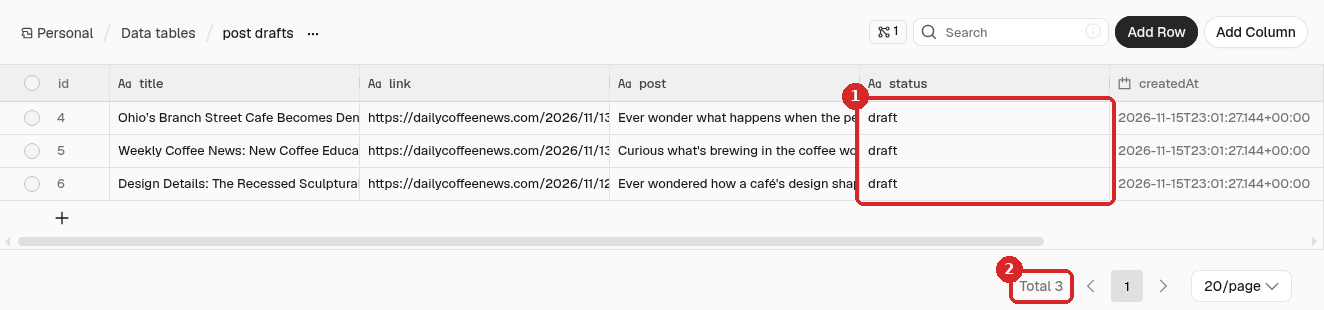
- The 3 new rows have the status draft.
- Total 3.
These are the 3 posts Claude wrote in our test (each one ends with the article's link on its own line):
Ever wonder what happens when the people who make your daily coffee become the owners themselves? In Ohio, Branch Street Coffee's managers just took over, renaming it Denizen.

Curious what's brewing in the coffee world this week? A new coffee education certificate and shifting ICO prices could shape the cup you enjoy tomorrow.

Ever wondered how a café's design shapes the way your coffee tastes? Check out this gorgeous sculptural bar at Palace Coffee in Melbourne for some serious café-envy inspiration.
To change a post, double-click its cell. When you have posted one, change its status to posted the same way, so you know what is left.
8. Publish it
Click Publish at the top right, then Publish in the window. From now on 3 new drafts arrive every Monday at 10:00. To stop it, click the arrow next to Published and choose Unpublish (details).
Note
For this guide we tested with Execute only and did not leave the workflow published, so we did not wait for a real Monday run. How the schedule itself behaves is shown in Run a workflow on a schedule.
Check that it worked
Open the RSS address in your browser and compare. In our test:
- The 3 rows had the same titles and links as the first 3 articles of the feed, in the same order.
- Each post had 2 sentences and 152 to 177 characters before the link, no hashtags and no emoji, and ended with the right link, exactly as in the feed.
- The facts in the posts matched the titles and summaries of the articles.
Claude is not good at counting characters
Our first prompt asked for at most 280 characters, link included. The 3 posts came back with 315 to 356 characters. Asking for at most 2 sentences and at most 200 characters and putting the link on its own line fixed it. Always read the drafts before posting.
Make it yours
- Your sector: change the RSS address and the first line of the prompt (your business, your city, your customers).
- More or fewer posts: change Max Items in Pick 3 news.
- Posts in Portuguese: add Write the post in European Portuguese to the prompt.
- Another day: change Trigger on Weekdays and Trigger at Hour in the trigger.
Common problems
RSS Read fails or returns nothing
Open the address in your browser. If you see a web page or a security check instead of a list of articles, the address is not an RSS feed or the website blocks robots. Try the website's /feed/ address or another website.
Every post has the title and link of the first article
The title and link boxes in Save as draft must use $('Pick 3 news').item.json... (with item), as in step 6, so each post gets the title and link of its own article.
The same news shows up again next Monday
The workflow takes the 3 newest articles each time it runs. If the website did not publish anything new during the week, you get the same 3 articles again. Delete the old rows, or pick a website that publishes every day.