Schedule a recurring task with Hermes
Hermes can do things on a schedule: a news summary every morning, a weekly report, a reminder. You ask for it in plain words and Hermes creates a scheduled job (also called a cron job). The result is sent to you on Telegram, WhatsApp or Discord.
| Time needed | 5 minutes |
| You need | A Hermes agent connected to an AI model and at least one channel, for example Telegram |
| Result | Hermes runs the task on its own and sends you the result |
1. Choose where results are delivered
Hermes sends scheduled results to the home channel of each app. Set it once:
- Easiest: in the chat where you want to receive the results (your Telegram chat with the bot, a Discord channel…), send the command
/sethome. - From the dashboard: open KEYS, find the GATEWAY section and click Set next to
TELEGRAM_HOME_CHANNEL(orDISCORD_HOME_CHANNEL,WHATSAPP_HOME_CHANNEL…). For Telegram, the value is your numeric Telegram ID (the same one you approved in Pairing). Then click Restart Gateway at the bottom left.
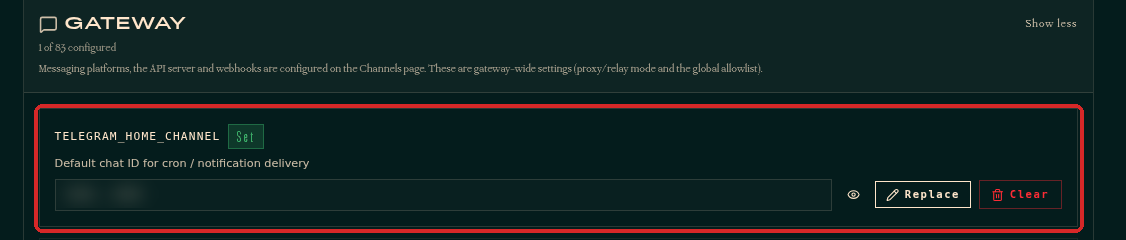
Without a home channel nothing arrives
If no home channel is set, the job still runs, but the result is only saved in the agent. Hermes warns you about this when it creates the job.
2. Ask Hermes to create the job
From any chat with Hermes (the dashboard Chat, Telegram, WhatsApp or Discord), describe what you want, when, and where. For example:
Create a scheduled task: every weekday at 09:00 Lisbon time, send me on Telegram three short headlines about AI news.
Hermes creates the job and confirms its name, the schedule and the next run.
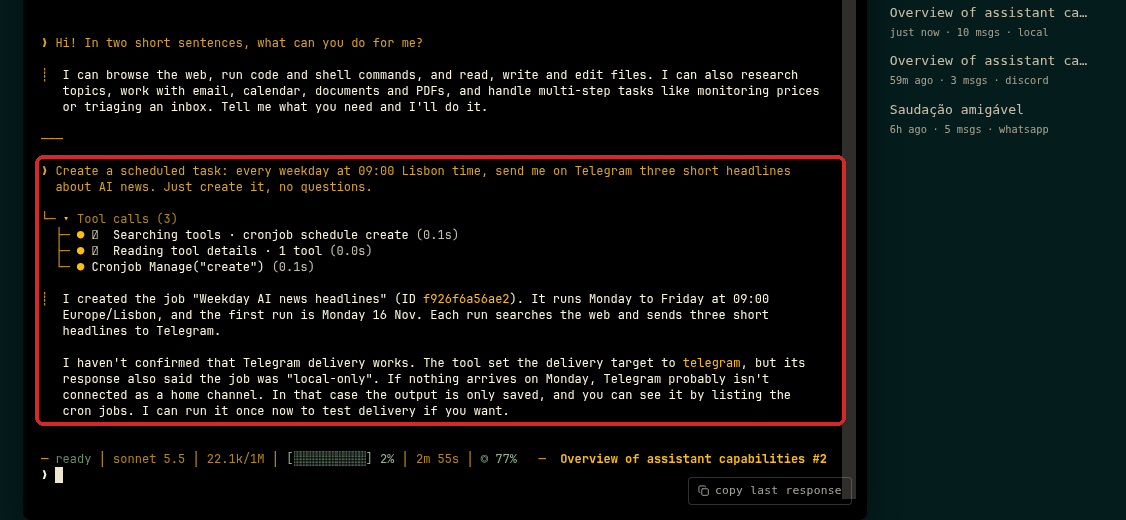
Say the time zone
Always include the time zone ("Lisbon time"), so the job runs when you expect.
3. See and manage your jobs
In the dashboard, click CRON. Each job shows its name, where it delivers (for example telegram), the schedule, and the Last and Next run.
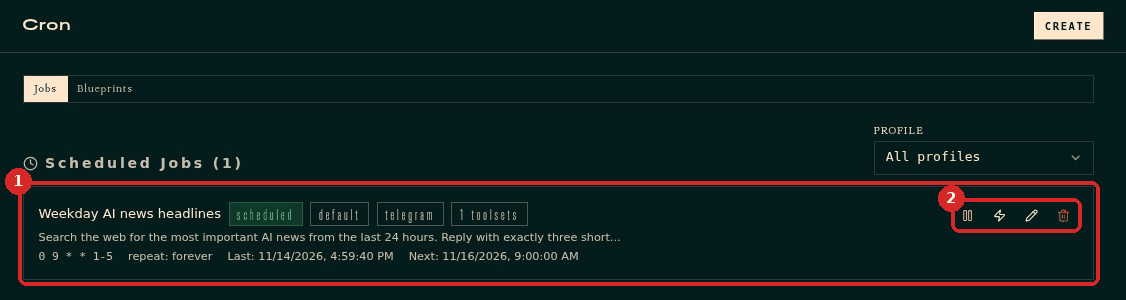
The icons on the right of each job:
- Pause stops the job until you resume it.
- Trigger now (lightning) runs it immediately. Use it to test.
- Edit changes the instructions or the schedule.
- Delete removes the job.
The schedule is written in cron format. 0 9 * * 1-5 means 09:00, Monday to Friday. You do not need to learn it: ask Hermes to change the job ("move the AI news job to 08:30") and it updates it for you.
Check that it worked
Click Trigger now on the job. After a minute, the result arrives in your home channel, and Last shows the time of the run. When we tested this guide, the headlines arrived on Telegram about 15 seconds after clicking.
Common problems
The job ran but I received nothing
The home channel is not set for that app. Do step 1, then click Trigger now again.
It runs at the wrong time
Ask Hermes to check the job's time zone, or edit the job and fix the schedule.
Does a scheduled job cost money?
Each run uses your AI provider, like a normal conversation. A job that searches the web and writes three lines is cheap; a job that runs every few minutes is not. Choose a sensible frequency.