Recipe: score new leads with AI and get the hot ones on Telegram
Your website form sends each new lead (name, company, message, budget) to n8n. Claude gives it a score from 1 to 5 with a one-line reason. Leads with a score of 4 or more reach you on Telegram straight away; the others are saved in a data table to look at later.
| Time needed | 40 minutes |
| You need | An n8n agent with your Claude key (Sign in and build your first AI agent), your Telegram bot saved in n8n (step 1 of the contact form recipe) and your numeric Telegram ID (from @userinfobot) |
| Result | A Telegram message such as Hot lead (5/5): Marta Silva, Hotel Mar Azul with the budget, the message and Claude's reason; the other leads in an other leads table with their score and reason |
This is the finished workflow, after a test with a hot lead:
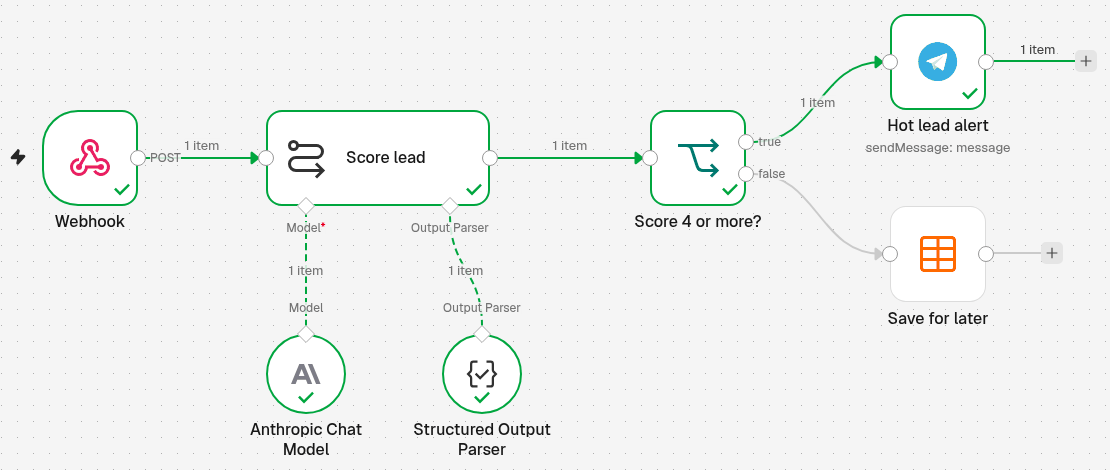
Webhook receives the lead → Score lead (Basic LLM Chain with Anthropic Chat Model and Structured Output Parser) gives a score and a reason → Score 4 or more? (If) → true: Hot lead alert (Telegram) / false: Save for later (Data table).
Send /start to your bot first
A Telegram bot can only write to people who have opened it. Open your bot in Telegram and tap Start once before you test.
A score is a hint, not a decision
Claude only sees what the lead wrote. Read the reason, and look at the low-score leads in the table from time to time.
Decide what a good lead is
Claude scores better when you tell it what each score means for your business. Our example is a small web agency, Lisboa Web Studio, whose websites start at 1,500 EUR:
| Score | Meaning |
|---|---|
| 5 | clear website project, budget of 5,000 EUR or more, wants to start soon |
| 4 | clear website project and a budget of 1,500 EUR or more |
| 3 | real interest, but the project is vague or the budget is unknown |
| 2 | budget under 1,500 EUR, or only asking for prices for later |
| 1 | spam, someone selling something to us, or not about a website |
Before testing, we wrote 3 test leads and decided ourselves which score each one deserved: 5 for a hotel with an 8,000 EUR booking website, 2 for a café asking the price of a 300 EUR page for next year, 1 for an SEO company trying to sell us something.
1. Create the table for the other leads
Create a data table named other leads with these columns (how to create a data table):
| Column | Type |
|---|---|
name |
String |
company |
String |
message |
String |
budget |
String |
score |
Number |
reason |
String |
budget is text, because people write it in many ways (8000 EUR, about 2k, or nothing).
2. Receive the lead (Webhook)
- Click the + at the top of the menu on the left, choose New workflow and name it, for example Lead scoring.
-
Click Add first step and choose On webhook call. Set it:
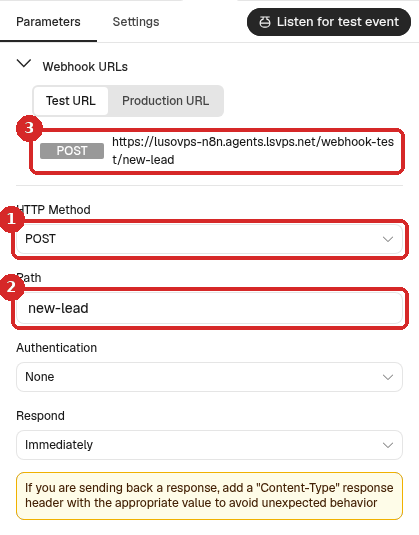
- HTTP Method: POST.
- Path:
new-lead. - The Test URL, which you use in step 7. More about the two addresses: Receive data with a webhook.
Your form must send the lead as JSON with the fields name, company, message and budget.
3. Let Claude score the lead
- Close the panel. Click the + at the right of Webhook, search for
Basic LLM Chainand click it. Rename itScore lead. -
Set it:
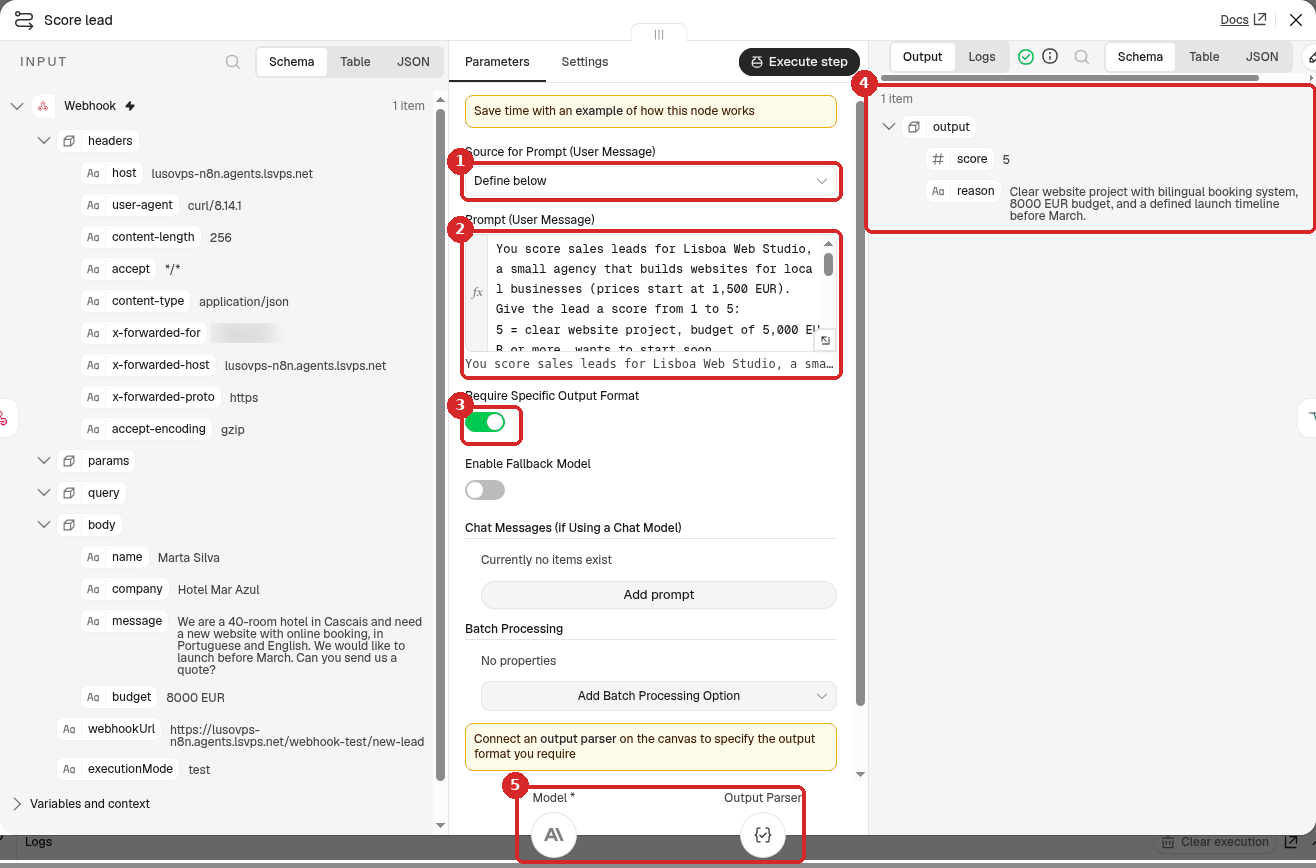
- Source for Prompt (User Message): Define below.
-
Prompt (User Message): click Expression and paste (put your business and your own scale):
You score sales leads for Lisboa Web Studio, a small agency that builds websites for local businesses (prices start at 1,500 EUR). Give the lead a score from 1 to 5: 5 = clear website project, budget of 5,000 EUR or more, wants to start soon 4 = clear website project and a budget of 1,500 EUR or more 3 = real interest, but the project is vague or the budget is unknown 2 = budget under 1,500 EUR, or only asking for prices for later 1 = spam, someone selling something to us, or not about a website Give a one-line reason in English. Name: {{ $json.body.name }} Company: {{ $json.body.company }} Message: {{ $json.body.message }} Budget: {{ $json.body.budget }} -
Require Specific Output Format: switch it on, so Claude answers in a fixed shape (step 4) that the If step can read.
- After a test, the OUTPUT shows output with a score (a number) and a reason.
- Click the + under Model and choose Anthropic Chat Model (n8n picks your Anthropic account credential). The + under Output Parser is for step 4.
4. Tell Claude the answer shape (Structured Output Parser)
- Click the + under Output Parser and choose Structured Output Parser.
-
Set it:
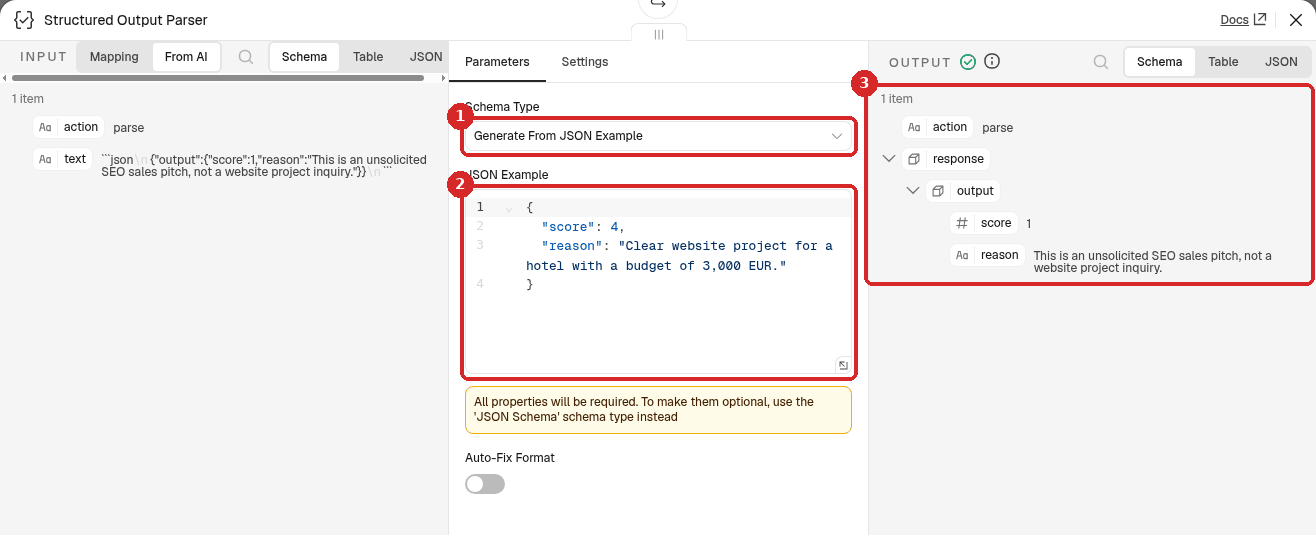
- Schema Type: Generate From JSON Example.
-
JSON Example: replace the example with:
Write the score without quotes (
4, not"4"): n8n then knows it is a number, which the If step compares in step 5. -
After a test, the OUTPUT shows the score and reason Claude gave.
5. Split hot leads from the rest (If)
- Add an If step after Score lead (the +, search
If). Rename itScore 4 or more?. -
Set the condition:
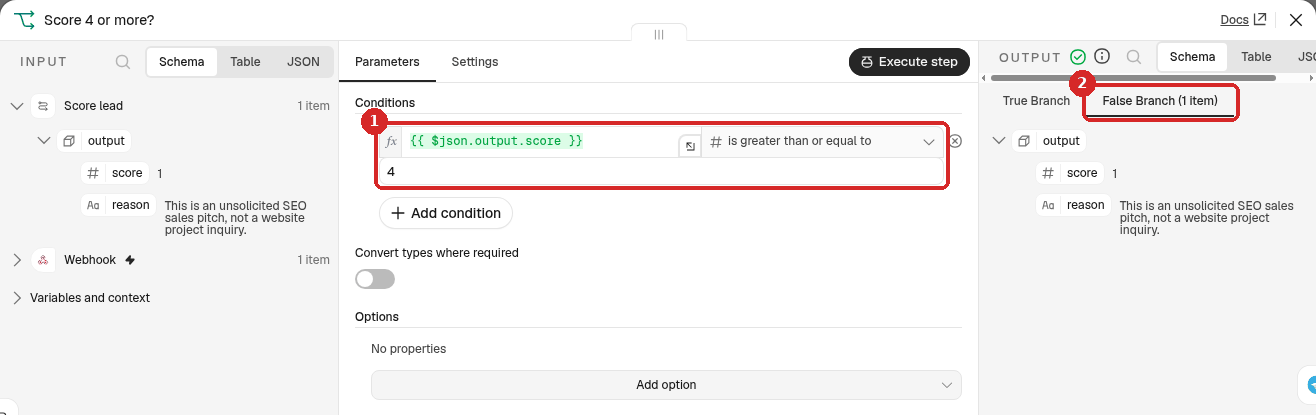
- First box: click Expression and type
{{ $json.output.score }}. Operator: Number → is greater than or equal to. Second box:4. - After a test, the OUTPUT shows which exit the lead took: True Branch or False Branch, with (1 item) on the one it used. Here, the SEO company (score 1) went to False Branch.
- First box: click Expression and type
6. Hot leads to Telegram, the rest to the table
True exit: Telegram.
- Click the + on the true exit of the If step, search
Telegramand choose Send a text message. Rename itHot lead alert. -
Set it:
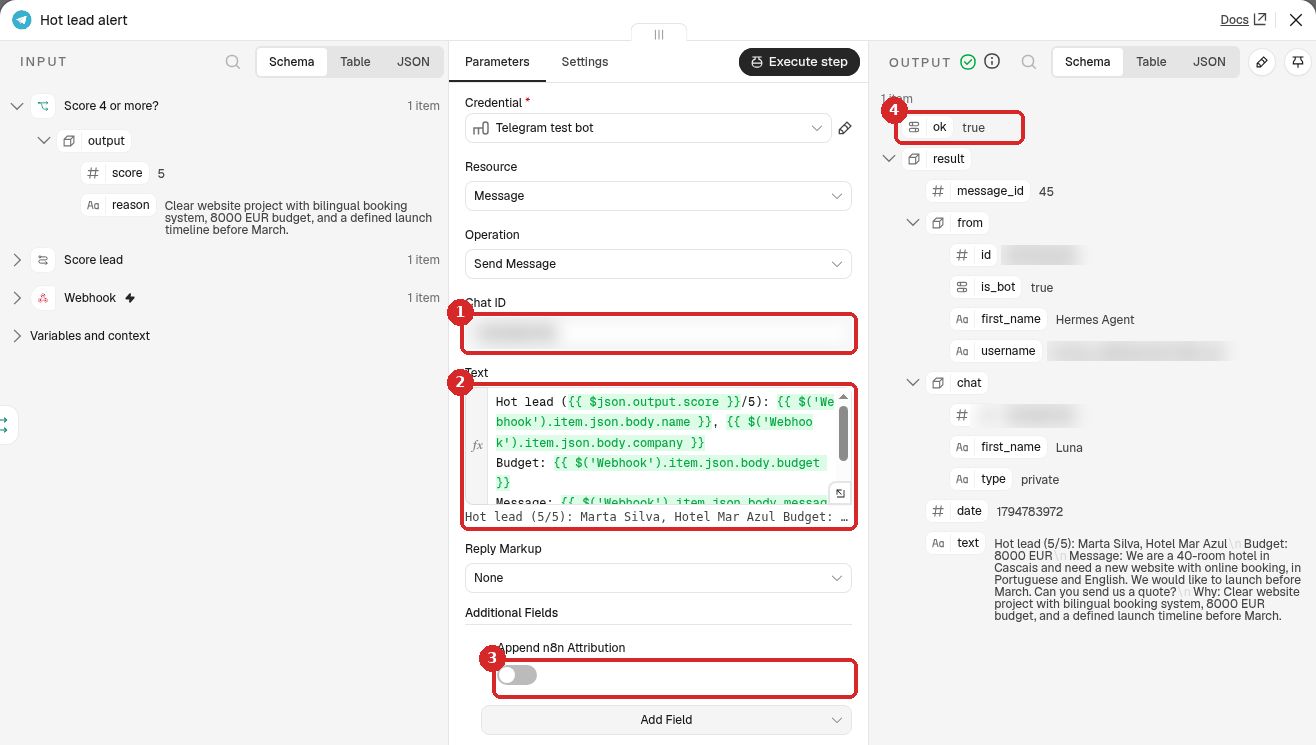
- Chat ID: your numeric Telegram ID. (Credential: your Telegram bot.)
-
Text: click Expression and paste:
Hot lead ({{ $json.output.score }}/5): {{ $('Webhook').item.json.body.name }}, {{ $('Webhook').item.json.body.company }}
Budget: {{ $('Webhook').item.json.body.budget }}
Message: {{ $('Webhook').item.json.body.message }}
Why: {{ $json.output.reason }}
The score and reason come from Claude (
$json.output); the lead's details come from the Webhook step. -
Additional Fields → Add Field → Append n8n Attribution, switch off.
- After a test, the OUTPUT shows ok true: Telegram accepted the message.
False exit: the table.
-
Click the + on the false exit of the If step, type
data tableand choose Insert row: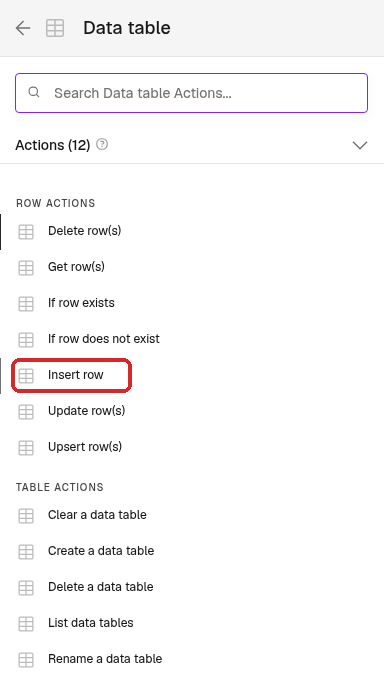
-
Rename it
Save for laterand set it: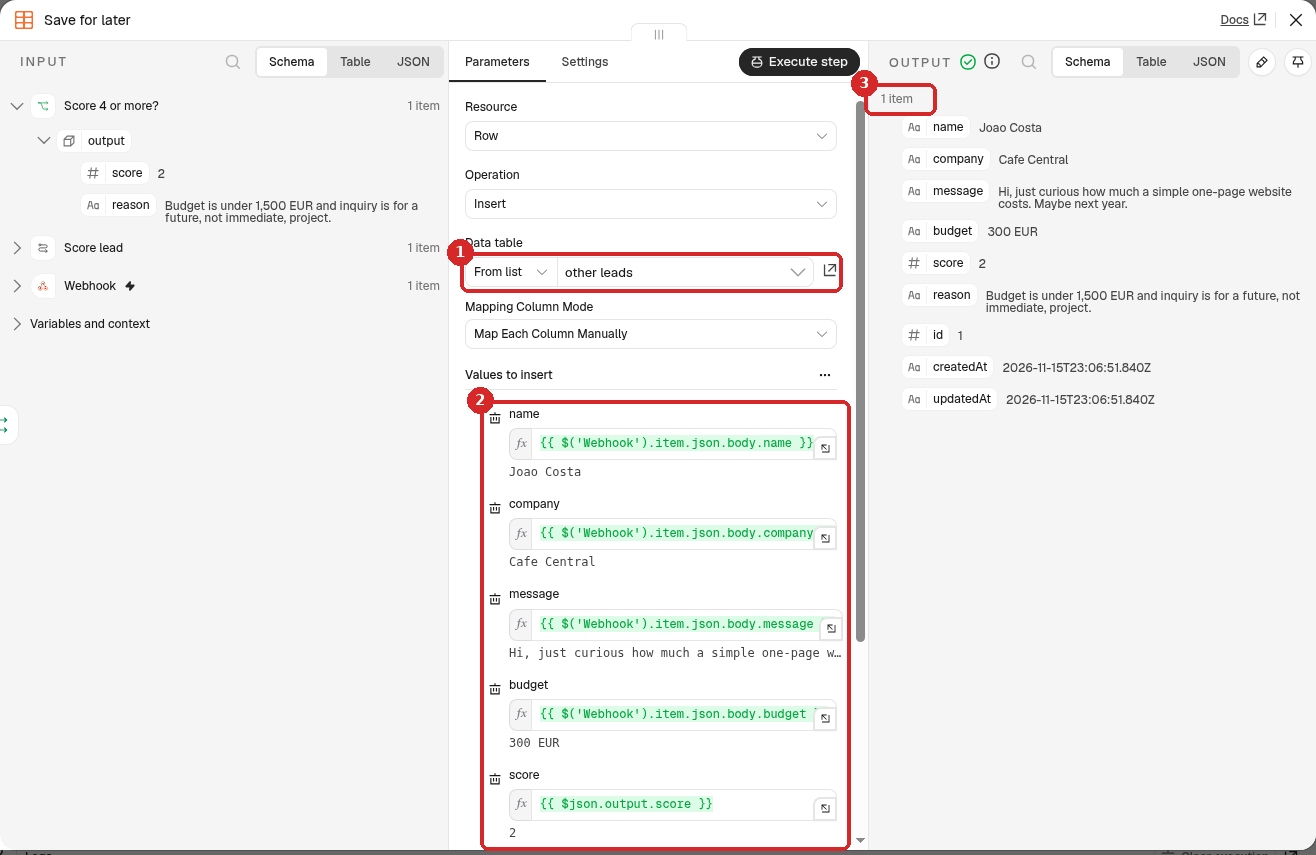
- Data table: From list → other leads.
-
Under Values to insert, click Expression in each box and type:
Column Value name {{ $('Webhook').item.json.body.name }}company {{ $('Webhook').item.json.body.company }}message {{ $('Webhook').item.json.body.message }}budget {{ $('Webhook').item.json.body.budget }}score {{ $json.output.score }}reason {{ $json.output.reason }} -
After a test, the OUTPUT shows the new row (1 item).
7. Test it with 3 leads
Do this once per test lead:
- Click Execute at the bottom of the canvas. n8n waits for a call to the Test URL.
-
Send a lead. Normally your form does this; to try it yourself, run in a terminal (with your own address):
curl -X POST https://yourname-n8n.agents.lsvps.net/webhook-test/new-lead \
  -H 'Content-Type: application/json' \
  -d '{"name":"Marta Silva","company":"Hotel Mar Azul","message":"We are a 40-room hotel in Cascais and need a new website with online booking, in Portuguese and English. We would like to launch before March. Can you send us a quote?","budget":"8000 EUR"}'
n8n answers
{"message":"Workflow was started"}.
Our other two test leads were:
{"name":"Joao Costa","company":"Cafe Central","message":"Hi, just curious how much a simple one-page website costs. Maybe next year.","budget":"300 EUR"}
{"name":"Rank Masters","company":"Rank Masters SEO","message":"We can put your agency on page 1 of Google in 30 days! Reply now for our special offer.","budget":""}
Each run took between 1 and 2 seconds. These are the scores Claude gave:
| Lead | Our score | Claude's score | Claude's reason | Went to |
|---|---|---|---|---|
| Marta Silva, Hotel Mar Azul | 5 | 5 | Clear website project with bilingual booking system, 8000 EUR budget, and a defined launch timeline before March. | Telegram |
| Joao Costa, Cafe Central | 2 | 2 | Budget is under 1,500 EUR and inquiry is for a future, not immediate, project. | table |
| Rank Masters | 1 | 1 | This is an unsolicited SEO sales pitch, not a website project inquiry. | table |
Claude agreed with us on all 3 leads. The Telegram message for Marta was:
Hot lead (5/5): Marta Silva, Hotel Mar Azul
Budget: 8000 EUR
Message: We are a 40-room hotel in Cascais and need a new website with online booking, in Portuguese and English. We would like to launch before March. Can you send us a quote?
Why: Clear website project with bilingual booking system, 8000 EUR budget, and a defined launch timeline before March.
The two other leads are in the table (menu on the left → Overview → Data tables → other leads):
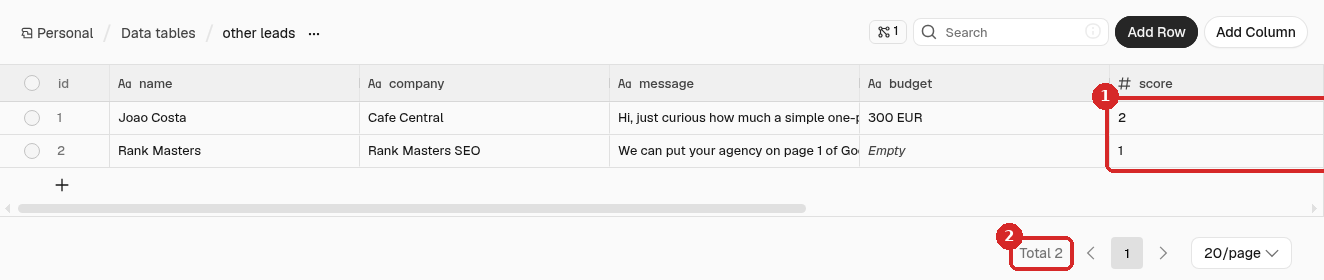
- The score column: 2 and 1.
- Total 2.
8. Publish it and connect your form
Click Publish at the top right, then Publish in the window. Then change the address in your form from /webhook-test/ to /webhook/ (the Production URL in the Webhook step). Details: Receive data with a webhook.
Note
We tested with the Test URL only and did not leave the workflow published.
Check that it worked
- Before testing, write down the score you would give each test lead. Compare it with Claude's score in the If step or the table.
- A lead with 4 or 5 must reach Telegram (ok true in Hot lead alert), and must not appear in the table.
- A lead with 1 to 3 must appear in other leads, and no Telegram message is sent.
Make it yours
- Your own scale: change the 5 lines of the scale in the prompt. Concrete rules (amounts, deadlines, the kind of work you do) give steadier scores than words like good or serious.
- Alert only for 5: change the
4in the If step to5. - Keep every lead: add a second Insert row after Hot lead alert, so the table holds all leads.
Common problems
Problem in node 'Score 4 or more?': Wrong type: '5' is a string but was expecting a number
The JSON Example in the parser has the score in quotes ("score": "4"), so Claude's score arrives as text. We tried it: the run stopped at the If step with exactly this message. Remove the quotes ("score": 4) and test again.
A hot lead went to the table, with an empty score and reason
The Structured Output Parser is not connected to Score lead (there is a + under Output Parser instead of a dashed line to the parser). We tried it: n8n gave no error, Claude answered in plain text (Score: 5 ...), the If step found no score and sent the lead to false, and the table got a row with an empty score and reason. Connect the parser (step 4).
Telegram says: Bad Request: chat not found
The Chat ID is wrong, or you never pressed Start in your bot. See the contact form recipe.