Recipe: turn receipt photos into an expenses spreadsheet
Photograph your receipts, give them to Hermes, and get one spreadsheet with the date, shop, items, total and payment method of each one, plus the sum and a check for anything that looks wrong.
| Time needed | 5 minutes |
| You need | A Hermes agent connected to an AI model that can read images (Claude can) and photos or scans of your receipts |
| Result | A CSV file you can open in Excel or send to your accountant |
1. Upload the receipts
In the dashboard, open FILES → workspace and click UPLOAD, as in Hermes reads a contract for you. You can select several files at once.
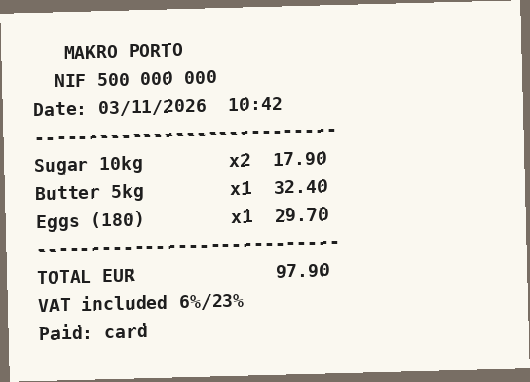
In our test we uploaded three receipts as images (receipt-1.png, receipt-2.png, receipt-3.png): a cash-and-carry store, a petrol station and a stationery shop. This is one of them:
2. Ask for the spreadsheet
In CHAT:
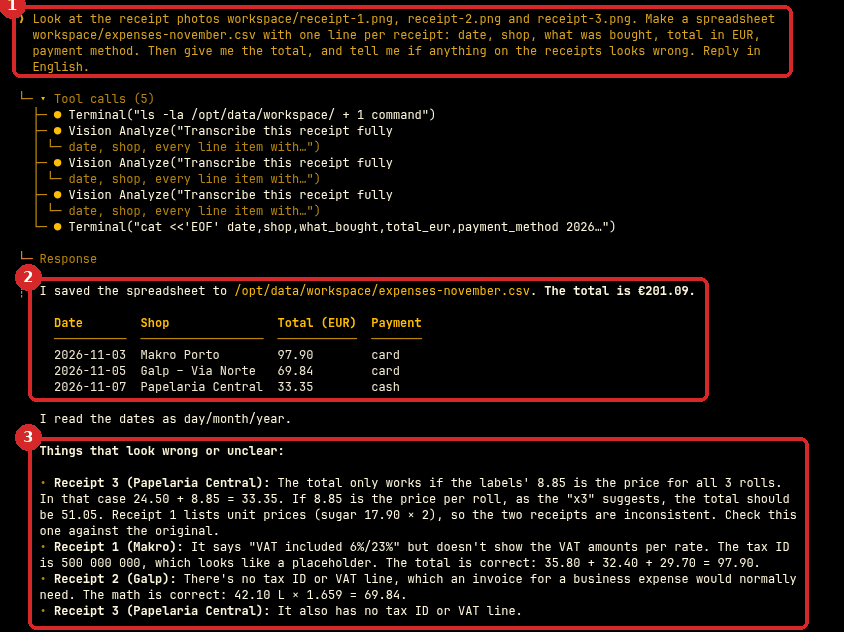
Look at the receipt photos workspace/receipt-1.png, receipt-2.png and receipt-3.png. Make a spreadsheet workspace/expenses-november.csv with one line per receipt: date, shop, what was bought, total in EUR, payment method. Then give me the total, and tell me if anything on the receipts looks wrong.
- Your request.
- Hermes reads each image (
Vision Analyze), writes the file and shows a table with the total: €201.09. We checked it: the three receipts add up to exactly that. - Under Things that look wrong or unclear, Hermes pointed out real problems: two receipts showed quantities in different ways (price per item or per line), and some receipts had no tax number or VAT line, which an accountant would need for a business expense.
3. Download the file
Open FILES → workspace and click the download arrow next to expenses-november.csv. Open it in Excel, Numbers or Google Sheets.
Check that it worked
- Add up the totals on your paper receipts and compare with Hermes' total.
- Open the CSV: there is one line per receipt.
Always check before you send it to your accountant
Photos can be blurry, and receipts are often unclear. Hermes tells you what it is not sure about: read that part, and correct the file if needed.
Make it yours
- Every Friday: "Read all new receipt photos in workspace/receipts and add them to expenses-november.csv", as a scheduled task.
- Add a column: "add a category column (fuel, ingredients, packaging)".
- Ask for a summary per category or per shop.
Common problems
Hermes reads a number wrong
Tell it which receipt and which line, and ask it to look again. Better photos (flat, good light, the whole receipt) give better results.
Hermes says it cannot see images
The AI model must support images. Claude does. If you use another provider, choose a model that supports vision (see Change the AI model).