Recipe: make a weekly staff rota
Tell Hermes who can work when, and the rules of your shop. It builds the rota for the week, counts the days per person and checks every rule, so you do not have to puzzle it out on paper.
| Time needed | 5 minutes |
| You need | A Hermes agent connected to an AI model and your staff availability (a small spreadsheet, or a few lines of text) |
| Result | A rota table for the week, saved in a file, with every rule checked |
1. Write down who can work when
Make a small table: one line per person, which days they can work, how many days at most, and anything special (here: who has the shop keys). Save it as CSV from your spreadsheet and upload it in FILES → workspace (see Hermes reads a contract for you).
Our test file, staff-availability.csv, for a bakery with 5 people:
name,keyholder,max_days,mon,tue,wed,thu,fri,sat,sun
Ana,yes,4,yes,yes,yes,yes,yes,yes,no
Bruno,no,4,yes,yes,yes,yes,yes,no,no
Carla,no,3,yes,no,yes,yes,yes,yes,yes
Diogo,yes,4,yes,yes,no,yes,yes,yes,yes
Eva,no,3,no,yes,yes,no,yes,yes,yes
So: Ana never works on Sundays, Bruno only Monday to Friday, Carla at most 3 days, and so on. Only Ana and Diogo have keys.
2. Give the rules and ask for the rota
Write the rules of the shop in the message: opening days, how many people per shift, and any "at least one..." rule. In CHAT we wrote:
Open workspace/staff-availability.csv. Make the staff rota for my bakery for Monday 16 to Sunday 22 November 2026. The shop is open every day with one shift (07:00-15:00). Every day needs exactly 2 people, and at least one of them must be a keyholder. Respect each person's available days and max_days. Show the rota as a table, then the days per person, then check every rule. Save it as workspace/rota-16-nov.md.
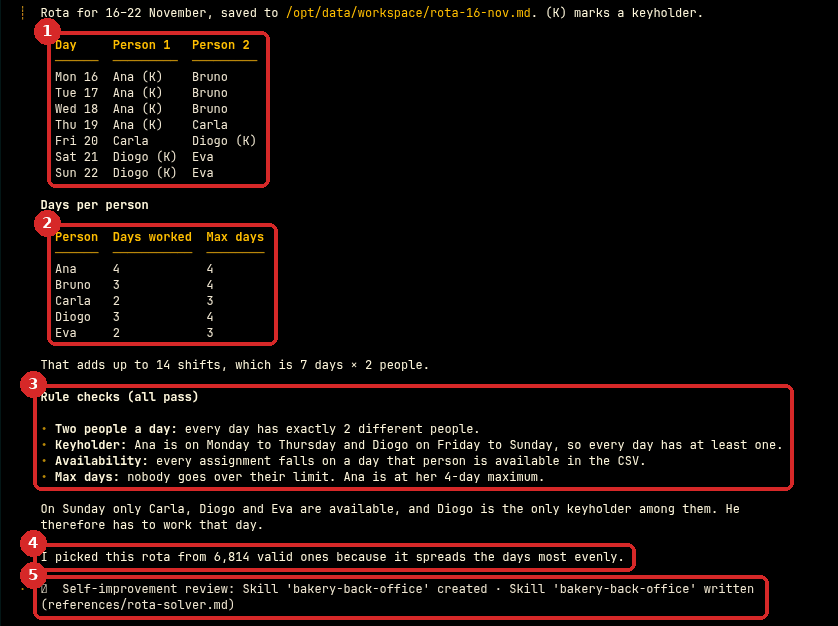
- The rota: two people every day, with (K) next to the keyholder.
- The days per person, next to each person's maximum.
- The rule check: two people a day, a keyholder every day, nobody on a day they are not available, nobody over their maximum.
- Hermes worked out every possible rota with a small program and picked the one that spreads the days most evenly.
- Hermes also saved what it learned as a skill (bakery-back-office), on its own. You will see it on the SKILLS page; you can delete it there if you do not want it.
The same table is in the file rota-16-nov.md in FILES → workspace, with the days of each person written out (for example Carla: Thu, Fri), ready to print or to paste in your staff group.
Check that it worked
Always check a rota yourself before you publish it: one mistake means a closed shop or an angry employee. We checked every line of Hermes' rota against our file:
- Every day has exactly 2 different people, and Ana or Diogo every day (Ana Monday to Thursday, Diogo Friday to Sunday).
- All 14 assignments are on days the person is available. For example Ana is not on Sunday and Diogo is not on Wednesday.
- Days per person: Ana 4 of 4, Bruno 3 of 4, Carla 2 of 3, Diogo 3 of 4, Eva 2 of 3. Nobody is over the maximum.
- We also counted all the valid rotas with our own program: 6,814, the same number Hermes gave. And this is as even as it gets: Ana and Diogo must cover 7 days between them, so one of them needs 4 days.
Make it yours
- Add wishes: "Bruno and Eva prefer not to work together." or "Try to give everyone 2 days off in a row."
- Two shifts a day: "Morning 07:00-12:00 needs 2 people, afternoon 12:00-19:00 needs 1."
- Holidays: "Carla is on holiday on Friday." Hermes makes the rota again with the change.
- Ask for a version to send: "Write the rota as a short WhatsApp message for the staff."
Common problems
Hermes says there is no possible rota
Your rules ask for more days than people can give (for example, nobody with keys is free on Sunday). Ask "Which rule makes it impossible, and what is the smallest change that makes it possible?", then change one rule.
The rota breaks a rule
Check that the rule is written in the message or the file, in clear words. Unwritten habits ("Eva only works afternoons") are not known to Hermes. Add the rule and ask again.
I don't want Hermes to create skills on its own
Open SKILLS in the dashboard to see and delete skills. See Teach Hermes a skill.
Next steps
- Recipe: meeting notes into action items
- Schedule a recurring task: for example, ask every Friday for next week's rota.
- Teach Hermes a skill