OpenClaw troubleshooting
Something is wrong with your OpenClaw agent? Find the symptom below. Each answer gives the usual cause and the fix, with a link to the guide that explains it step by step.
| Time needed | 5 to 15 minutes (more on a busy Lite agent) |
| You need | Your client area login |
| Result | You find the cause of a common problem and fix it, or you have what support needs to help you |
Do not use Reinstall to fix a problem
Reinstall deletes conversations, memory and connected channels, and cannot be undone. Restart and Update keep your data. (When OpenClaw misbehaves)
OpenClaw needs a lot of memory
On our Lite test agent (2 GB) the memory was almost full while it answered a question, some dashboard pages took 30 to 60 seconds to open, and the chat sometimes stayed on grey placeholders. Many problems on this page come from that. If you use OpenClaw every day, choose Plus (4 GB) or more. (OpenClaw FAQ)
Start with three quick checks
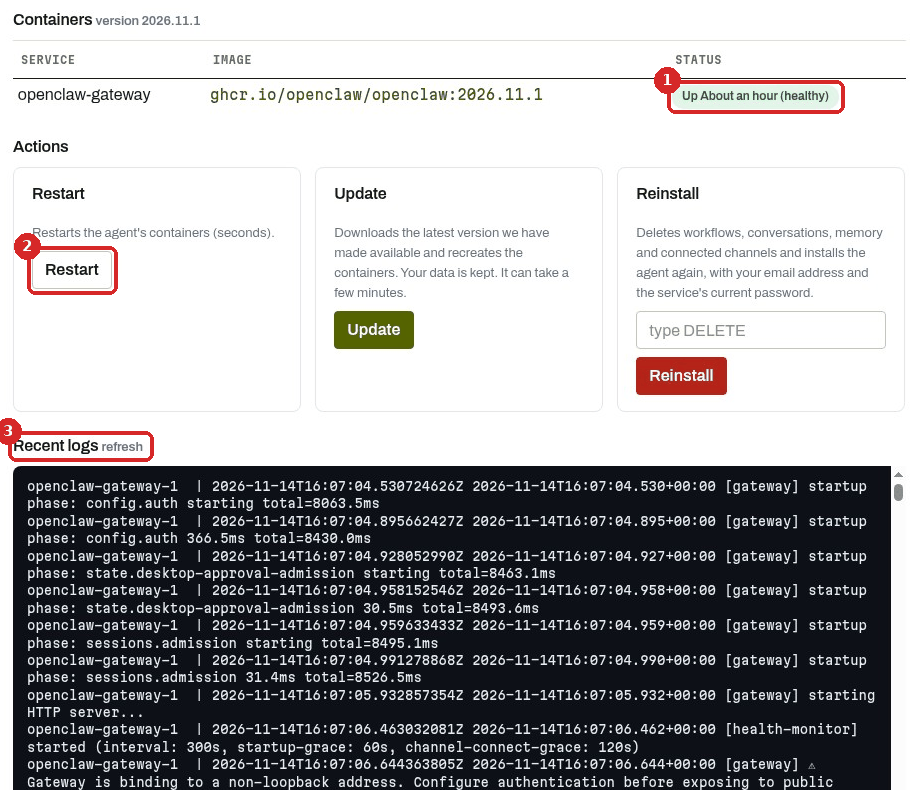
- The status. In the client area, open your agent and the Manage agent tab. STATUS of
openclaw-gatewayshould say Up … (healthy). (health: starting) means it has just started: wait one or two minutes. (Logs and restart) - The recent logs. At the bottom of the same tab, Recent logs shows the agent's latest messages. Click refresh. Look for
error,unauthorized,creditorquotanear the end. (Logs and restart) - Your AI provider. No credit, a spending limit or a deleted key make any agent go silent. (My agent stopped answering)
The dashboard does not open
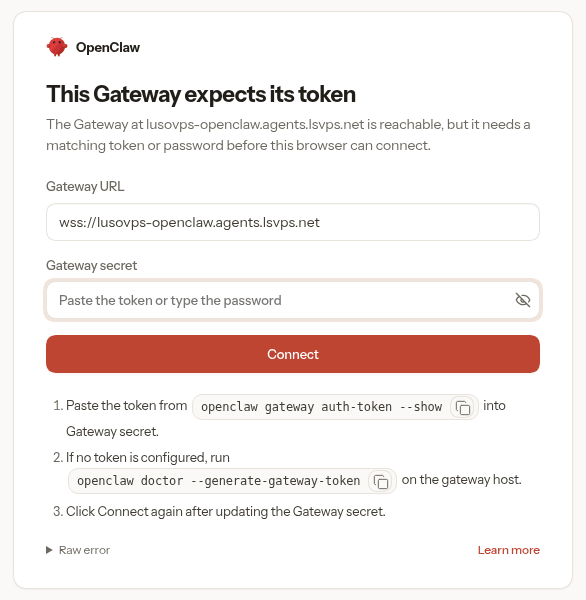
\"This Gateway expects its token\" or \"Conversation unavailable\"
Cause: your browser is not registered with the agent: a new browser, cleared cookies, a closed private window, or the one-time link expired. Recent logs may show unauthorized … gateway token missing.
Fix: go back to the client area and click Manage agent → Open dashboard again. It is a one-time link, valid for 10 minutes. (First steps with OpenClaw)
\"Unable to auto-login. Please contact support.\"
Cause: the agent was too busy to answer, for example while restarting after Save and apply or an update, or while its memory was full.
Fix: wait a few minutes and click Open dashboard again. If it keeps happening, Restart, wait until the status is healthy, then try again. On our test agent, after a model change, Open dashboard worked about 7 minutes after Save and apply. (Logs and restart, Change the AI model)
What is the password for the dashboard?
There is none. OpenClaw opens with the one-time link from Open dashboard, or with the Access token in the client area Overview tab. (OpenClaw FAQ)
Open dashboard takes a long time
On our test agent, Open dashboard took about 55 seconds to open the dashboard. Wait for it. (A tour of the OpenClaw dashboard)
OpenClaw does not answer
The chat shows \"No models available\"
Cause: the agent has no working AI key.
Fix: check Settings in the client area (provider and key), click Save and apply, wait a minute and reload the dashboard. To check, open your avatar menu → Settings → Models: your provider should show Ready. (First steps with OpenClaw)
The chat says \"Unable to finish this reply: worker task timed out\"
Cause: the agent did not have enough memory or time to answer. On our Lite agent this happened in a long conversation.
Fix: restart the agent (Manage agent → Restart), wait until it is healthy, open a new chat (red +) and ask again. A new chat is lighter than a long one. (Change the AI model)
I set the key inside OpenClaw, and now it changed back
Cause: whatever is filled in the client area Settings is applied again every time you click Save and apply, and it wins.
Fix: use only one place for the key: the client area or OpenClaw (Settings → Models). (First steps with OpenClaw)
The logs say \"Set OPENAI_API_KEY in your environment\"
It is only about memory search, which wants an OpenAI key. With only a Claude key, the assistant still answered in our tests. (Logs and restart)
Slow, frozen or out of memory
A page stays on grey placeholders or \"Loading…\"
Fix: wait up to a minute and click the page again. If nothing loads, the agent is probably short of memory: restart it from Manage agent. (A tour of the OpenClaw dashboard)
\"We could not get your agent's status right now…\" and (no logs)
Cause: the server is too busy to answer, usually because its memory is full. On our Lite test agent the Manage agent tab then took up to 2 minutes to open.
Fix: click Restart once and wait. (Logs and restart)
Recent logs show main-thread stall, liveness heartbeat delayed or host timing gap detected
Cause: the agent is struggling: not enough memory or CPU. host timing gap detected: process was frozen … means the whole server froze for that time.
Fix: Restart. (Logs and restart)
I clicked Restart and got an error
Cause: when the agent is overloaded, a restart takes much longer than usual. On our Lite test agent with its memory full, the page showed an error after about 80 seconds, but the restart still happened: (health: starting) about 6 minutes after the click, (healthy) about a minute later, and a working dashboard about 9 minutes after the click.
Fix: do not click Restart several times. Wait 5 minutes and reload the Manage agent tab. (Logs and restart)
It keeps freezing after every restart
Cause: the agent needs more memory than the plan has.
Fix: see Change your plan. If it still happens, open a ticket and paste the last lines of Recent logs. (Logs and restart)
The Terminal tab says \"Connection timed out during banner exchange\"
Cause: the server is so busy that it cannot even open the terminal.
Fix: wait a few minutes, press Enter in the terminal to reconnect, or restart from Manage agent. (Logs and restart)
An openclaw command in the terminal is very slow or does not return
Cause: every openclaw command needs extra memory. On our Lite agent the free memory dropped to almost zero while one was running. openclaw status printed its summary after about 2 minutes, then did not return to the prompt.
Fix: when the summary appears, press Ctrl+C. For a quick check, use openclaw health instead (Gateway event loop: ok means the agent is not overloaded). If the agent is already slow, restart it from the client area instead. (Logs and restart)
Avoid openclaw doctor on a Lite agent
On our Lite agent, openclaw doctor --lint did not finish in 4 minutes, used all the memory and froze the server. The agent already runs this check every time it starts: look for Doctor complete. in Recent logs. (Logs and restart)
Saving settings and changing the model
\"The operation could not be completed. Please try again in a few minutes\"
Cause: the agent was too busy to answer in time. On our Lite test agent this happened when we clicked Save and apply while a chat was still running. The change was still applied in the background, but the agent ran out of memory, restarted on its own, and only worked again about 11 minutes after the click.
Fix: before clicking Save and apply again, wait 5 minutes, check that Manage agent shows healthy, then look at Settings → Models in the dashboard: the change may already be there. (Change the AI model)
The page loaded for minutes and the model did not change
Cause: on our Lite agent this happened right after it had restarted from running out of memory.
Fix: wait until Manage agent shows healthy, make sure nothing else is running (a chat, a scheduled task), and click Save and apply again. (Change the AI model)
After Save and apply, the agent is back on the default model
Cause: when the client area has a provider and you click Save and apply with an empty Model (optional) field, the agent goes back to the default model (Claude Sonnet with a Claude key).
Fix: set the model you want in the client area Model (optional) field, in the form anthropic/claude-haiku-5-5. (Change the AI model)
Scheduled tasks (Automations)
The run says Error: \"worker task timed out | timeout\"
Cause: the agent was too busy to finish in time. On our Lite test agent the first run stopped after 2 minutes 46 seconds with this error; a few minutes later Run now finished in 7 seconds.
Fix: click Run now again later. If it happens often, the agent is short of memory. On Lite, schedule few automations and not at short intervals. (Schedule a recurring task)
Nothing arrives on my phone
Cause: with DELIVERY → Mode: None (internal) the result is only kept in Run history.
Fix: read it in Pages → Automations → Run history. Sending results to a chat app needs a connected channel. (Schedule a recurring task)
It runs at the wrong time
Fix: fill in Timezone (for example Europe/Lisbon). Without it, OpenClaw uses the server's time zone. (Schedule a recurring task)
Run history is full of \"heartbeat-main · Skipped\" lines
That is OpenClaw's own check every 30 minutes (heartbeat skipped: no-route). It is normal when no chat channel is connected. (Schedule a recurring task)
Run history stays on \"Loading...\"
Fix: wait a minute and click the Run history tab again. (Schedule a recurring task)
Skills
I turned a skill on, but it shows Needs Setup
Cause: the skill needs a program or a key that is not on the server.
Fix: open the skill and read Missing requirements. If it says os: darwin, the skill only works on a Mac. (Skills in OpenClaw)
I clicked the switch, but it did not move
Fix: trust the green message (Skill enabled or Skill disabled), then reload the page. On our test agent the switch only showed the change after reloading. (Skills in OpenClaw)
The assistant does not use the skill
Fix: check that the skill is Enabled and eligible (reload the page first). Then say it in your message: "Use your weather skill: …". (Skills in OpenClaw)
The terminal says \"Lost the connection to OpenClaw\" before the answer
In our test, the terminal stopped waiting after 111 seconds, but the agent finished the job: the answer appeared in Manage agent → Recent logs. (Skills in OpenClaw)
Updates and costs
OpenClaw says \"Update available\", but the client area installs an older version
Cause: OpenClaw checks for new versions on its own. The client area installs the latest version that LusoVPS has made available, so it can be a little behind.
Fix: use Update in the client area. We did not test OpenClaw's own Update now button. (Update OpenClaw)
The page loads for a long time after I click Update
That is normal: the page waits while the agent is updated (about 2 minutes in our test). Do not click Update or Restart several times. (Update OpenClaw)
The cost on the Usage page is different from my provider's bill
Cause: Pages → Usage shows an estimate made by OpenClaw. Your provider applies its own prices, taxes and any free credit.
Fix: always trust the provider's console. (See how much AI your OpenClaw uses)
The cost goes up even when I am not chatting
Cause: something else uses the AI, for example a scheduled task in Pages → Automations.
Fix: look at SESSIONS on the Usage page to see which conversation used the tokens, and pause or remove what you do not need. (See how much AI your OpenClaw uses)
Still stuck? Open a ticket
Click Open Ticket in the client area menu and include:
- which agent and its address,
- what you see (the exact message, or a screenshot without passwords or keys),
- what you already tried from this page,
- the last lines of Recent logs (copy and paste them),
- the time it happened.