Recipe: an AI helper that turns rough notes into customer emails
A chat assistant with one fixed job: you type quick notes, and Claude answers with a polite customer email in European Portuguese, ready to copy.
| Time needed | 15 minutes |
| You need | An n8n agent with your Claude key (Sign in and build your first AI agent) |
| Result | A chat in n8n where mrs costa order 2 cakes for saturday. oven broke... becomes a finished email, and shorter please rewrites it |
This is the finished workflow:
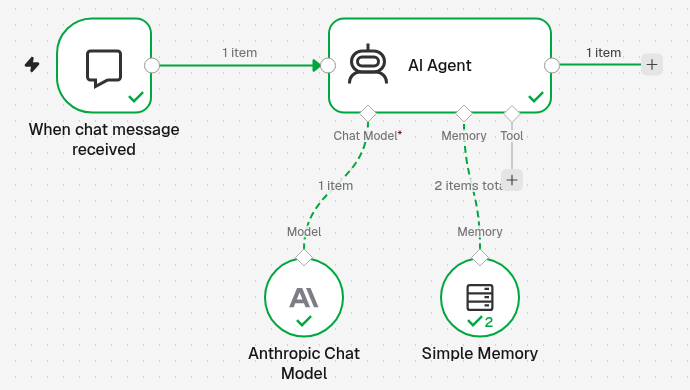
When chat message received → AI Agent with Anthropic Chat Model (Claude) and Simple Memory (so it remembers the conversation).
The trick is the System Message: fixed instructions that the agent follows for every message. You write them once, and you never have to explain the job again.
1. Build the chat agent
Follow steps 3 and 4 of Sign in and build your first AI agent: a new workflow with On chat message → AI Agent → Anthropic Chat Model. Name the workflow, for example Customer email helper.
If you already have My first AI agent, you can also copy it: ... next to the workflow name → Duplicate.
2. Give the agent its job (System Message)
- Double-click the AI Agent step.
-
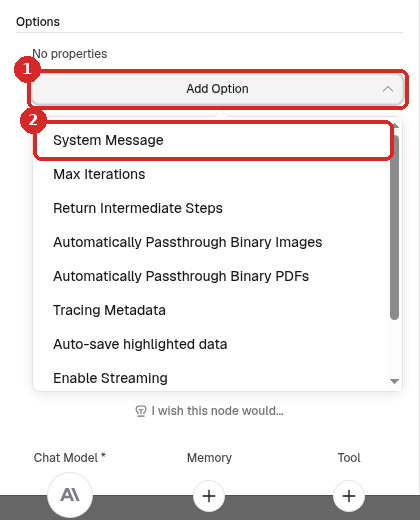
Under Options, click Add Option (1) and choose System Message (2).
-
Replace the text in System Message with your instructions. We used:
You help a small business owner write to customers.
The user sends rough notes. Turn them into a short, polite email to the customer in European Portuguese (Portugal, not Brazil).
Keep every fact from the notes. Do not invent prices, dates or promises.
Reply with the email only: a subject line, then the text, signed "A equipa".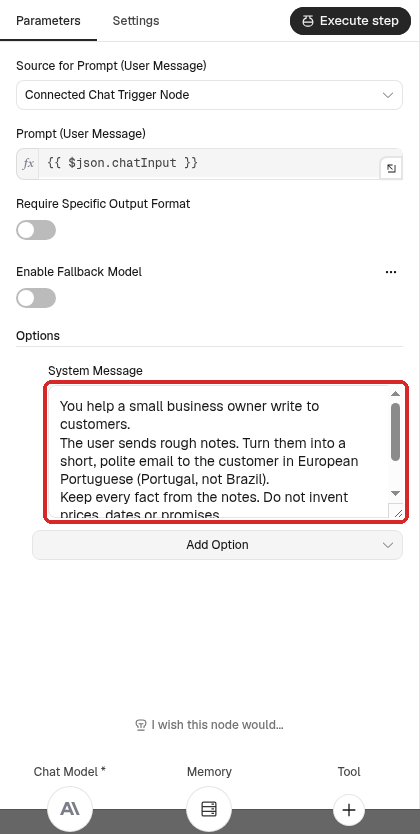
-
Leave Source for Prompt (User Message) as Connected Chat Trigger Node: the agent reads what you type in the chat.
Write the System Message like a note to a new employee
Say who the agent works for, what it gets, what it must produce, in which language, and what it must never do. Short, plain sentences work best.
3. Let it remember the conversation (Simple Memory)
Without memory, each message is a new conversation: shorter please would not know which email you mean.
- At the bottom of the AI Agent panel (or under the AI Agent step on the canvas), click the + under Memory and choose Simple Memory.
-
Keep the settings:
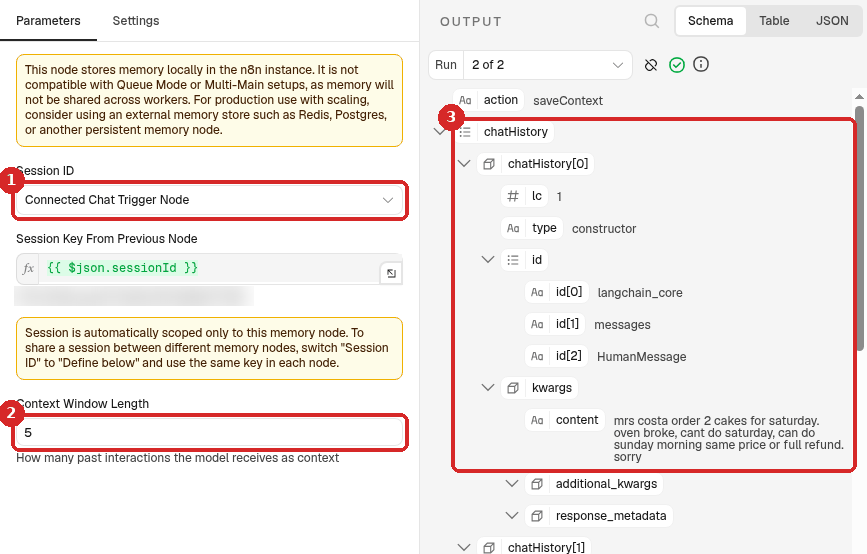
- Session ID: Connected Chat Trigger Node. Each chat session has its own memory.
- Context Window Length:
5, how many past messages Claude sees. - After a chat, the OUTPUT shows what it remembered (chatHistory: your notes and the first answer).
4. Try it
- Close the panels and click Open chat at the bottom of the canvas.
-
Type your notes as they come, and press Enter. We typed: mrs costa order 2 cakes for saturday. oven broke, cant do saturday, can do sunday morning same price or full refund. sorry
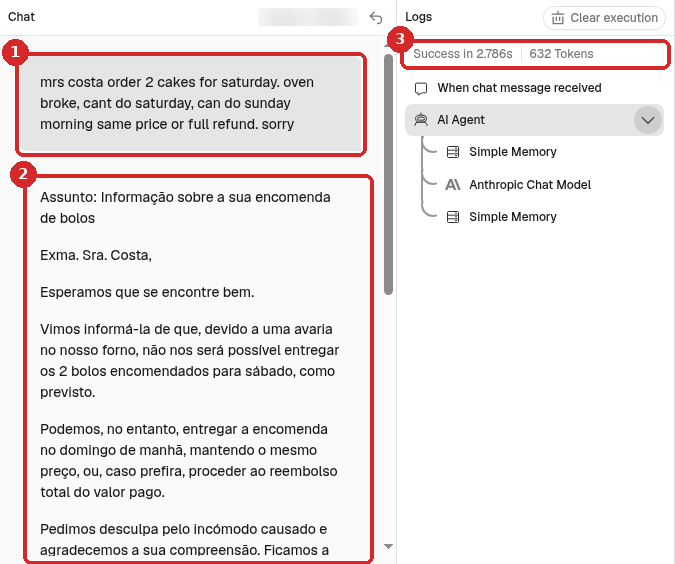
- Your notes.
- The email from Claude, in European Portuguese, with a subject line and A equipa at the end. It kept the facts: 2 cakes, Saturday not possible, Sunday morning at the same price or a full refund.
- Logs shows Success (in our test, about 4 seconds).
-
Ask for a change in the same chat. We typed shorter please, 3 sentences max:
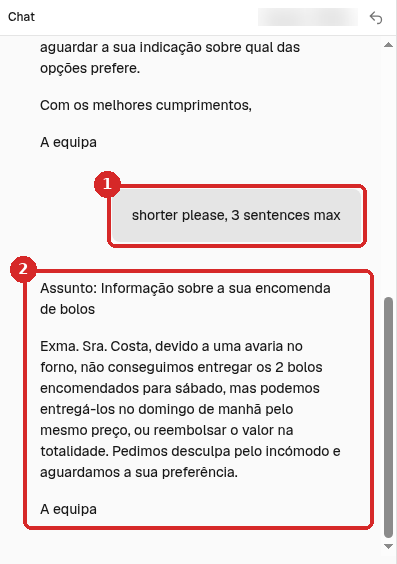
- Your request. You did not repeat the notes.
- Claude rewrote the same email in 3 sentences. That is Simple Memory at work.
Copy the email from the chat into your email program. To start a new email with an empty memory, click the round arrow (Reset) next to Session at the top of the chat: n8n starts a new session and clears the chat.
Check that it worked
- The answer follows your System Message (language, format, signature) without you repeating it.
- A follow-up like shorter please changes the previous answer instead of asking what you mean.
- Logs shows Success for each message.
Make it yours
Change only the System Message to give the helper another job:
- Turn my notes into a friendly reply to a Google review, in the same language as the review.
- Rewrite my text as a short Instagram post with 3 hashtags.
- Translate the customer's message into Portuguese and suggest a reply in their language.
- Write a product description of about 80 words from my notes, for my online shop.
Add facts the agent must always know to the System Message (opening hours, delivery area, return policy), so it can use them without you typing them each time. Keep one workflow per job, each with its own name.
Common problems
It answers in Brazilian Portuguese or in English
Say it plainly in the System Message: in European Portuguese (Portugal, not Brazil). If you want a specific form of address (você, o senhor/a senhora), say that too.
It adds things that were not in my notes
Keep Do not invent prices, dates or promises in the System Message, and always read the email before you send it. The AI writes the draft; you are responsible for what you send.
It forgets what we were talking about
Check that Simple Memory is connected under Memory of the AI Agent step, and that you stay in the same chat session (the round arrow, Reset, next to Session starts a new, empty one).
The AI Agent step is red or the chat shows an error
Open Anthropic Chat Model and check that Credential is your Anthropic account. See Sign in and build your first AI agent.