n8n: reuse a workflow inside another (sub-workflows)
A sub-workflow is a small workflow that other workflows can call, like a shared tool. In this guide you make a sub-workflow that sends you a Telegram message, and call it from another workflow. When your Telegram details change, you then fix them in one place instead of in every workflow.
| Time needed | 20 minutes |
| You need | An n8n agent (Sign in and build your first AI agent), your Telegram bot saved in n8n (step 1 of the contact form recipe) and your numeric Telegram ID (from @userinfobot) |
| Result | A workflow Send me a Telegram message that any other workflow can call with a message |
How it works:
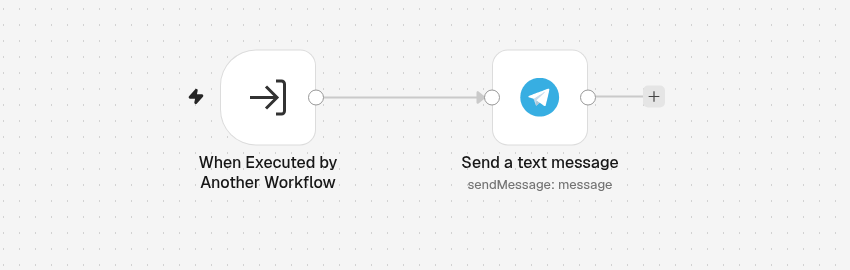
- The sub-workflow starts with the trigger When Executed by Another Workflow and says which fields it expects (here,
message). - The calling workflow (the parent) uses an Execute Workflow step, picks the sub-workflow and fills in those fields.
- The result of the sub-workflow's last step comes back to the parent.
This is the sub-workflow we built:
1. Make the sub-workflow
- Click the + at the top of the menu on the left, choose New workflow and name it Send me a Telegram message.
-
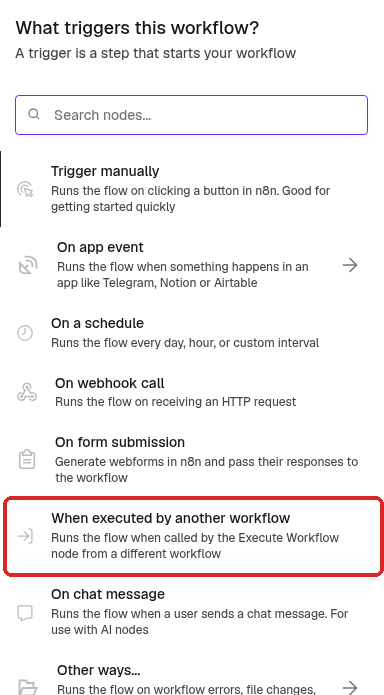
Click Add first step and choose When executed by another workflow:
-
The step is called When Executed by Another Workflow. Set it:
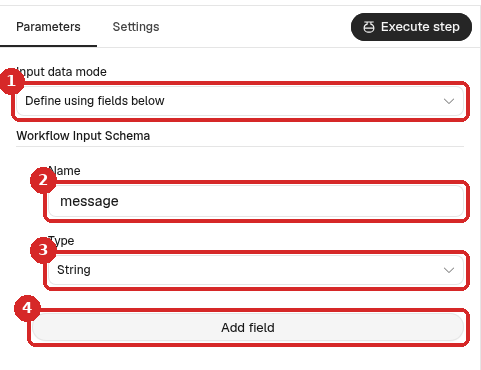
- Input data mode: Define using fields below.
- Name:
message. This is the field the other workflows must fill in. - Type: String (text).
- Add field adds more fields, for example
titleorchat_id.
2. Add what the sub-workflow does
- Close the panel. Click the + at the right of the trigger, search for
Telegramand choose Send a text message. -
Set it:
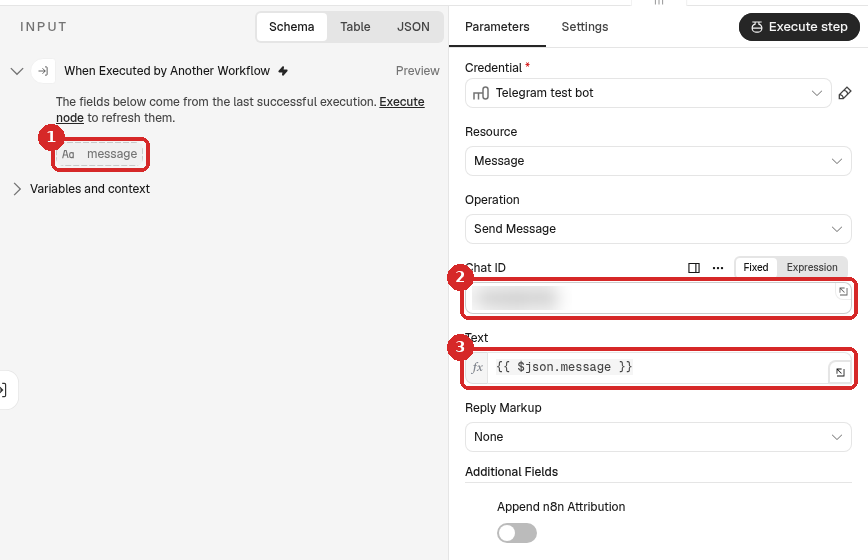
- On the left, INPUT shows the message field of the trigger. (n8n shows it after the first run.)
- Chat ID: your numeric Telegram ID.
- Text: click Expression and type
{{ $json.message }}, the field from step 1.
Under Additional Fields, we added Append n8n Attribution and left it off.
3. Publish the sub-workflow
Click Publish at the top right, then Publish in the window.
Publish the sub-workflow first
You can test a parent workflow while the sub-workflow is not published: our test worked. But n8n refuses to publish a parent that calls an unpublished sub-workflow (see Common problems).
4. Call it from another workflow
Open the workflow that must send the message (the parent). We made a new one, Daily check (parent), with only the trigger When clicking 'Execute workflow'.
-
Click the + at the right of the last step and search for
Execute Workflow. n8n shows Execute Sub-workflow: click it, then the action Execute A Sub Workflow.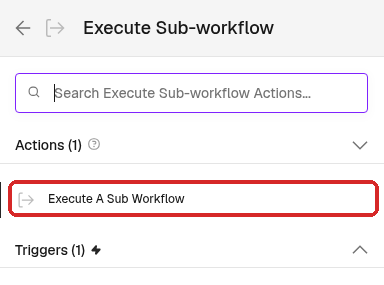
-
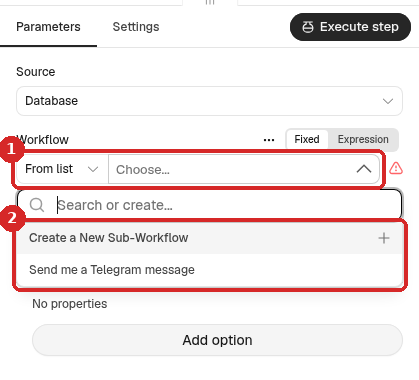
In Workflow, keep From list and click Choose... (1). The list shows only the workflows that start with When Executed by Another Workflow (2): ours showed Send me a Telegram message. (Create a New Sub-Workflow makes a new one for you.)
-
Choose your sub-workflow. n8n renames the step Call 'Send me a Telegram message' and shows the fields the sub-workflow expects under Workflow Inputs.
- Fill in message. Type a fixed text, or click Expression to use data from earlier steps, for example
{{ $json.summary }}.
5. Test it
Close the panel and click Execute workflow at the bottom of the canvas. Then double-click the Call ... step:
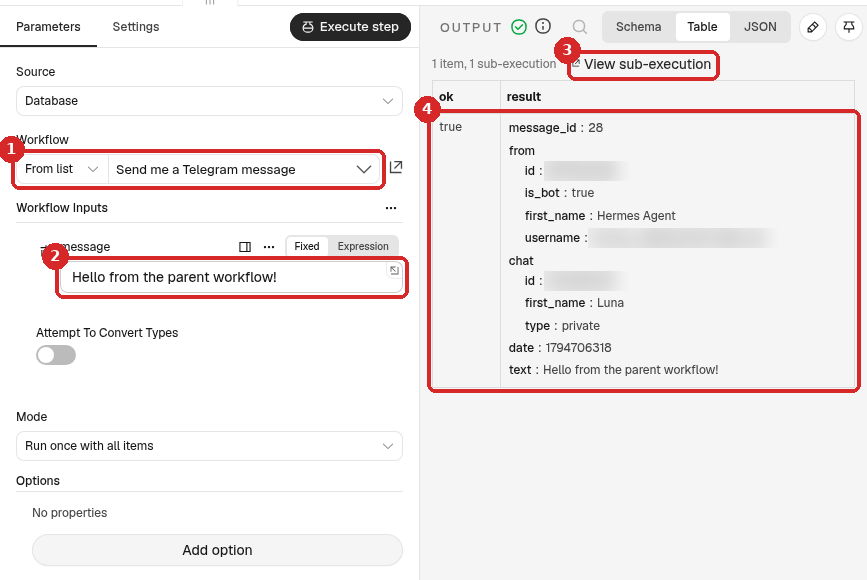
- Workflow: the sub-workflow it calls.
- message: what the parent sends. We sent Hello from the parent workflow!
- The OUTPUT says 1 item, 1 sub-execution. View sub-execution opens the run of the sub-workflow.
- The OUTPUT is the result of the sub-workflow's last step: here the Telegram answer, with ok true and the text that arrived on the phone.
The whole test took about half a second.
Check that it worked
- The message arrives on Telegram.
-
Open the sub-workflow and its Executions tab. Every call is a run there, even though the sub-workflow has no trigger of its own:
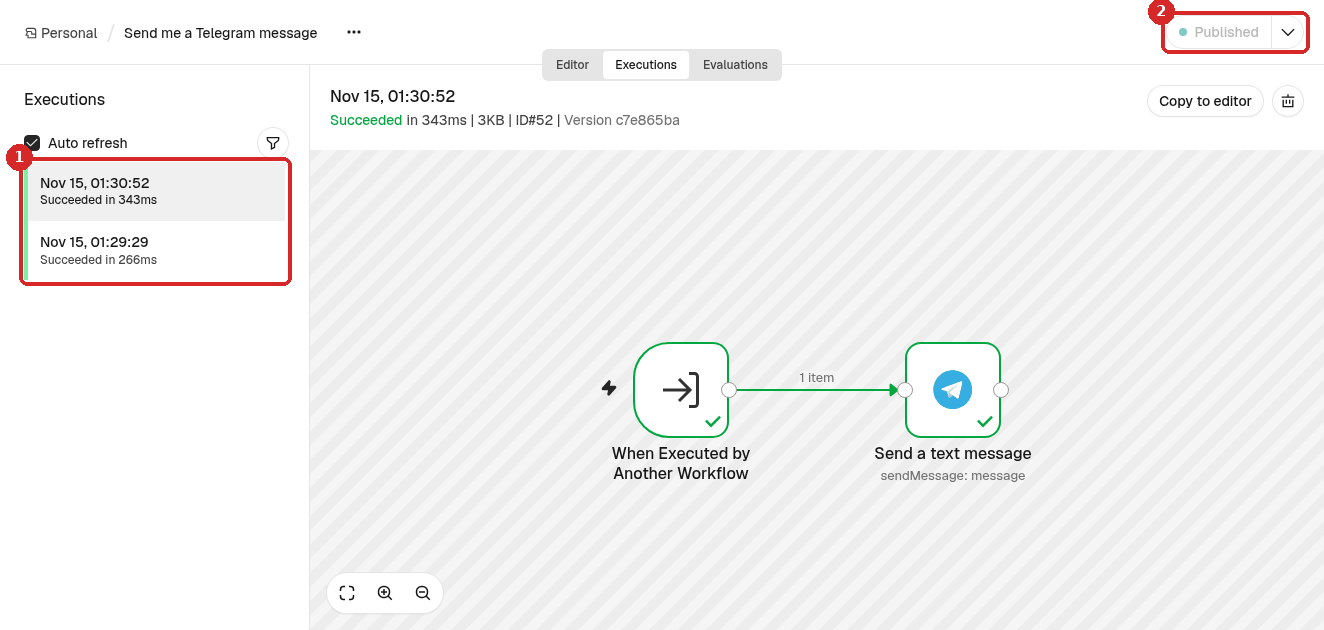
- One run per call: the test from the parent, and a call from a published parent workflow.
- The sub-workflow is Published.
We also called the sub-workflow from a published parent with a webhook trigger: the production run worked and the message arrived.
Ideas for sub-workflows
- One place for alerts: all your workflows call Send me a Telegram message. To send alerts to a colleague instead, change the Chat ID once.
- The same AI job in several workflows: put a Basic LLM Chain with your prompt (for example summarise this text in 3 lines) in a sub-workflow with a
textfield, and call it from your email, form and webhook workflows. - Keep big workflows readable: move a group of steps into a sub-workflow and replace them with one Call ... step.
Common problems
Publishing says: Workflow could not be published ... which is not published
The full message was Cannot publish workflow: Node "Call 'Send me a Telegram message'" references workflow ... ("Send me a Telegram message") which is not published. Please publish all referenced sub-workflows first.
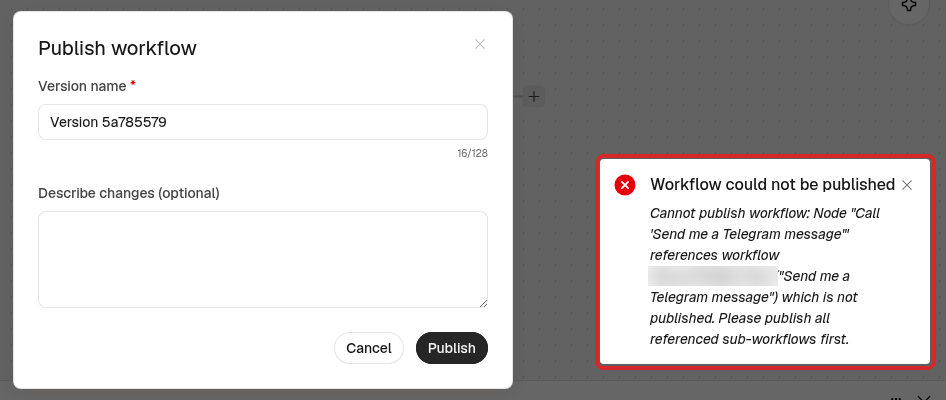
Click Cancel, open the sub-workflow, click Publish, then publish the parent again.
My workflow is not in the Workflow list
The list shows only workflows that start with When Executed by Another Workflow. Open the workflow you want to call and make that its first step (step 1).
The field I need is not under Workflow Inputs
The fields come from the sub-workflow's trigger. Add the field there (Add field, step 1), then open the Call ... step in the parent again.
The message arrives empty
The Text of the Telegram step must use the same name as the trigger field: {{ $json.message }} for a field called message. Names must match exactly, with the same capitals.