My agent stopped answering
Follow these steps in order. Most problems are solved by step 2 or 3.
| Time needed | 5 to 15 minutes |
| You need | Your client area login |
1. Check the AI provider
Most "silent" agents have a problem with the AI key, not with the server:
- The provider account ran out of credit, or hit its spending limit.
- The key was deleted or rotated in the provider's console.
Open your provider's console (Anthropic, OpenAI or OpenRouter) and check the balance and the key. If you created a new key, paste it in the client area (Settings → API key) and click Save and apply.
2. Check that the agent is running
- Sign in to the client area, open Services → My Services and click your agent.
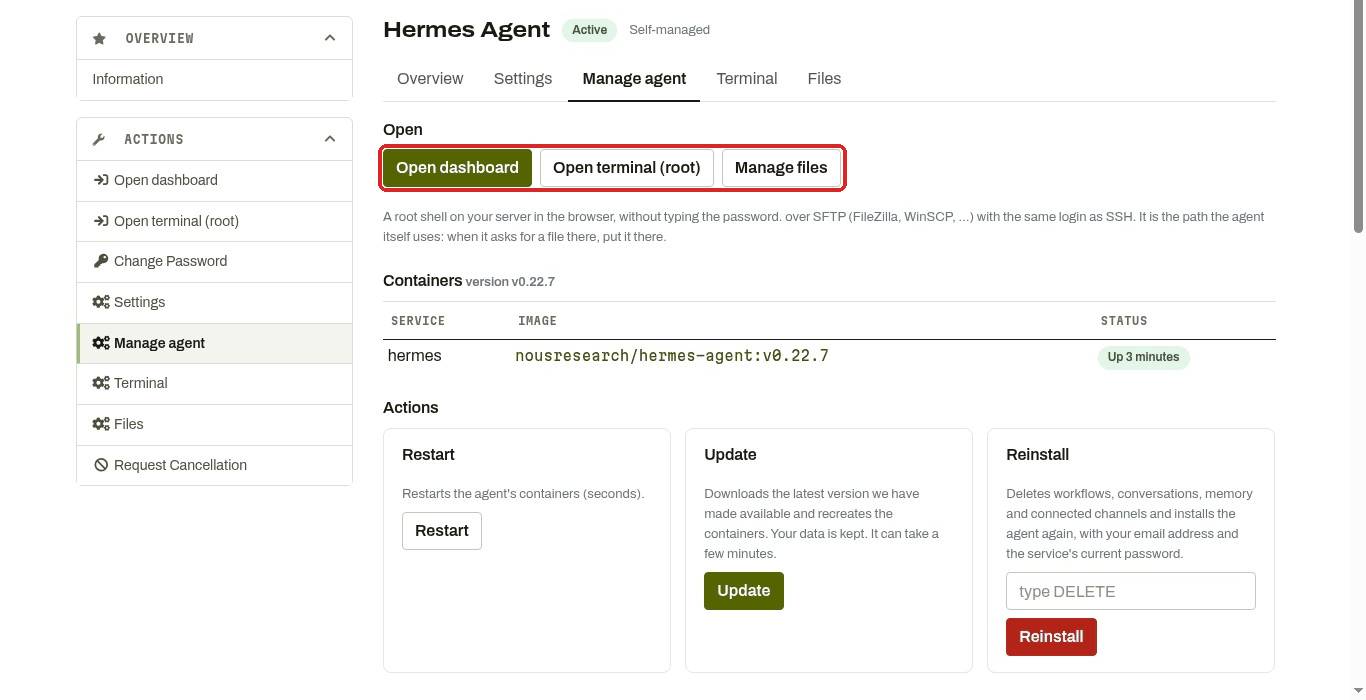
- Click the Manage agent tab.
- Under Containers, the STATUS column should say Up (for example
Up 7 hours (healthy)).
3. Restart
Under Actions, click Restart. It takes a few seconds and keeps all your data. Wait a minute and try again.
4. Read the recent logs
At the bottom of Manage agent, Recent logs shows the agent's latest messages. Click refresh to load new lines. Look for words such as error, invalid, unauthorized, quota or denied near the end.
On Hermes, the dashboard LOGS page shows much more detail: see Read Hermes' logs.
Some things to look for:
- Lines about the API key, authentication or unauthorized: the AI key is wrong. Paste it again in Settings and click Save and apply.
- Lines about credit, quota or rate limit: add credit or raise the limit with your AI provider.
Discord messages are being denied because no allowlist is configured(Hermes): add your Discord user ID. See Connect Discord.
5. Update
If it still does not work, click Update. It installs the latest version we have made available and keeps your data. It can take a few minutes.
6. Open a ticket
Click Open Ticket in the client area menu and include:
- which agent (Hermes, n8n or OpenClaw) and its address,
- what you did and what you expected,
- the last lines of Recent logs (copy and paste them),
- the time it happened.
Do not use Reinstall to fix a problem
Reinstall deletes everything (conversations, memory, workflows, connected channels) and cannot be undone. Use it only if you want to start from zero.