Choose who can talk to your Hermes agent
Your agent uses your AI credit and can act on your behalf, so by default it does not answer strangers. When someone new messages it on WhatsApp, Telegram or another channel, Hermes replies with a pairing code and waits for you to approve that person.
| Time needed | 1 minute per person |
| You need | A Hermes agent with at least one channel connected (WhatsApp, Telegram) |
| Result | Only the people you approved get answers |
Discord works differently
On Discord you list the allowed user IDs when you set up the channel. See Connect Discord.
1. The person sends a first message
The new person (it can be you) sends any message to the agent. Hermes answers:
Hi! I don't recognize you yet, so I can't reply until the person running this bot approves you. Your pairing code:
ABCD1234(valid for 1 hour)
The code is valid for one hour.
2. Approve the request in the dashboard
- In the client area, open your Hermes agent and click Open dashboard.
- In the dashboard menu, click Pairing.
Pending requests lists everyone waiting, with the channel (whatsapp, telegram…), their name and their number or ID.
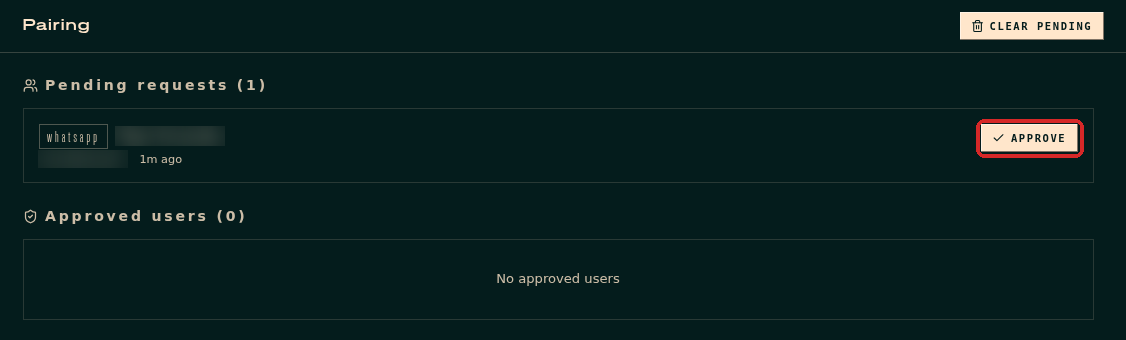
Check that it is someone you know, then click APPROVE.
The person moves to Approved users.
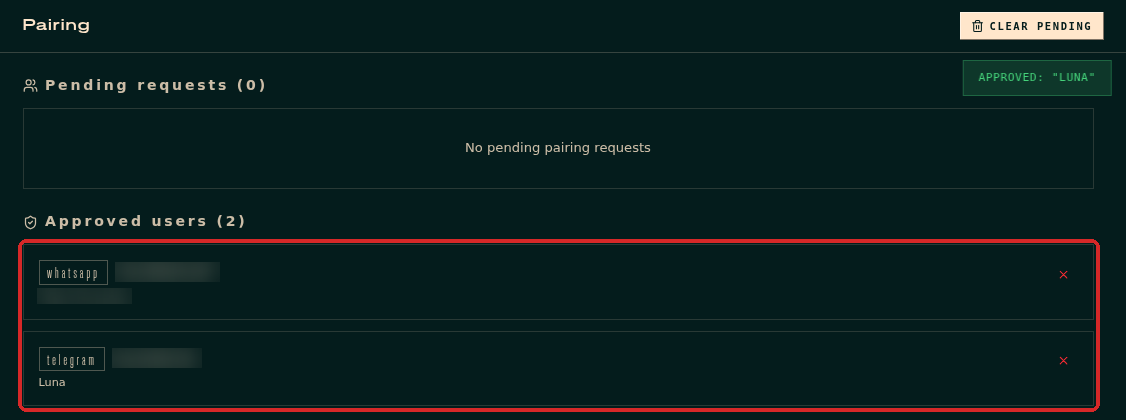
3. The person sends the message again
Messages sent before the approval are not answered. Ask the person to send their message again: now Hermes answers.
Remove someone
In Pairing → Approved users, click the × on the right of the person. Hermes stops answering them.
Ignore requests
Click CLEAR PENDING to delete all waiting requests. Nobody is approved.
Approving from the terminal
The pairing message also shows a command such as hermes pairing approve whatsapp ABCD1234. It does the same thing as the APPROVE button. You can run it in the client area's Terminal tab.
I approved someone but the agent still asks for a code
The approval is per channel. If the person writes on WhatsApp and on Telegram, approve both requests. Also check the code had not expired (one hour).