Recipe: daily reminders for overdue invoices
Every morning, n8n reads your open invoices from a data table, keeps the ones that are past their due date, Claude writes a polite reminder for each customer, and you get one Telegram message with the list, the total and the drafts ready to send.
| Time needed | 30 minutes |
| You need | An n8n agent with your Claude key (Sign in and build your first AI agent), your Telegram bot saved in n8n (step 1 of the contact form recipe), your numeric Telegram ID (from @userinfobot), and a CSV file with your open invoices |
| Result | A Telegram message every morning such as Overdue invoices on 15/11/2026: 4, Total: 2096.60 EUR, followed by each invoice and a reminder email written by Claude |
This is the finished workflow:
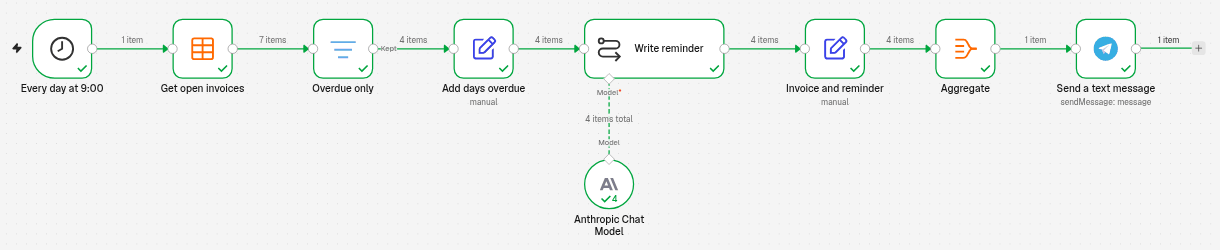
Every day at 9:00 (Schedule Trigger) → Get open invoices (Data table) reads all rows → Overdue only (Filter) keeps the invoices due before today → Add days overdue (Edit Fields) adds the date in Portuguese format and the number of days late → Write reminder (Basic LLM Chain with Anthropic Chat Model) drafts one email per invoice → Invoice and reminder (Edit Fields) keeps each invoice with its email → Aggregate puts them in one list → Send a text message sends the summary to Telegram.
n8n drafts, you send
This workflow does not email your customers. It sends the drafts to you on Telegram, so you can check them and send them yourself. Claude only sees the invoice number, the customer name, the amount and the dates.
The invoices file
We used a small CSV file with 7 open invoices of a bakery. Save it as open-invoices.csv (the first line holds the column names; dates as YYYY-MM-DD):
customer,invoice_no,amount_eur,due_date
Cafe Central,FT 2026/101,245.50,2026-10-20
Hotel Mar Azul,FT 2026/104,1320.00,2026-10-31
Restaurante O Pescador,FT 2026/107,418.75,2026-11-05
Pastelaria Doce Lar,FT 2026/117,112.35,2026-11-14
Pastelaria Doce Lar,FT 2026/111,76.40,2026-11-15
Mercearia da Praca,FT 2026/115,58.20,2026-11-22
Restaurante O Pescador,FT 2026/116,302.10,2026-11-30
We tested on 15 November 2026. Before running anything, we worked out the right answer by hand: 4 invoices are overdue (FT 2026/101, 104, 107 and 117), together 2096.60 EUR. FT 2026/111 is due today, so it is not late yet; the last two are due later.
1. Put the invoices in a data table (Import CSV)
- Click the + at the top of the menu on the left and choose New data table (more about tables: Store data inside n8n).
-
Fill in the window:
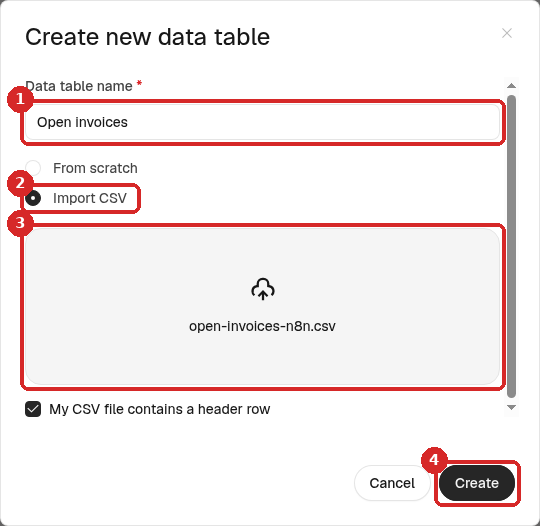
- Data table name:
Open invoices. - Choose Import CSV.
- Drop your CSV file in the box, or click it to pick the file. Keep My CSV file contains a header row ticked.
- Click Create.
- Data table name:
-
n8n reads the file and suggests a type for each column:
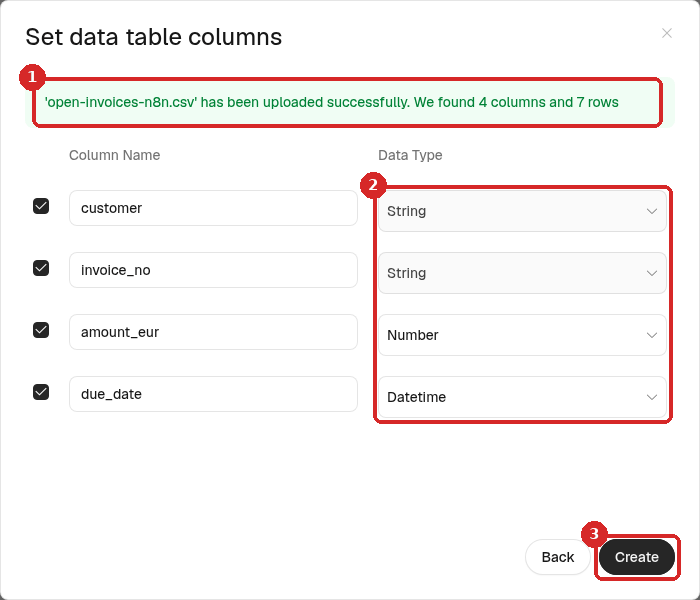
- n8n confirms the upload: ... has been uploaded successfully. We found 4 columns and 7 rows.
- Data Type: check them. n8n chose String for the names and numbers of the invoices, Number for
amount_eurand Datetime fordue_date, which is what this recipe needs. - Click Create.
The table opens with your 7 rows:
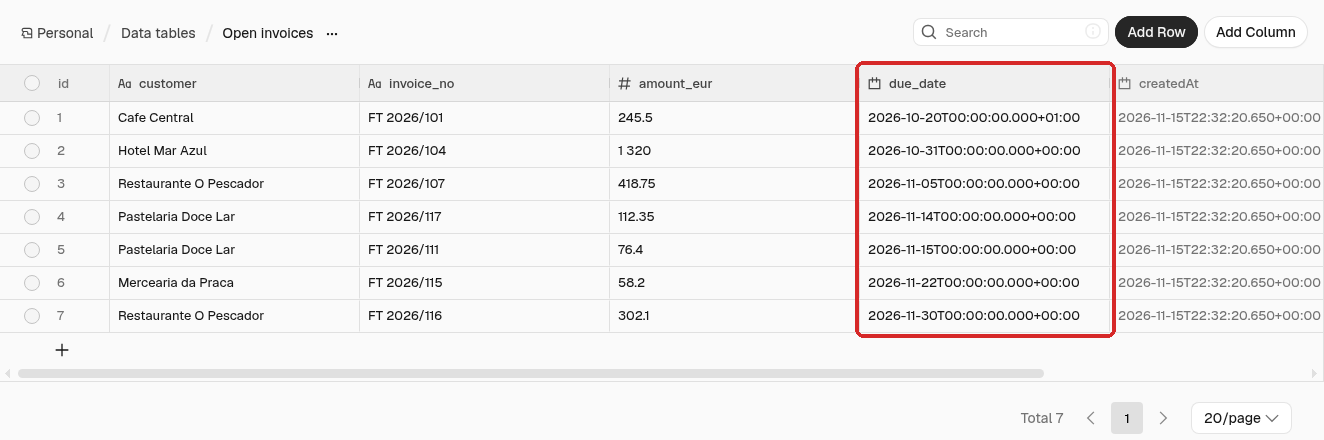
The due_date column (box) shows each date at midnight. The first one ends in +01:00 because 20 October is still summer time in Portugal; the others end in +00:00. That is normal: all of them mean midnight in Lisbon.
When an invoice is paid, delete its row in the table (round box at the left of the row → Delete), so it stops showing up in the reminders.
2. Run every day at 9:00
- Click the + at the top of the menu on the left, choose New workflow and name it, for example Invoice reminders.
- Click Add first step, choose On a schedule and set Trigger Interval Days, Days Between Triggers
1, Trigger at Hour 9am, Trigger at Minute0. Rename the stepEvery day at 9:00(click its name at the top of the panel).
The screens are the same as in Run a workflow on a schedule. The hour follows the workflow's time zone, which was Europe/Lisbon on our agent (check it).
3. Read the open invoices
- Close the panel. Click the + at the right of the trigger, type
data tableand choose Get row(s). Rename itGet open invoices. -
Set it:
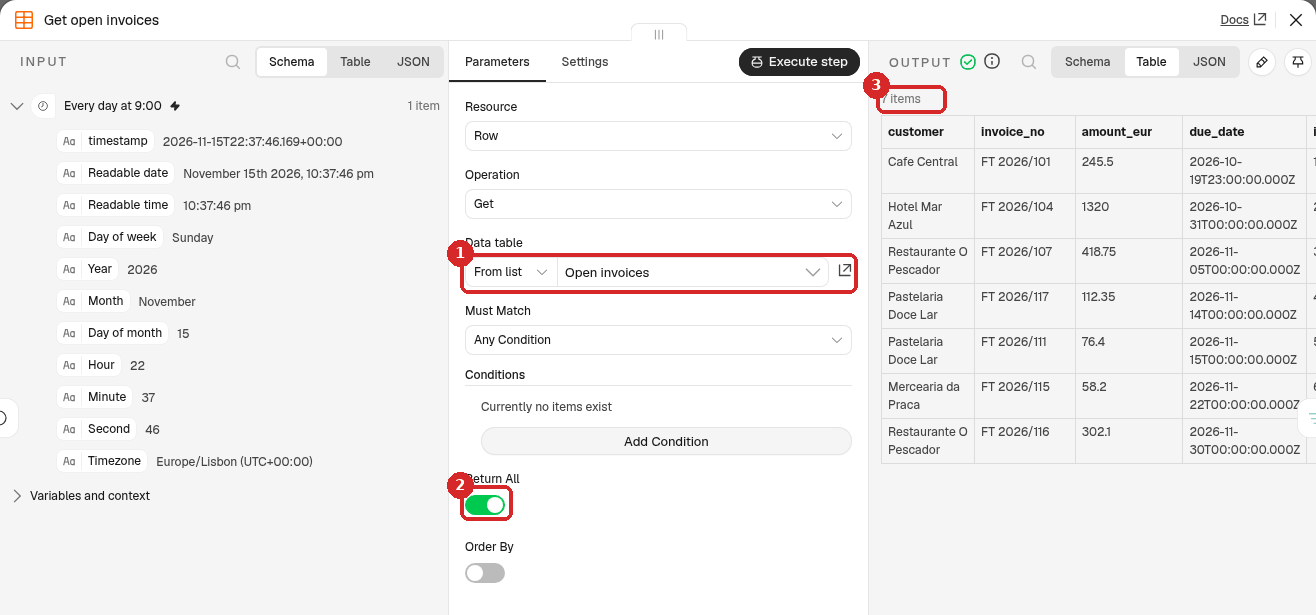
- Data table: From list → Open invoices.
- Return All: on. Leave Conditions empty: this step reads every row.
- After a test, the OUTPUT has 7 items, one per invoice.
4. Keep only the overdue invoices (Filter)
- Add a Filter step after Get open invoices (the +, search
Filter). Rename itOverdue only. -
Set the condition:
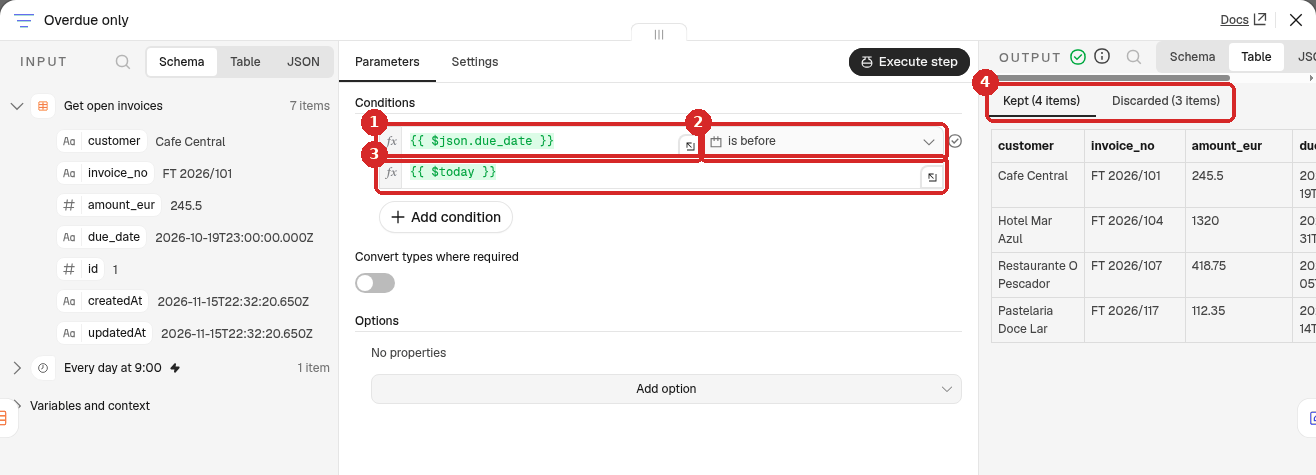
- First box: drag due_date from the INPUT on the left, or click Expression and type
{{ $json.due_date }}. - Click the operator list and choose Date & Time → is before.
- Second box: click Expression and type
{{ $today }}. - After a test, the OUTPUT has two tabs: Kept (4 items) and Discarded (3 items).
- First box: drag due_date from the INPUT on the left, or click Expression and type
$today is today at midnight, in the workflow's time zone (Lisbon). is before today therefore keeps the invoices whose due date was yesterday or earlier, and leaves out the one due today.
Use $today here, not a Code step
On our agent, $now inside a Code step used New York time, which is 5 hours behind Lisbon in winter. Between midnight and 5:00 in Lisbon a Code step would still think it is yesterday. Fields like this one use the right time zone. If you must use a Code step, see the Code node guide.
5. Add the days overdue
Claude writes better reminders if it knows the date in the usual format and how late the payment is. n8n works this out, so Claude does not have to.
- Add an Edit Fields (Set) step after Overdue only (search
Edit Fields). Rename itAdd days overdue. -
Set it:
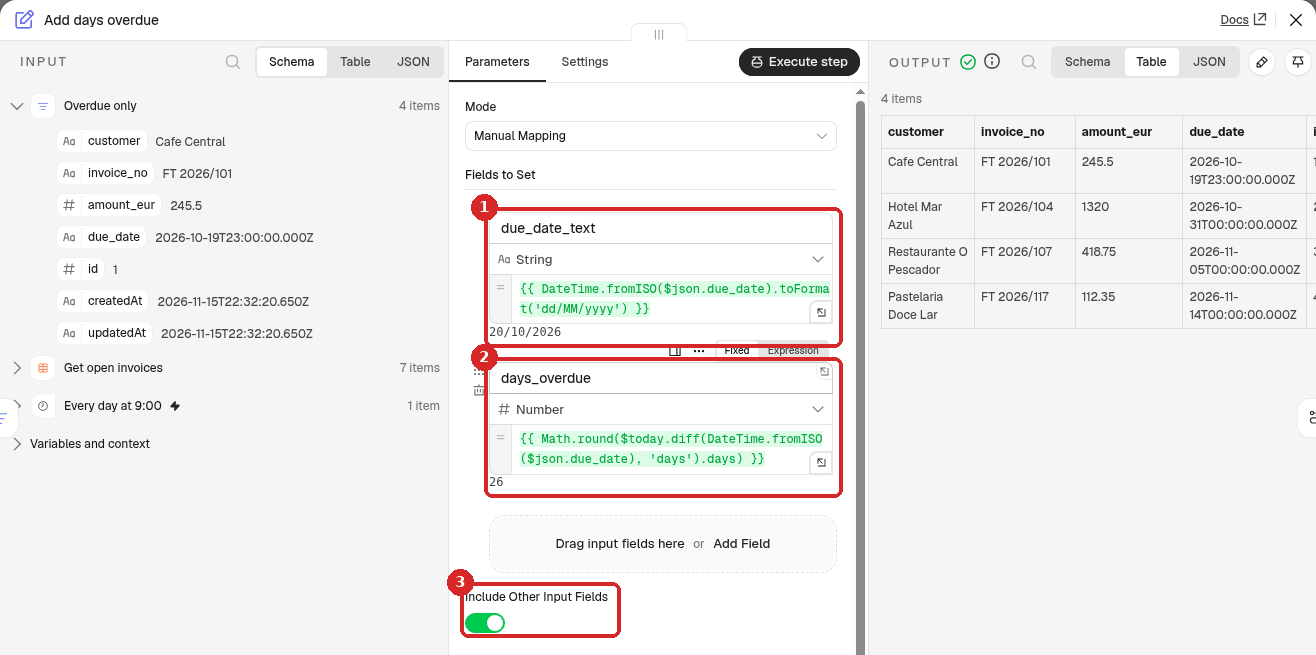
-
Add Field: name
due_date_text, type String, value (click Expression):Under the box n8n shows the result for the first invoice:
20/10/2026. -
Add Field: name
days_overdue, type Number, value:This counts the days between the due date and today. For the first invoice it shows
26. -
Include Other Input Fields: on, with Input Fields to Include All. The step then keeps the customer, invoice number and amount, and adds the two new fields.
-
6. Let Claude write each reminder
- Add a Basic LLM Chain step after Add days overdue. Rename it
Write reminder. -
Set it:
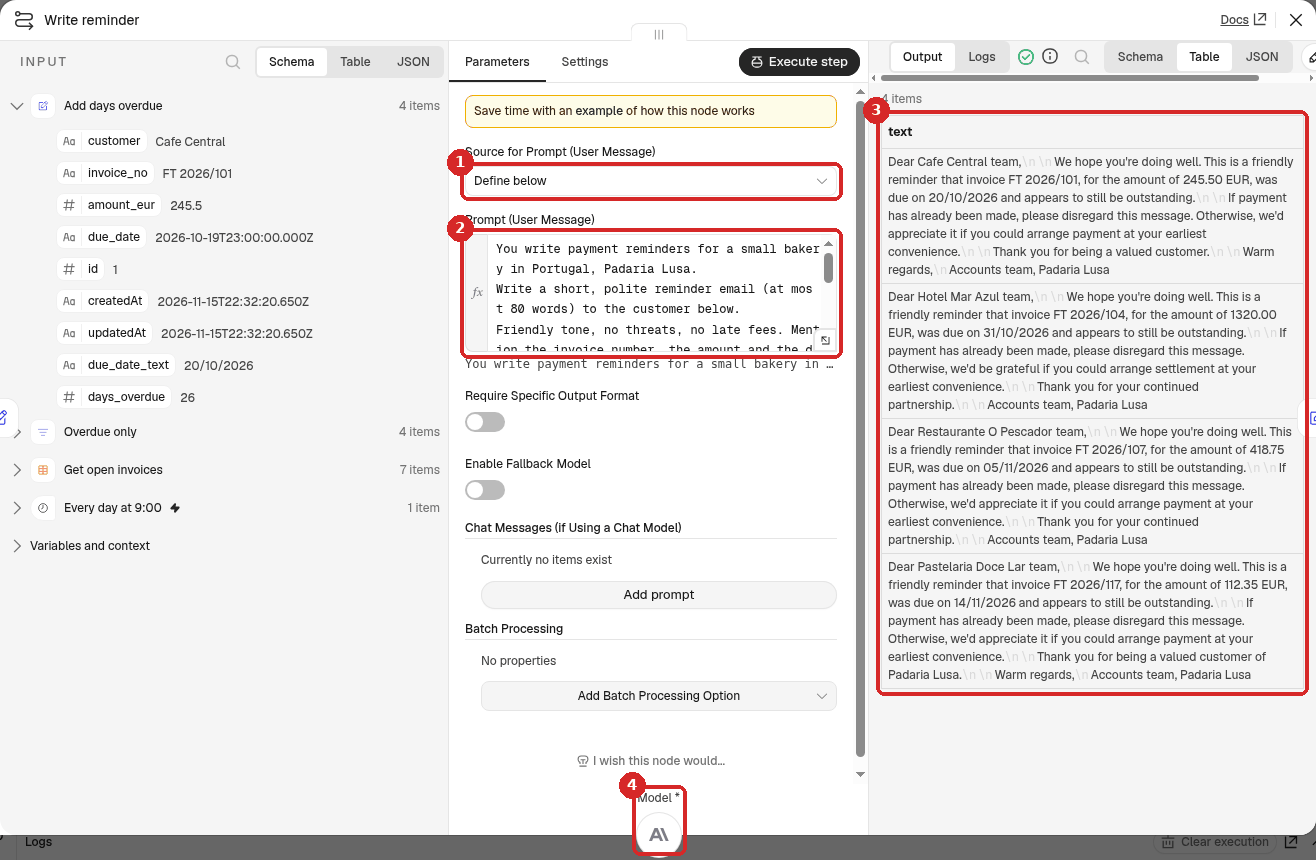
- Source for Prompt (User Message): Define below.
-
Prompt (User Message): click Expression and paste (change the shop name to yours):
You write payment reminders for a small bakery in Portugal, Padaria Lusa. Write a short, polite reminder email (at most 80 words) to the customer below. Friendly tone, no threats, no late fees. Mention the invoice number, the amount and the due date. Sign it as "Accounts team, Padaria Lusa". Plain text only: no subject line, no markdown. Customer: {{ $json.customer }} Invoice: {{ $json.invoice_no }} Amount: {{ $json.amount_eur.toFixed(2) }} EUR Due date: {{ $json.due_date_text }} Days overdue: {{ $json.days_overdue }}toFixed(2)writes the amount with two decimals (1320.00, not1320). -
After a test, the OUTPUT has 4 items: one email (text) per overdue invoice.
- Click the + under Model and choose Anthropic Chat Model (n8n picks your Anthropic account credential).
7. Put the invoices and emails together and send the summary
-
Add an Edit Fields (Set) step after Write reminder and name it
Invoice and reminder. Mode Manual Mapping; add these fields (name, type, then the value as an expression). The chain gives back only the email, so this step picks the invoice data from Add days overdue:Name Type Value invoice_noString {{ $('Add days overdue').item.json.invoice_no }}customerString {{ $('Add days overdue').item.json.customer }}amount_eurNumber {{ $('Add days overdue').item.json.amount_eur }}days_overdueNumber {{ $('Add days overdue').item.json.days_overdue }}reminderString {{ $json.text }} -
Add an Aggregate step after it: Aggregate All Item Data (Into a Single List), Put Output in Field
data. You get 1 item with the 4 invoices, so Telegram sends one message and not four. (Both steps are shown with screenshots in the review sorting recipe.) -
Add a Telegram Send a text message step after Aggregate (search
Telegram). Set it: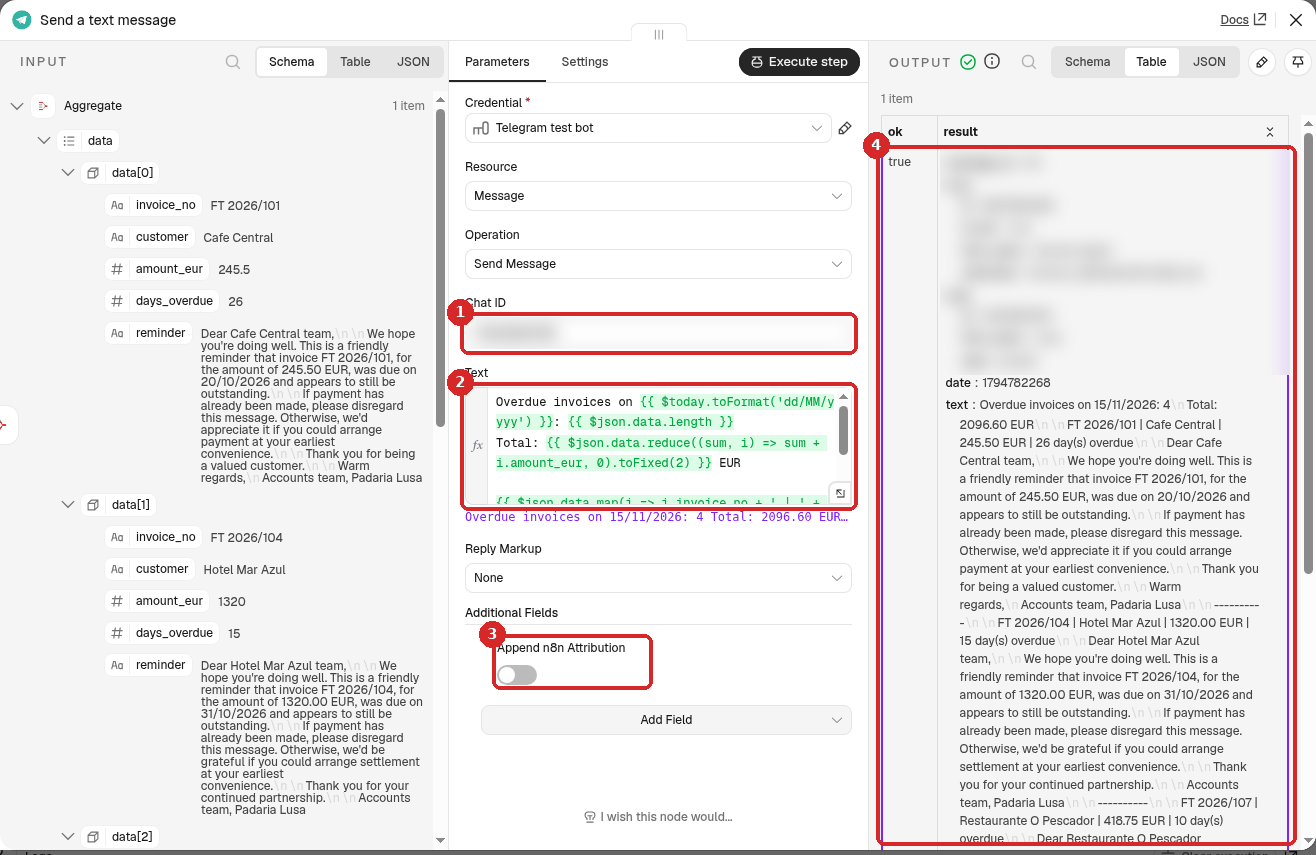
- Chat ID: your numeric Telegram ID. (Credential: your Telegram bot.)
-
Text: click Expression and paste:
Overdue invoices on {{ $today.toFormat('dd/MM/yyyy') }}: {{ $json.data.length }} Total: {{ $json.data.reduce((sum, i) => sum + i.amount_eur, 0).toFixed(2) }} EUR {{ $json.data.map(i => i.invoice_no + ' | ' + i.customer + ' | ' + i.amount_eur.toFixed(2) + ' EUR | ' + i.days_overdue + ' day(s) overdue\n\n' + i.reminder).join('\n\n----------\n\n') }}lengthcounts the invoices,reduceadds up the amounts, and the last line writes each invoice followed by its email. Copy it as it is. -
Additional Fields → Add Field → Append n8n Attribution, switch off.
- After a test, the OUTPUT shows ok true and the exact text that was sent.
8. Test it now
You do not have to wait until 9:00. Close the panel and click Execute at the bottom of the canvas: the whole workflow runs once, now. All the steps get a green tick, with 7 items into Overdue only and 4 items after it (see the picture at the top). The run took about 2.5 seconds, and the message arrived on Telegram. It started like this:
Overdue invoices on 15/11/2026: 4
Total: 2096.60 EUR

FT 2026/101 | Cafe Central | 245.50 EUR | 26 day(s) overdue

Dear Cafe Central team,

We hope you're doing well. This is a friendly reminder that invoice FT 2026/101, for the amount of 245.50 EUR, was due on 20/10/2026 and appears to still be outstanding.

If payment has already been made, please disregard this message. Otherwise, we'd appreciate it if you could arrange payment at your earliest convenience.

Thank you for being a valued customer.

Warm regards,
Accounts team, Padaria Lusa

----------

FT 2026/104 | Hotel Mar Azul | 1320.00 EUR | 15 day(s) overdue
...
9. Publish it
Click Publish at the top right, then Publish in the window. From now on the summary arrives every day at 9:00. To stop it, click the arrow next to Published and choose Unpublish (details).
Note
For this guide we tested with Execute only and did not leave the workflow published, so we did not wait for a real 9:00 run. How the schedule itself behaves is shown in Run a workflow on a schedule.
Check that it worked
Work out the answer yourself for a few invoices and compare. In our test:
- Overdue only kept exactly the 4 invoices we expected (FT 2026/101, 104, 107 and 117) and discarded the 3 others, including FT 2026/111, due on the day of the test.
- The days overdue were right: 26, 15, 10 and 1.
- The total in the message, 2096.60 EUR, matched our own sum.
- Each email named the right invoice, amount and due date, was polite, had no threats or fees, and stayed under 80 words (68 to 74).
We also tested a day with nothing overdue (we changed the date in the Filter for a moment): Overdue only passed 0 items, the next steps did not run, no Telegram message was sent, and the run still showed as successful.
Make it yours
- Emails in Portuguese: add Write the email in European Portuguese to the prompt.
- Firmer tone for very late invoices: add a rule to the prompt, for example If days overdue is more than 30, ask for payment within 7 days.
- Only the total: remove the last line of the Telegram text if you only want the count and the total.
Common problems
Overdue only keeps nothing, but some invoices are late
Check that the due_date column is a Datetime column (the icon in the table header is a calendar) and that the operator is Date & Time → is before. If the column was imported as String, delete the table and import the CSV again, choosing Datetime for due_date in the column step.
An invoice due today is in the list
The second box of the Filter has {{ $now }} instead of {{ $today }}. $now is the current time, so a due date of today at midnight counts as before it. We tried it: with $now, Kept went from 4 to 5 items and FT 2026/111, due that day, was in the list. Use $today.
The emails say 1320 EUR instead of 1320.00 EUR
Use {{ $json.amount_eur.toFixed(2) }} in the prompt, as in step 6.
Telegram says: Bad Request: chat not found
The Chat ID is wrong, or you never pressed Start in your bot. See the contact form recipe.