Recipe: a weekly sales report on Telegram
Every Monday morning, Hermes reads your sales file and sends you a 5-line summary on Telegram: total, best and worst product, best day and one suggestion.
| Time needed | 5 minutes |
| You need | A Hermes agent with Telegram connected, a home channel set (see Schedule a recurring task), and a sales file in FILES → workspace |
| Result | A short report on Telegram every Monday |
This recipe combines Analyse your sales spreadsheet with a scheduled job, so the analysis comes to you without asking.
1. Create the job
In CHAT:
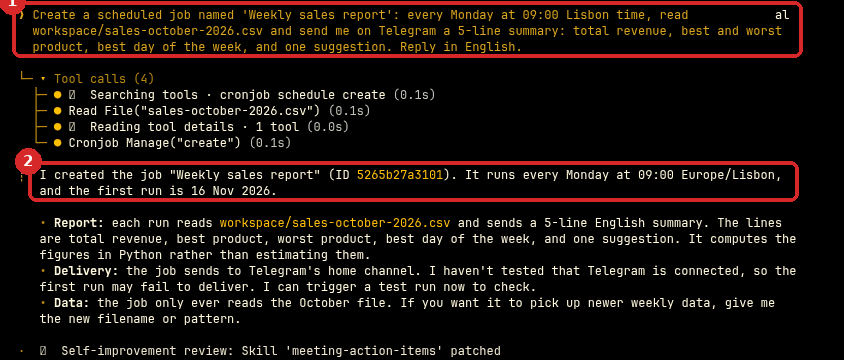
Create a scheduled job named 'Weekly sales report': every Monday at 09:00 Lisbon time, read workspace/sales-october-2026.csv and send me on Telegram a 5-line summary: total revenue, best and worst product, best day of the week, and one suggestion.
- Your request.
- Hermes creates the job and tells you when it first runs. It also says that it calculates the figures with a small program rather than estimating them.
2. Run it once now
Open CRON, find Weekly sales report (1) and click the lightning icon (2), Trigger now.

In our test the report reached Telegram about 12 seconds later:
Total revenue: €9,797.20
Best product: Broa de milho, €2,550.80
Worst product: Croissant, €1,119.60
Best day of the week: Thursday, €1,598.10
Suggestion: Wednesday is the weakest day (€1,169.10), so run a midweek promotion on Croissant, the lowest-revenue product, to lift both.
We checked every number against our own calculation of the same file: all correct.
Check that it worked
- The report is in your Telegram chat with the bot.
- CRON shows a Last time for the job, and Next is next Monday at 09:00.
Make it yours
Use a file name that does not change
The job reads exactly the file you named. If you export a new file every week, either always save it with the same name (for example sales-latest.csv), or tell Hermes: "read the newest CSV file in workspace/sales/".
- Compare with the previous week: "…and say how this week compares with last week."
- Send it to the team's Discord instead (see Connect Discord).
Common problems
The report says it cannot find the file
Check the name in FILES → workspace. Names are exact: Sales.csv is not sales.csv.
Nothing arrives on Monday
Check that the job is scheduled (not paused) in CRON, and that the home channel is set.