Recipe: reminders on Telegram with Hermes
Tell Hermes "remind me in 3 minutes…" or "remind me tomorrow at 9…" and it sends you the reminder on Telegram at that time.
| Time needed | 2 minutes |
| You need | A Hermes agent with Telegram connected and a home channel set (see Schedule a recurring task) |
| Result | A Telegram message at the time you asked |
1. Ask for the reminder
In any chat with Hermes (the dashboard CHAT page, or Telegram itself), say what and when:
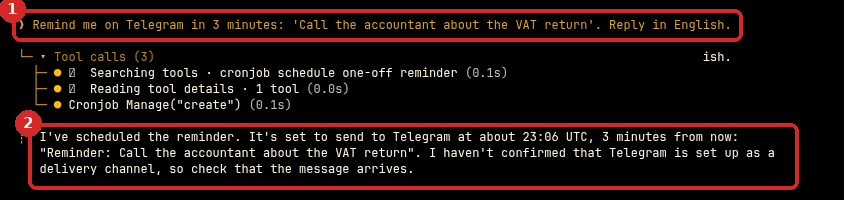
Remind me on Telegram in 3 minutes: 'Call the accountant about the VAT return'.
- Your request.
- Hermes creates a one-time scheduled job and tells you when it will be sent.
2. Wait for it
At the time, the reminder arrives on Telegram. In our test it arrived about a minute after the time Hermes announced (Hermes checks its scheduled jobs once a minute).
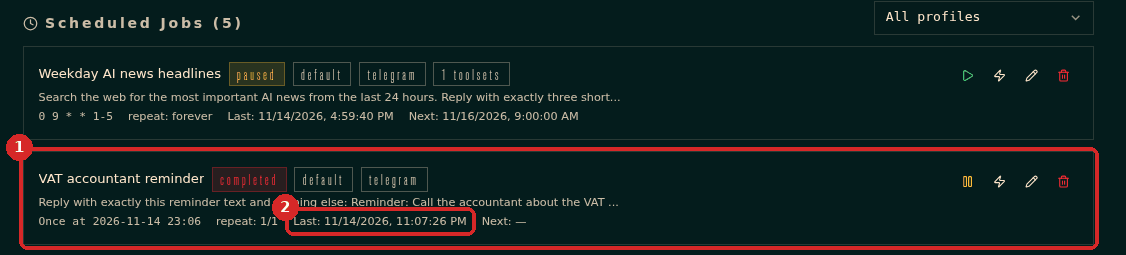
In the dashboard, CRON lists the reminder (1). After it is sent, it shows completed and Last (2) shows when it ran.
Check that it worked
- The message is in your Telegram chat with the bot.
- CRON shows the reminder as completed, with repeat: 1/1.
Make it yours
- "Remind me every Monday at 9:00 to send the invoices." (a repeating reminder)
- "Remind me on 1 March at 10:00 to renew the insurance."
- "What reminders do I have?" or "Cancel the insurance reminder."
- Always say the time zone if it matters ("9:00 Lisbon time").
Common problems
The reminder did not arrive
Check that Telegram is connected (CHANNELS) and that a home channel is set: without it the job runs but has nowhere to send the message. See Schedule a recurring task.
It arrived at the wrong hour
Hermes may have used another time zone. Ask it to use your time zone and check the time it announces.